36
5.3.3.11 ConguringtheQuasiOn/Offcontrol
With the parameters in the submenu “Operat.Range” you can control the operation of Nordmann AT4 D
in such a way that the steam production is started only from a certain request and stopped again, if the
request has dropped by a certain percentage.
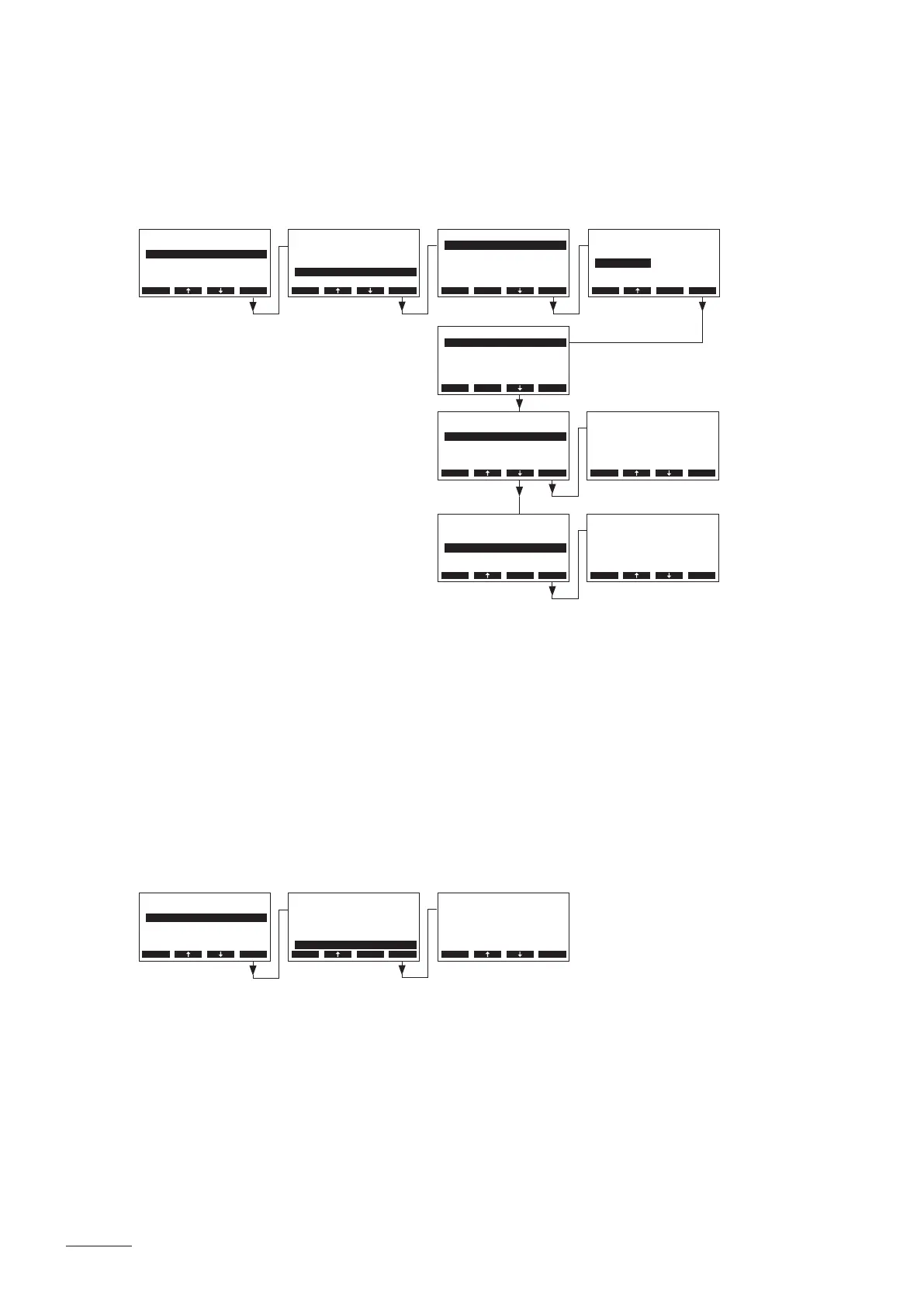
Select “Operat.Range” in the steam bath settings menu, then press the <Set> key.
Adjust the parameters in the submenu “Operat.Range” for the quasi On/Off control to the desired values:
• “Mode”: Activating/Deactivating the quasi On/Off control function (Factory setting: Off)
• “OnThreshold”: Demand in % of the maximum steam capacity at which the steam production is to
be started (Factory setting: 60 %, Setting range: 30...90 %)
• “Hysteresis”: Percentage, the request must drop, until the steam operation is stopped (Factory
setting: 5 %, Setting range: 1...20%)
5.3.3.12 Setting the maximum door opening time
Select “Max.DoorOpen” in the steam bath settings menu, then press the <Set> key.
In the upcoming modication dialogue set the maximum time in minutes the steam bath door may be
open, until the bathing operation is stopped.
Factory setting: 2 minutes
Options: 1...30 minutes
BathSettings
P-Band :4°C
Integr.-Time:2min
Operat.Range:Set
Control :Int.(PI)
Max.DoorOpen:2min
Esc Set
Settings
BathSettings:Set
Cylinder :4564
SC-System :Set
Language :English
Power Limit :100%
Esc Set
Operat.Range
OnThreshold :60%
Hysteresis :5%
Mode :O
Esc Set
Operat.Range
OnThreshold :60%
Hysteresis :5%
Mode :On
Esc Set
Operat.Range
OnThreshold :60%
Hysteresis :5%
Mode :On
Esc Set
Operat.Range
OnThreshold :60%
Hysteresis :5%
Mode :On
Esc Set
Mode
O
On
On
Esc Set
Hysteresis
5 %
5 %
Esc Set
OnThreshold
60 %
60 %
Esc Set
BathSettings
P-Band :4°C
Integr.-Time:2min
Operat.Range:Set
Control :Int.(PI)
Max.DoorOpen:2min
Esc Set
Settings
BathSettings:Set
Cylinder :4564
SC-System :Set
Language :English
Power Limit :100%
Esc Set
Max.DoorOpen
2 min
2 min
Esc Set


 To Next Page