30
5.3.3.5 Fragrance pump control settings
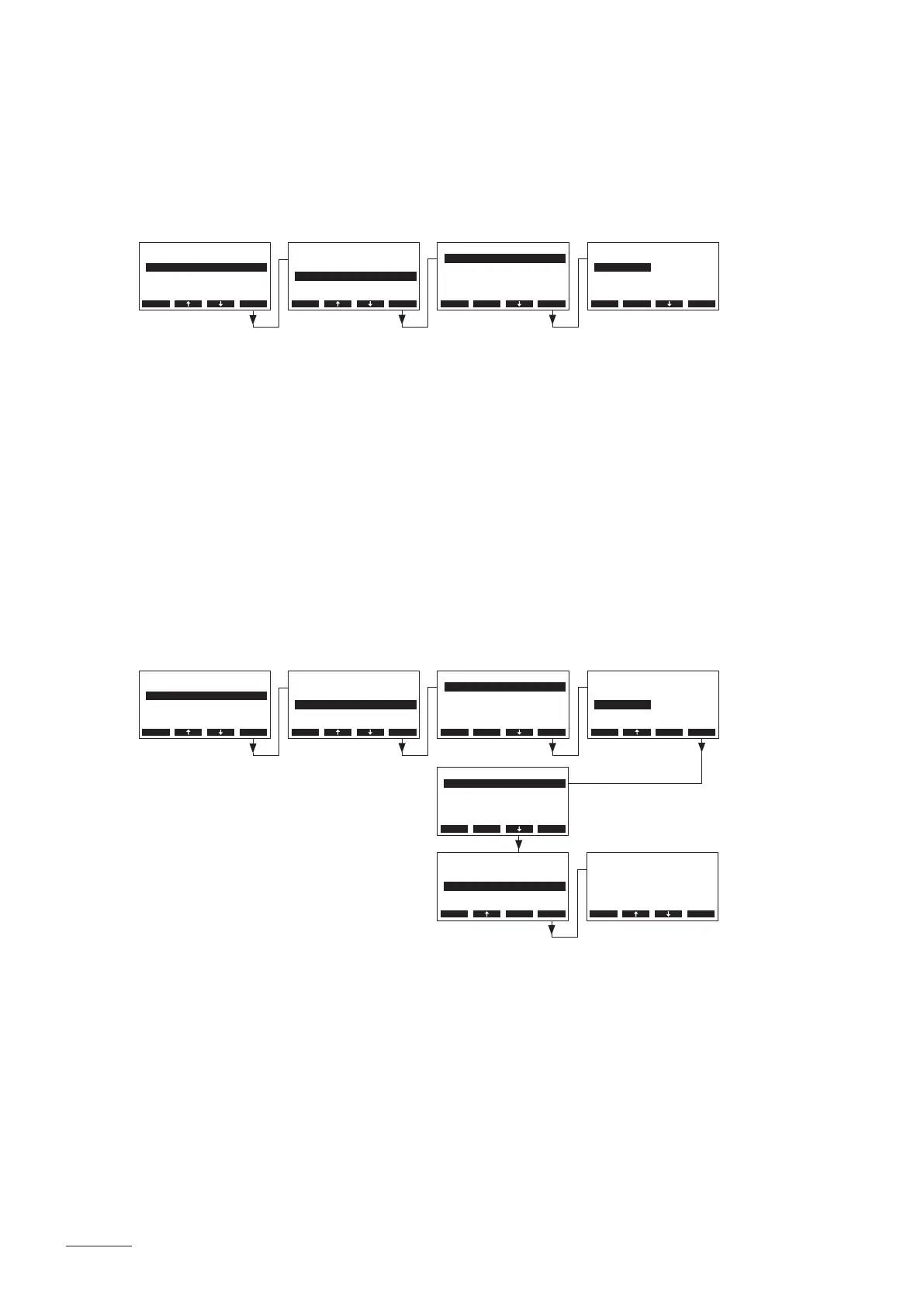
At the Nordmann AT4 D control two fragrance pumps can be connected, which can be activated either
via the integrated interval control or via an external push-button.
Select “Fragrance” in the steam bath settings menu, then press the <Set> key. In the upcoming display,
select the desired fragrance pump whose operating mode you want to modify, then press the <Set> key.
In the upcoming modication dialogue select the desired operating mode for the selected fragrance pump.
Factory setting: Interval
Options: Interval (fragrance pump is activated via the integrated interval)
External (fragrance pump must be activated manually via an external push-button)
Note: the fragrance pump is active only, if the main contactor of the steam generator is activated and
the system is in steam bath operation.
5.3.3.6 Light control settings
At the Nordmann AT4 D control a cabin light (Light-1) or effect light (Light-2) can be connected. Both
lights can be switched on independently either manually automatically.
Select “Light” in the steam bath settings menu, then press the <Set> key. In the upcoming display, select
the desired light whose operating mode you want to modify, then press the <Set> key.
In the upcoming modication dialogue select the desired operating mode for the selected light.
Factory setting: Manual
Options: Manual (manual activation of light 1 and light 2 via light switches)
Automat. (automatic activation of light 1 and light 2 as soon as the set steam
bath temperature (steam bath operation) or the set humidity (caldarium operation)
is reached in the steam bath cabin)
Note: if automatic activation of light is selected the menu item “LightOff” appears additionally. With this
setting you can determine how long the light remains switched on after the steam bath time has ended
(Factory setting: 5 minutes, Setting range: 1... 600 minutes).
BathSettings
Fan :Set
Fragrance :Set
Light :Set
Operation :Panel
Sensor :Set
Esc Set
BathSettings
Fragrance :Set
Light :Set
Sensor :Set
Fan :Set
Control :Int.(P)
Esc Set
Settings
BathSettings:Set
Cylinder :4564
SC-System :Set
Language :English
Power Limit :100%
Esc Set
Settings
BathSettings:Set
Cylinder :4564
SC-System :Set
Language :English
Power Limit :100%
Esc Set
Fragrance
Fragrance-2 :Interval
Fragrance-1 :Interval
Esc Set
Light
Light-2 :Manual
Light-1 :Manual
Esc Set
Fragrance-1
Interval
External
Interval
Esc Set
Light-1
Manual
Automat.
Automat.
Esc Set
Light
Light-2 :Manual
LightO :5min
Light-1 :Automat.
Esc Set
Light
Light-2 :Manuell
LightO :5min
Light-1 :Automat.
Esc Set
LightO
5 min
5 min
Esc Set


 To Next Page