45
5.4.2 Settings for the communication with the optional remote terminal
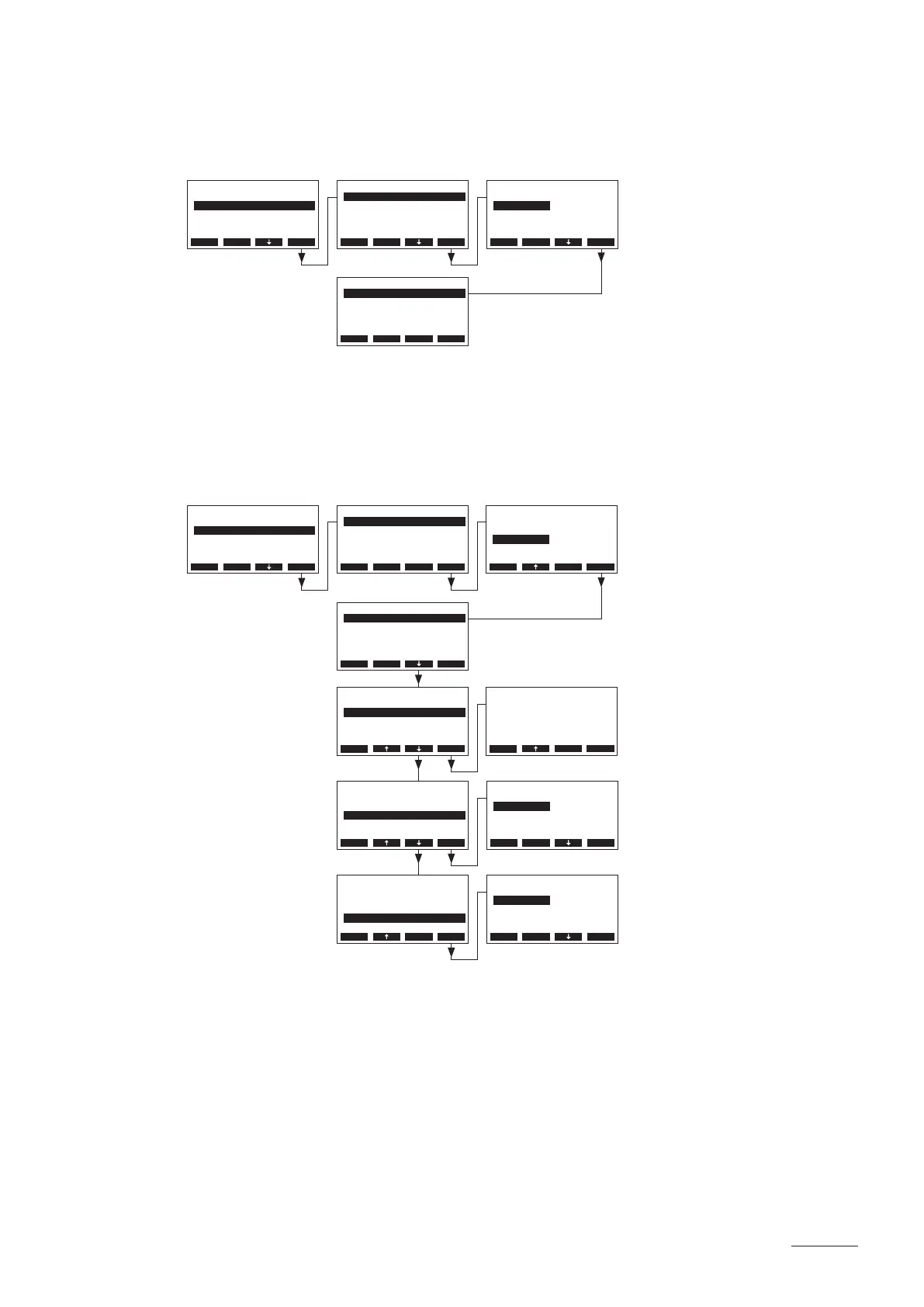
Select “Remote” in the Modbus submenu, then press the <Set> key.
– Data upload
Note: this function is intended only for the service technician of your Nordmann representative.
– Settings for the communication with the optional remote terminal
Note: this function is not available via the optional remote terminal.
Select “Remote” in the Modbus submenu, then press the <Set> key. Then, adjust the settings for
communication with the optional remote terminal.
Settings:
• “Settings”: Remote
• “Modbus Addr.”: Modbus adress of the steam generator
(Factory setting: 1, Setting range: 1...247)
• “Baudrate”: Baudrate for the data transmission
(Factory setting: 9600, Options: 9600, 19200, 38400, 57600)
• “Parity”: Parity bit for the data transmission
(Factory setting: None1, Options: None1, None2, Odd, Even)
Remote
Modbus Addr.:1
Baudrate :9600
Parity :None1
Settings :Remote
Esc Set
Remote
Settings :Upload
Esc Set
Modbus
Remote :Set
Networking :Set
Esc Set
Settings
Upload
Remote
Upload
Esc Set
Modbus
Remote :Set
Networking :Set
Esc Set
Baudrate
9600
19200
38400
9600
56800
Esc Set
Parity
None1
None2
Odd
None1
Even
Esc Set
Remote
Modbus Addr.:1
Baudrate :9600
Parity :None1
Settings :Remote
Esc Set
Remote
Modbus Addr.:1
Baudrate :9600
Parity :None1
Settings :Remote
Esc Set
Remote
Modbus Addr.:1
Baudrate :9600
Parity :None1
Settings :Remote
Esc Set
Remote
Modbus Addr.:1
Baudrate :9600
Parity :None1
Settings :Remote
Esc Set
Remote
Settings :Upload
Esc Set
Remote Sett
Upload
Remote
Remote
Esc Set
Modbus Addr.
1
1
Esc Set


 To Next Page