20
5.2 Basic steam bath settings
5.2.1 Setting the temperature setpoint (steam bath operation) or humidity setpoint
(caldarium operation)
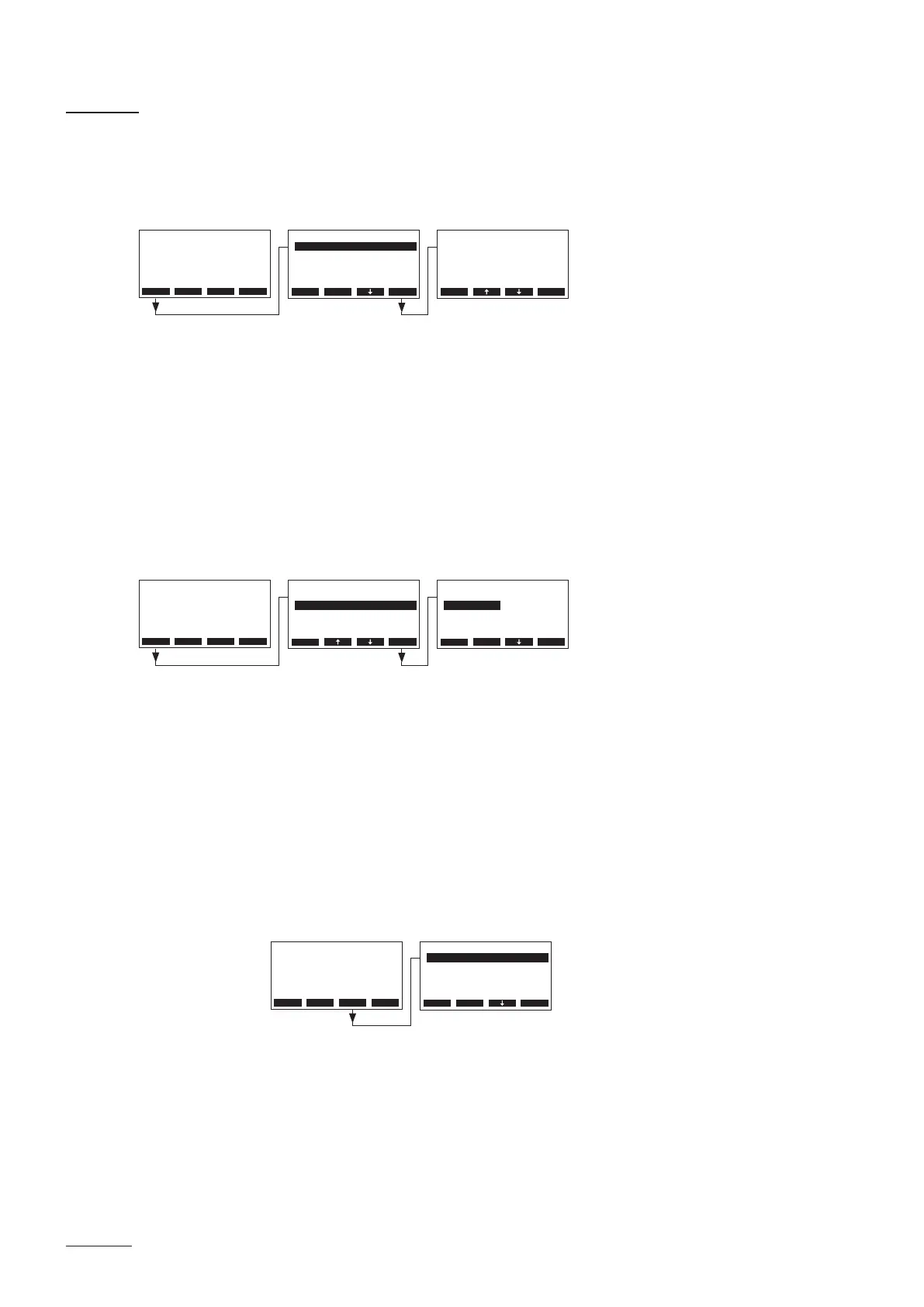
Select “Setpoint” in the main menu, then press the <Set> key.
In the upcoming modication dialogue set the desired temperature or humidity setpoint.
Factory setting: 48 °C (45 %rH)
Setting range: 25 ... 55 °C (30...90 %rH)
5.2.2 Setting the control mode
Note: this menu item is available only if the operating mode in the steam bath control settings (see
chapter 5.3.3.1) is set to “Panel”.
Select “Operat.Mode” in the main menu, then press the <Set> key.
In the upcoming modication dialogue select the desired control mode for panel operation.
Factory setting: Manual
Options: Manual, Timer
Description of the control mode settings
– Manual: The steam generator must be switched on and off via the Start/Stop key of the display
and control unit or via an external Start/Stop key.
– Timer: The steam generator is switched on and off time controlled via the day timer.
The timer settings can be accessed by pressing the <Timer> key in the standard
operating display.
– Status: activate (On) or deactivate (Off) timer function
Note: the day timer must be activated every time after the steam
bath time has elapsed.
– Start time: set starting time (format: hh:mm)
– Duration: set heating time in minutes
Main Menu
Operat.Mode :Manual
Duration :45min
Fragrance :Set
Setpoint :48°C
Light-2 :O
Esc Set
Menu Light Start
AT4D 65kg/h 400V3
Steam Bath :Standby
Temperature :34°C
Setpoint :48°C
2011-08-31 12:00:00
Setpoint
48 °C
48 °C
Esc Set
Main Menu
Operat.Mode :Manual
Duration :45min
Fragrance :Set
Setpoint :48°C
Light-2 :O
Esc Set
Menu Light Start
AT4D 65kg/h 400V3
Steam Bath :Standby
Temperature :34°C
Setpoint :48°C
2011-08-31 12:00:00
Operat.Mode
Manual
Timer
Manual
Esc Set
Main Menu
Start time :12:00
Duration :45min
Status :O
Esc Set
Menu Light Timer
AT4D 65kg/h 400V3
Steam Bath :Standby
Temperature :34°C
Setpoint :48°C
2011-08-31 12:00:00


 To Next Page