PROPlus / PRO Series Automated Dispensing Systems
50 www.nordsonefd.com info@nordsonefd.com +1-401-431-7000 Sales and service of Nordson EFD dispensing systems are available worldwide.
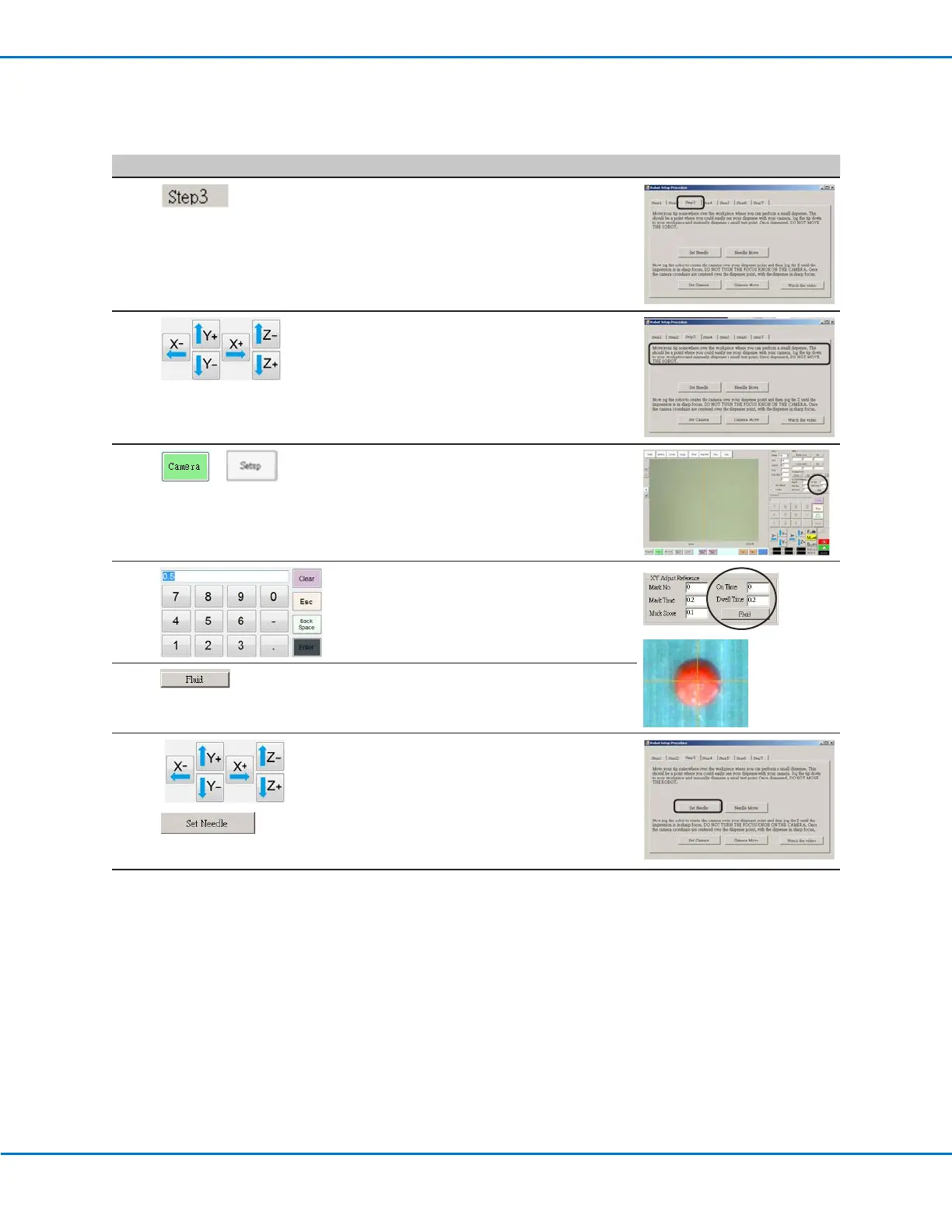
Robot Initial Setup (Step3 Tab): Setting the Camera-to-Tip Offset
# Click Step Reference Image
1
• Click the STEP3 tab.
2 • Jog the tip to a good location on the work
surface to deposit a test dot of fluid.
3
>
• Click the CAMERA tab and then click SETUP
at the top of the Camera screen.
You will use the fields under XY Adjust
Reference to deposit a test dot of fluid.
4
• Use the keypad to enter the following
recommended dispense dot parameters:
- ON TIME: 0.5
- DWELL TIME: 0.2
5
• Click FLUID to dispense a dot of fluid.
6
>
• Jog the tip until it is positioned about 2mm
above the dispense dot.
• Click SET NEEDLE.
Continued on next page
Setting Up the System Using the Robot Initial Setup Wizard (continued)



 To Next Page