PROPlus / PRO Series Automated Dispensing Systems
53www.nordsonefd.com info@nordsonefd.com +1-401-431-7000 Sales and service of Nordson EFD dispensing systems are available worldwide.
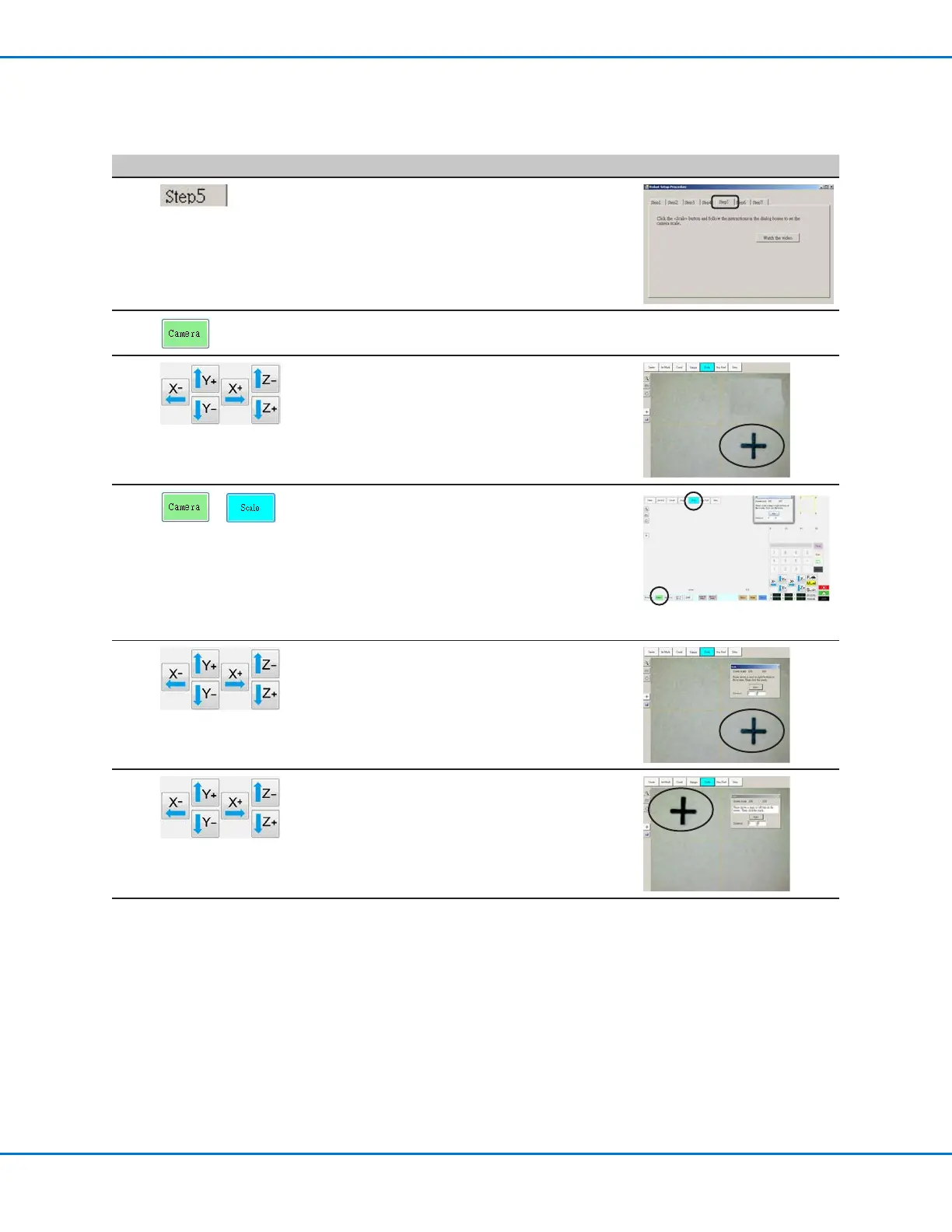
Robot Initial Setup (Step5 Tab): Setting the Camera Scale
# Click Step Reference Image
1
• Click the STEP5 tab.
2 • Click the CAMERA tab.
3
• Jog the camera to a point of reference that
is located on the lower right corner of the
workpiece.
• Bring the reference point into focus. Refer
to “Camera” on page17 as needed for
instructions on focusing the camera.
4
>
• Click the CAMERA tab and then click SCALE.
The Scale window opens.
NOTE: When the camera views an object, it
converts the pixels to a true measurement.
For the camera to make this conversion
accurately, you must “teach” the camera
what the size of an object is in comparison
to pixels per inch by setting the camera scale.
5 • Choose a point of reference on the workpiece
and jog the camera so that the reference
point is located in the lower right quadrant of
the camera screen, then click the point.
6 • Jog the camera again until the same
reference point is located in the upper left
quadrant of the camera screen, then click the
point.
The camera scale is now set.
7 • Continue to “Robot Initial Setup (Step6 Tab):
Setting the Tip-to-Workpiece Offset” on
page54.
Setting Up the System Using the Robot Initial Setup Wizard (continued)



 To Next Page