PROPlus / PRO Series Automated Dispensing Systems
75www.nordsonefd.com info@nordsonefd.com +1-401-431-7000 Sales and service of Nordson EFD dispensing systems are available worldwide.
Method 1: Using Eight Trig Marks (Highest Accuracy) (continued)
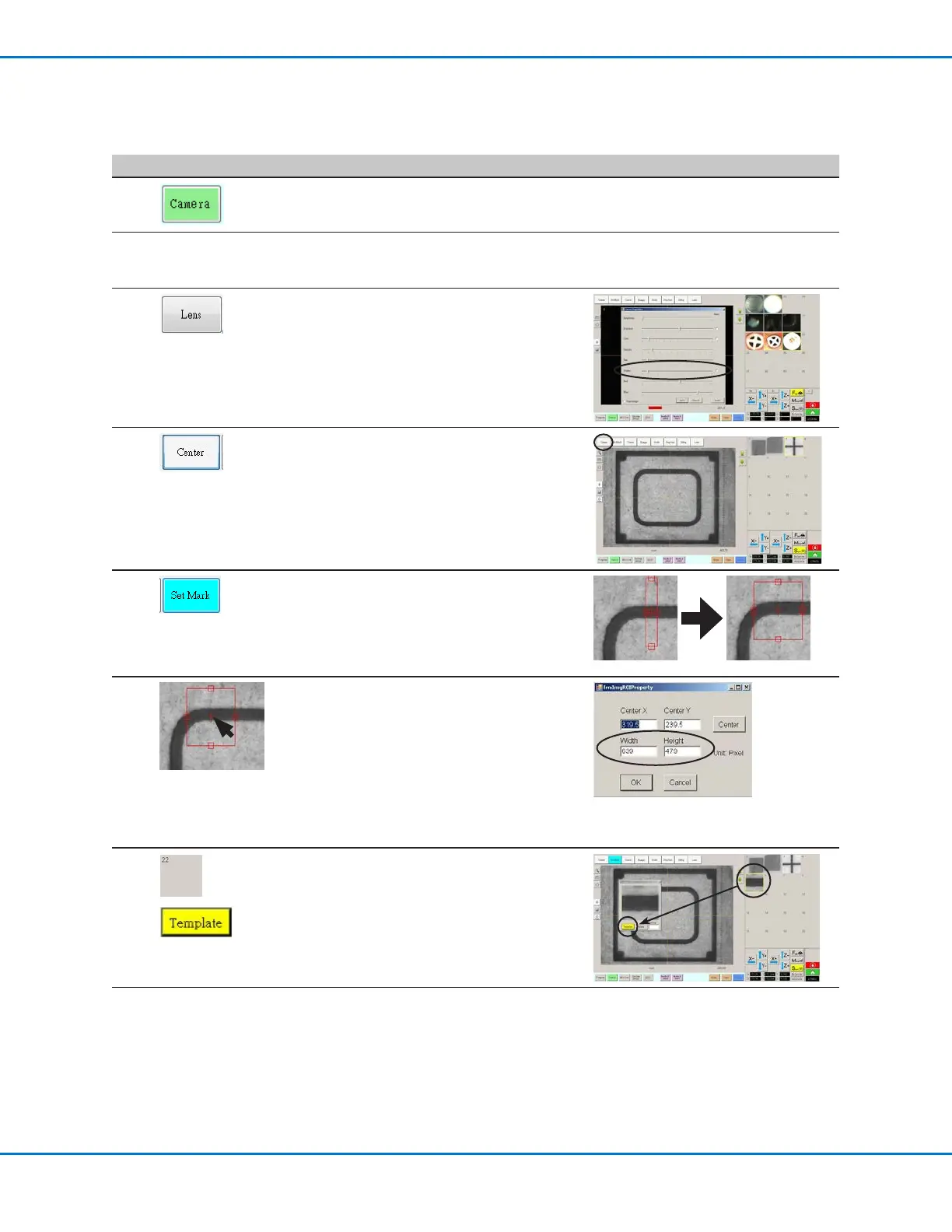
To Create Four Horizontal Trig Marks and Set the Range
# Click Step Reference Image
1
• Click CAMERA to go to the camera
screen.
2
• Bring the image into focus. Refer to
“Camera” on page17 as needed for
instructions on focusing the camera.
3
• Click LENS and make the SHUTTER
setting as low as possible while
ensuring that you can still clearly see the
workpiece.
4
• Click CENTER to center the image of
the workpiece in the camera view.
Important: The camera must be
precisely centered over the workpiece
because the offset values are calculated
automatically.
5
• Click SET MARK, click and drag the
crosshairs of the red square over the
first horizontal target on the workpiece,
then click and drag the red square
borders to position the square around
the target.
6
• Double-click the crosshairs in the center
of the red rectangle and then enter the
desired values for Width and Height.
NOTE: For horizontal marks, the Width
value can be smaller, but the Height
value should be large enough for the
system to find the mark.
• Make a note of these values for later
use.
7
>
• Click a socket in the Mark Library to
save the mark, then click TEMPLATE
when the Template Match window
appears.
Continued on next page



 To Next Page