PROPlus / PRO Series Automated Dispensing Systems
96 www.nordsonefd.com info@nordsonefd.com +1-401-431-7000 Sales and service of Nordson EFD dispensing systems are available worldwide.
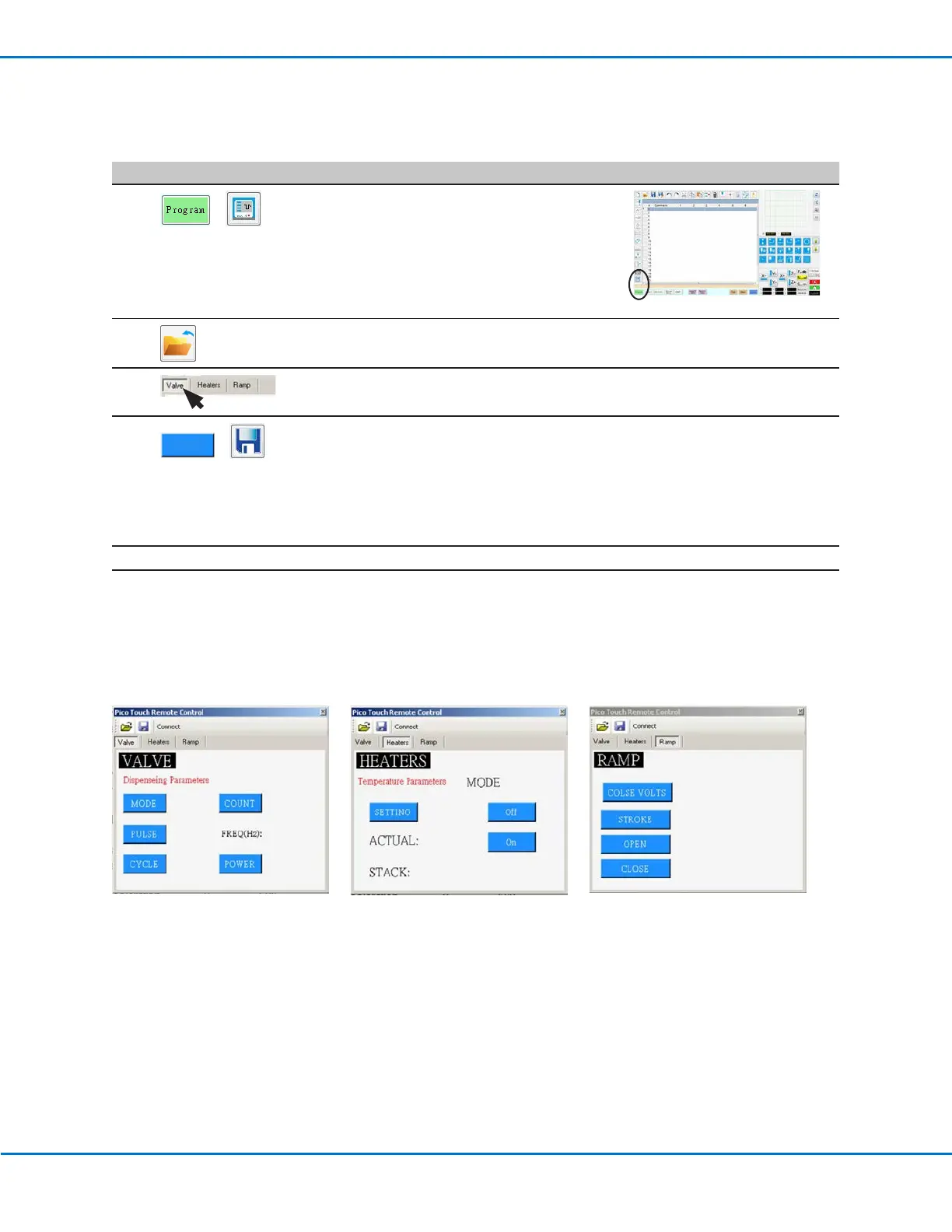
PICO Toµch Controller settings editable through the DispenseMotion software
To Edit an Existing PICO File
# Click Step Reference Image
1
>
• Click PROGRAM > PICO TOUCH to open the
Pico Touch Remote Control window.
• Click OPEN and then open the file you want to edit.
2
• Click the tab for the settings you want to edit (Valve, Heaters, or Ramp).
3
>
• Click the button for the parameter you want to edit and enter the desired setting.
Refer to the Toµch Controller Operating Manual for details on settings.
• Click SAVE AS.
NOTE: Every time you make a change and click SAVE AS, you will have to overwrite
the existing file or create a new file.
• Continue making selections and saving until all desired settings are entered.
4
X
• To exit, close the Pico Touch Remote Control window.
5
• To use the PICO Toµch settings in a program, continue to “To Use the PicoTouch
Parameter Update Command in a Program” on page97.
How to Adjust PICO Parameters Using DispenseMotion (continued)



 To Next Page