Chapter 8 - Understanding Waypoint/Route Navigation
951/952 Operator’s Manual Rev. B Page 119
Choosing a steering
screen
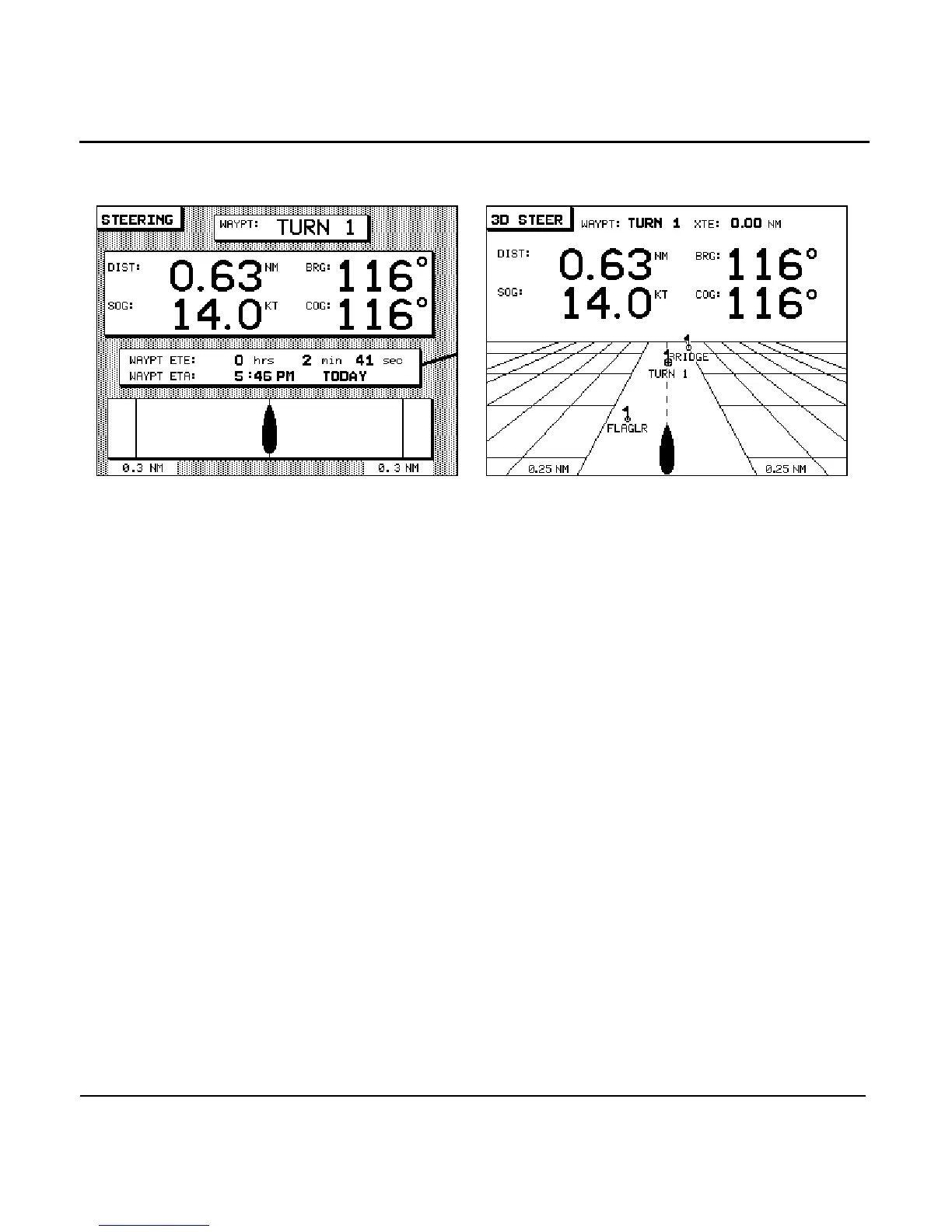
Both steering screens are intended to guide you precisely
along a course line that might follow a harbor channel, or a
line between shoals and sandbars. You can use whichever
screen you prefer. Both steering screens show your cross-track
distance graphically at the bottom of the screen. (Cross-track
distance is the distance you’re off from your intended course
line.) At the top of the display, both screens show numeric
navigation information in large digits.
The STEERING screen uses a traditional graphic display with
cross-track distance shown as how far the boat is from the cen-
ter line of the display. The 3D STEER screen is a waypoint
“heading-up” display showing the waypoints between you and
the destination waypoint, and your position relative to the
course line, for precision steering.
Displaying distance
and bearing
Both the STEERING and 3D STEER screens display your dis-
tance and bearing to the waypoint, along with your
Speed-Over-Ground and Course-Over-Ground. An arrow
between the SOG and COG displays points upwards when the
trend of your speed is increasing, and down when it’s decreas-
ing.



 To Next Page