Chapter 1 - Quick Start
951/952 Operator’s Manual Rev. B Page 9
older ones; in these cases, the word PRESENT is displayed in
place of the cartridge name and date.
Inserting a chart
cartridge
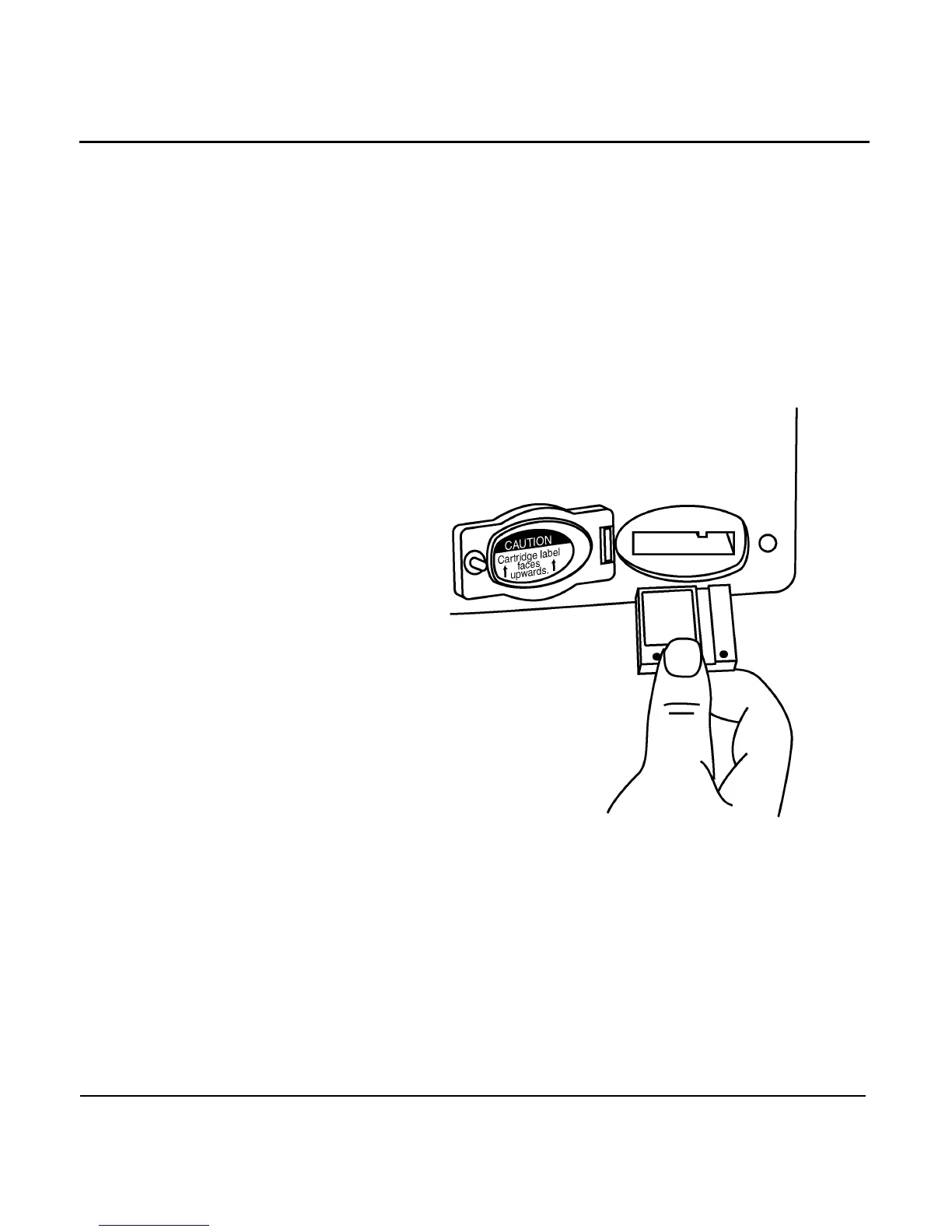
Before inserting the cartridge, make sure that the cartridge
label is facing up and that the cartridge is oriented as shown
below in Figure 1: ”Proper insertion of a chart cartridge,”
below. Insert the cartridge gently but firmly into position with
one straight, smooth motion. If you partially insert the car-
tridge, stop, then move the cartridge again, it may become
stuck in an awkward position.
Figure 1: Proper insertion of a chart cartridge
Initial position
display screen
After the unit has completed its start-up sequence of self-tests
and acquired satellite data, and you’ve acknowledged the
warning screen, a CHARTscreen representing your present
position (such as the following) is displayed.
The Navionics chart cartridge
must remain free from debris
and moisture at all times. To
ensure that you do not expose
the cartridge to any environ-
mental damage, please use
caution when changing the
cartridge. Exercise care when
inserting the cartridge into the
Northstar unit (see description
and illustration at right). When
not in use, store the cartridge
in a clean, dry place away
from heat, humidity, and dust.
Improper handling and stor-
age of the cartridge may result
in damage to the Northstar
unit. Such damage is not cov-
ered under manufacturer war-
ranty.



 To Next Page