Chapter 2 - Introducing the Northstar 951/952
951/952 Operator’s Manual Rev. B Page 19
To see the message, press the function key ( ) once.
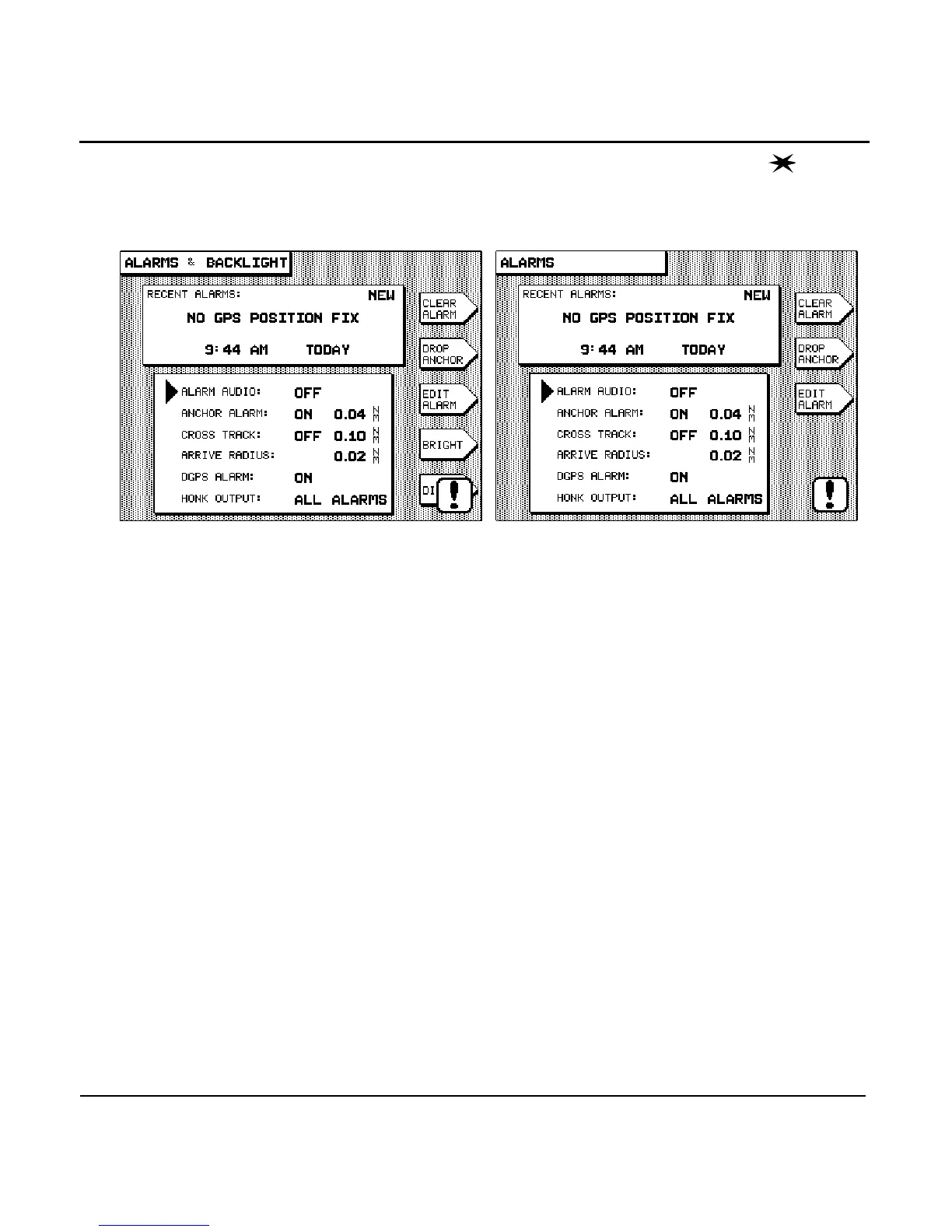
The 952 displays the ALARMS screen (below right), and the
951 displays the ALARMS & BACKLIGHT screen (below left).
The and keys of the 951 screen aren’t displayed
on the 952 screen because the 952’s double key is
used to brighten and dim its display screen.
The alarm message NO GPS POSITION FIX, along with its time
and date, is shown in the RECENT ALARMS box. The word NEW
in the upper right corner of the box indicates that this is a
message you haven’t previously seen and acknowledged. This
alarm condition usually occurs in units shipped to customers
located more than several hundred miles from Northstar, and
only the first time the unit is turned on after being installed.
This sequence is a normal part of using a new unit for the first
time, as it notifies you that it’s in the process of acquiring satel-
lite information necessary for navigation. Normally, the unit
takes only two to five minutes to acquire this data, after which
it’s ready to navigate.
To acknowledge and clear the message, press the
menu key to the right of the display screen. Press the
function key to return to the main GPS POSITION
screen. As soon as signals are acquired, the unit is ready to
navigate.
For more on alarms, see “Alarm messages” on page 38 and
“Understanding the alarms” on page 132.



 To Next Page