Chapter 5 - Determining Position Coordinates
951/952 Operator’s Manual Rev. B Page 65
Displaying DGPS
status
To display more information about received DGPS corrections,
press the menu key on the GPS POSITION screen.
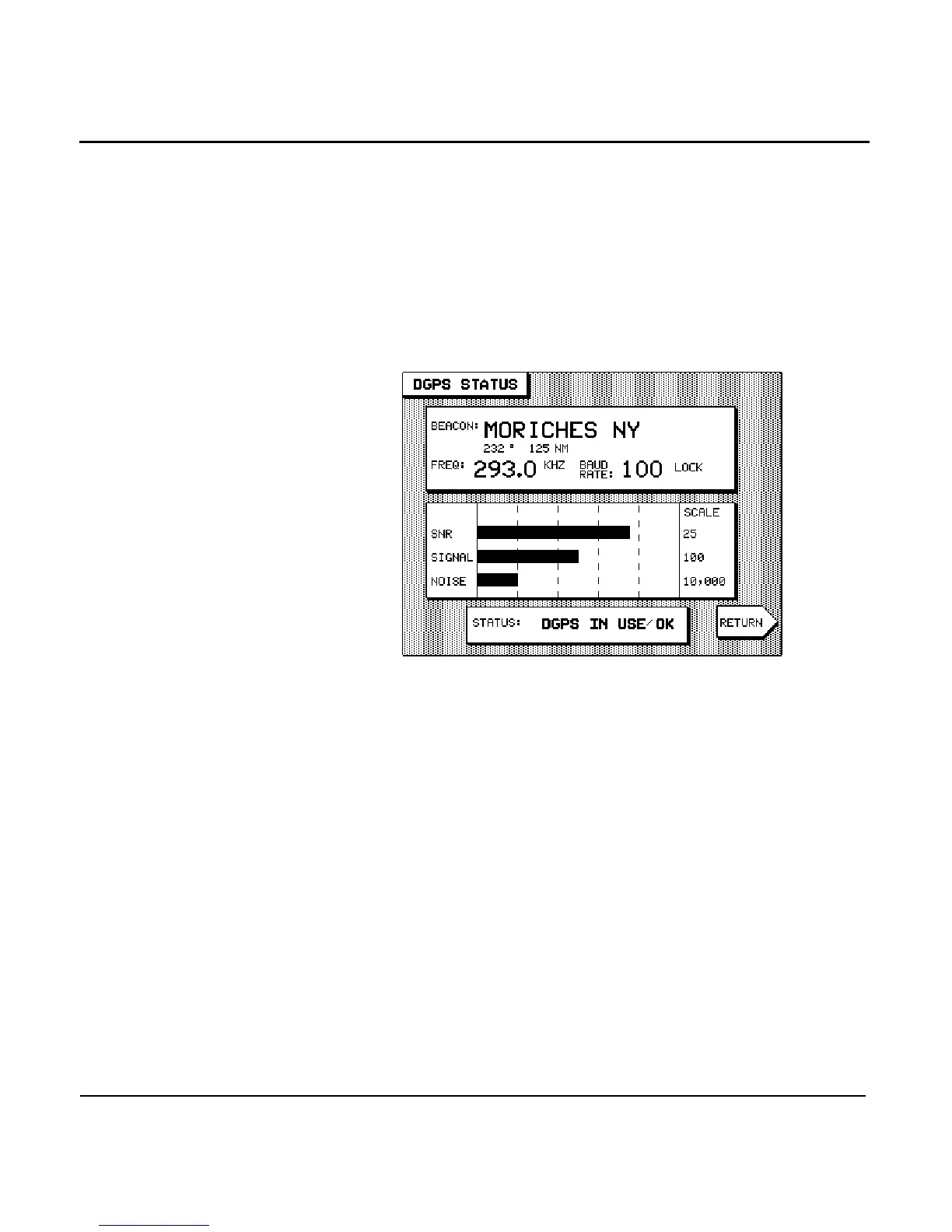
The DGPS STATUS screen is displayed, showing the DGPS
transmitter currently in use.
The upper part of the screen shows the beacon’s name, fre-
quency, baud rate, and its distance and bearing from your ves-
sel. When the 951X/952X is successfully decoding error-free
data from the tuned beacon, the word LOCK appears next to
the baud rate.
The lower part of the DGPS STATUS screen shows three bar
graphs:
• SNR: The Signal to Noise Ratio is a good measure of over-
all signal quality, and should be as high as possible. Val-
ues of 15 and higher are preferred, while anything below
10 could indicate poor reception.
• SIGNAL: This represents the actual strength of the
received signal. This value should be as high as possible,
and it varies with distance from the differential transmit-
ter.
• NOISE: The NOISE level measures the static caused by
lightning and other atmospheric effects, and should be
low for best results. Table 3 below defines the noise levels.



 To Next Page