10 Conducting the Examination with a Computer/Laptop
40 / 86 Instruction Manual Mesotest II (G/62800/0715/en)
10.4.1 Conduct the Programm "Mesopic vision bin"
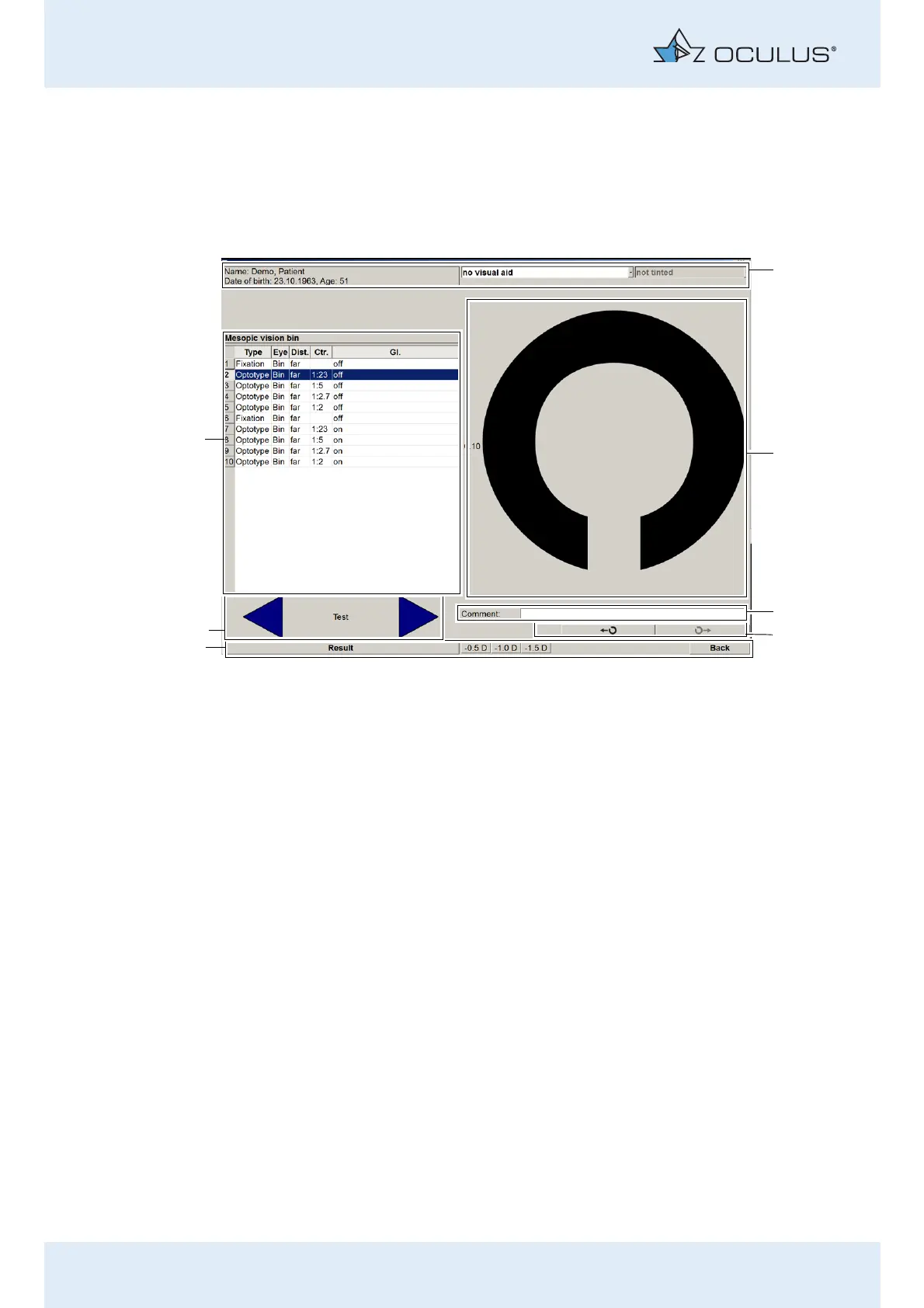
With the examination program „Mesopic vision bin“, you can examine
mesopic vision binocularly, at different contrast levels, with and without
glare. It consists of 10 test steps.
Test 1 and Test 6: Facilitate the fixation, as here the fixation marks are
displayed
Test 2-5: Are used to test mesopic vision
Test 7-10: Are used to test mesopic vision with glare.
Enter a visual aid
If the patient wears glasses or contact lenses, the examination is
conducted with the glasses or contact lenses.
Enter whether the patient wears visual aids (including any tinting,
etc.), sec. 10.1.1, page 29.
Instruct the patient
Select test step 1
1 Header with information about the patient and
“vision aid” selection field.
5 Task bar with the buttons [Back] and [Result], as well
as minus lenses for myopia test (Mesotest II konkav)
2 Optotype display 6 Arrow keys for steps: “back” and “next”
3 Input field “Comment” 7 Display the exam programme with test steps
4 Button: Change Landolt ring position
Fig. 10-17: Examination menu



 To Next Page