12 Patient Data Management
62 / 86 Instruction Manual Mesotest II (G/62800/0715/en)
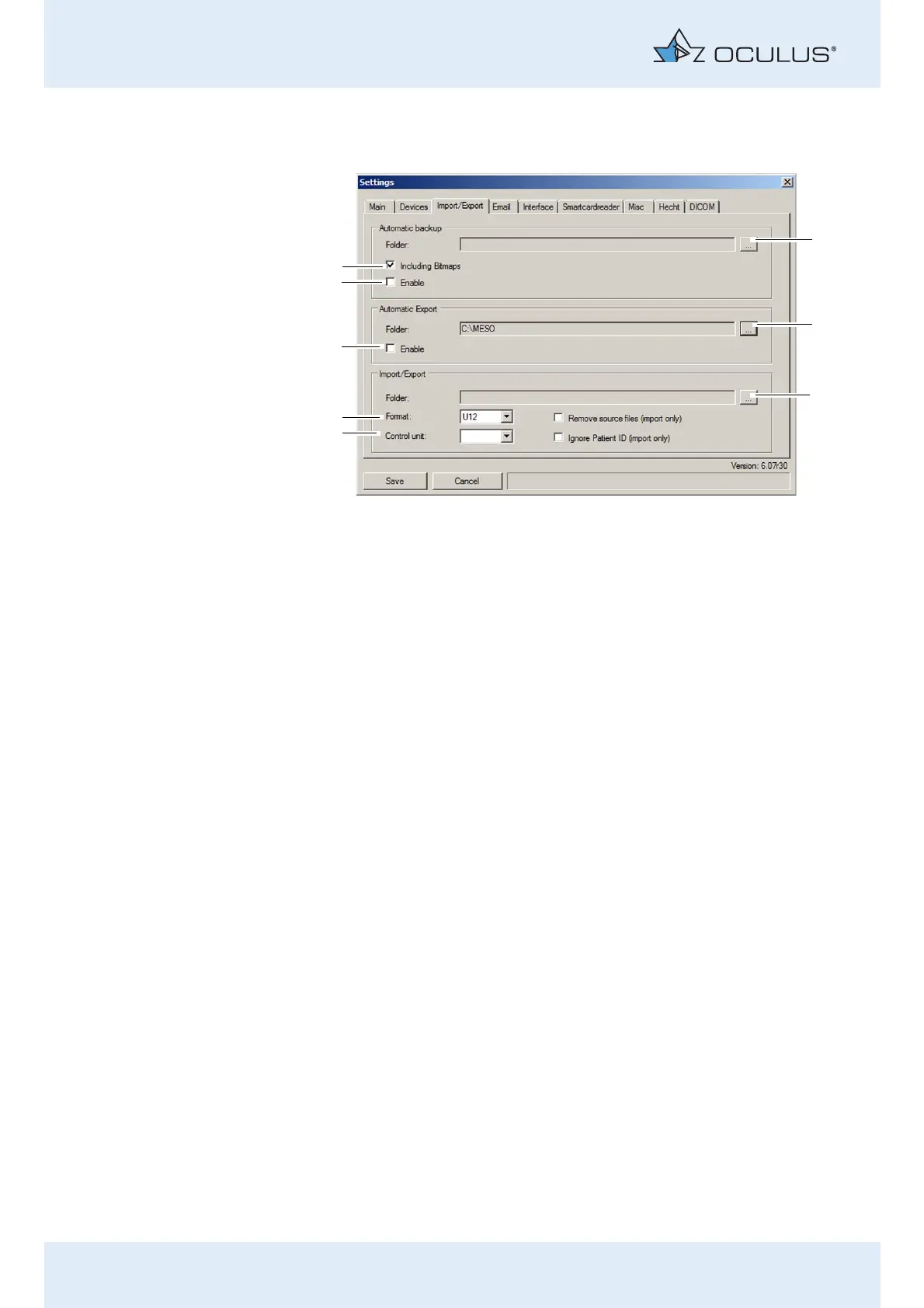
12.5.3 "Import/Export" tab
"Automatic backup" box
In addition to the manually executed backup (sec. 12.4, page 55), there is
also the option to perform a backup when the Patient Data Management
user interface is closed. The settings required for this can be specified in
the group box.
Select the folder where the data should be saved during an
automatic backup using the folder selection button (1).
Select the checkbox [Including Bitmaps] (8) if camera images should
also be backed up.
If the automatic backup should be executed with the specified
settings, enable the [Enable] checkbox (7).
"Automatic export" box
If you enable this checkbox, every examination will be exported
automatically.
Select the folder using the folder selection button (2) which should
normally be preselected for the automatic export.
If the automatic export should be executed, enable the [Enable]
checkbox (6).
1 Automatic backup folder 5 Standard format for import and export
2 Select import/export folder 6 [Enable] checkbox for automatic export
3 [Remove source files] checkbox 7 [Enable] checkbox for automatic
backup
4 Interface for manual operating unit 8 [Including bitmaps] checkbox
Fig. 12-9: "Import/Export" tab



 To Next Page