2021-03-23 / Rev. 10 VV016042 17
7.4 Sensor calibration
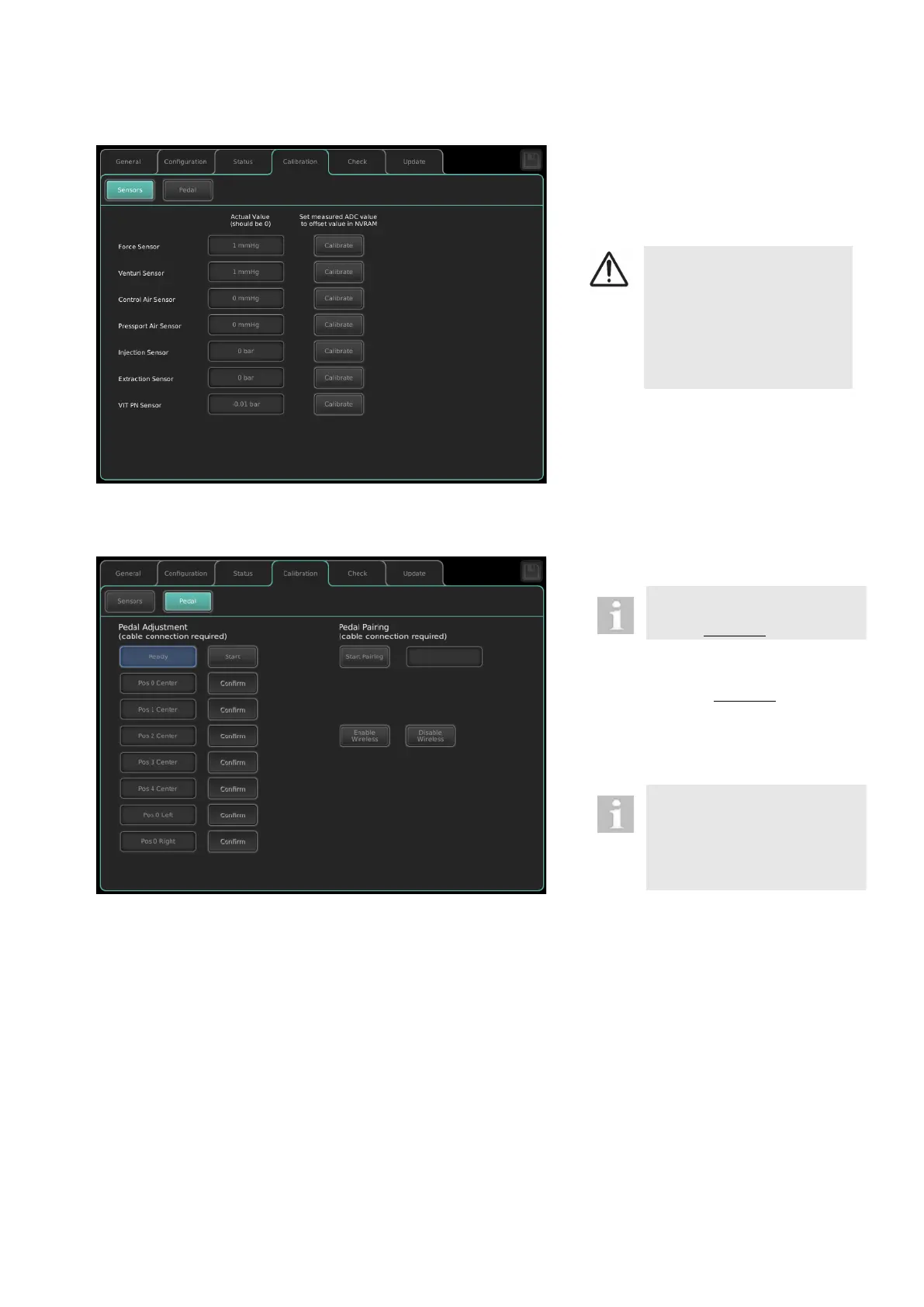
Calibration sensors
Store actual offset values of the sensors
displayed by touching <Calibrate>.
DANGER!
Incorrect calibration
Risk of eye damage to pa-
tient
► No instruments shall be
connected to the device
while calibrating sensors.
Before adjusting and pairing the
pedal make sure that it is con-
nected with cable to the OS 4.
Turn off the device, wait for 20 sec. at
the minimum
Connect pedal with cable to the OS 4
Turn on the device
Call up the service mode (see 7.1)
Pedal Adjustment:
The pedal adjustment has to be
carried out before the pedal
pairing is started.
Make sure that the foot pedal is
placed on the ground.
Push <Start> to begin with the cali-
bration routine.
Move to pedal position shown on the
sequence and <Confirm>.
Pedal Pairing:
In the menu <Calibration> select <Pe-
dal>
Push the button <Start Pairing>
As soon as the pairing is finished, the
message “Success” appears.
Establish radio communication:
Connect pedal with cable to the OS 4
Push the button <Enable Wireless>
Turn off radio communication:
Connect pedal with cable to the OS 4
Push the button <Disable Wireless>



 To Next Page