2021-03-23 / Rev. 10 VV016042 98
11.3.4 Fibre coupling unit for endo laser
VX400223
Fibre coupling unit with cable
Remove the housing according
to 11.1.5
Remove front enclosure accord-
ing to 11.1.6.
Disconnect cable labelled as SCN
from the laser module, remove it
from the trunking, and remember
the path of it.
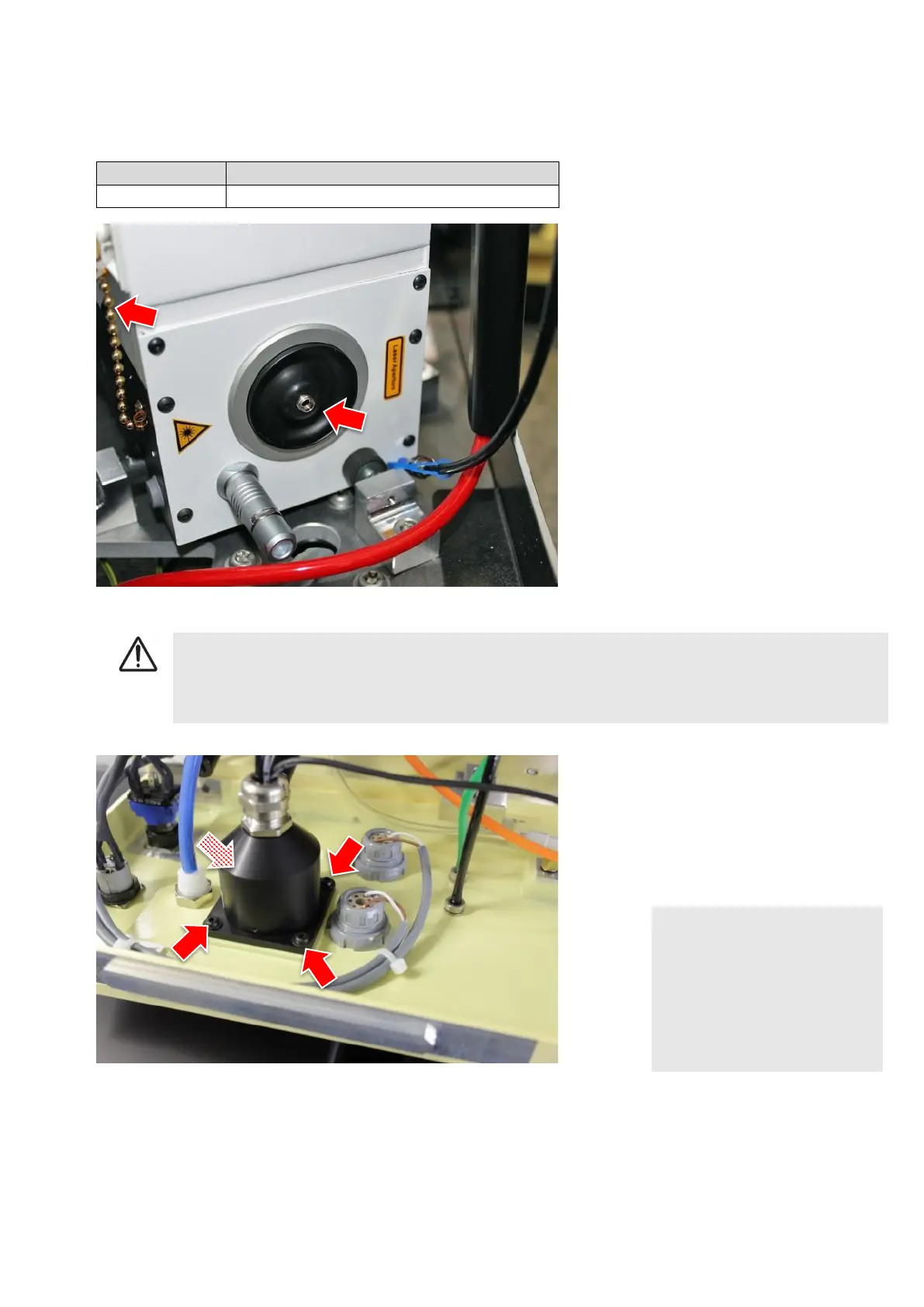
Unscrew light fibre at laser module.
Screw on protection cap on the la-
ser module. The cap is chained to
the laser module.
WARNING!
Dust and debris inside the power output of the laser module
Risk of fire inside the unit, reduction or damage of laser fibre
► Always keep connector clean from dust and debris. Use the protection cap at all times.
Carefully pull light fibre and cable out
of the unit. Make sure to remember
the route. Best is to use a tracing
line.
Remove 4 (TX4) screws from the fi-
bre.
NOTE!
Laser power loss too high
Laser output cannot be cali-
brated
► Do not bend or kink new fibre
when installing. A minimum
radius of 75mm must be ad-
hered to.
Install in reverse order.
Execute the calibration of the target and the power laser according to chapters 9.7.4 and 9.7.3. This will ensure the
correct power output of the lasers.



 To Next Page