EnForcer™ SCR Service Manual I.B. 1561
23
Data Logging
While in Idle Mode or Done mode, hold down the DOWN and UP buttons (approximately 10 seconds) until the display reads Data
Logging Selections.
Release the buttons and the display will read “Number of Records:”.
Toggle the EQUALIZE button and the display will read Display a Record? The last record number will be shown at the bottom
right of the display.
Toggle the DOWN arrow keys to scroll through the available records. To view the contents of the individual record, toggle the
EQUALIZE button. The Log Date will be displayed. To view the log data, toggle the UP or DOWN buttons. The log time, charge
parameters for that log can be read. To exit a particular log, press the EQUALIZE button. You can then continue to scroll through
different Data Logs with the UP and DOWN buttons. Select a new log again by pressing the EQUALIZE button. In order to exit
Data Logging at any time, press the START/STOP button.
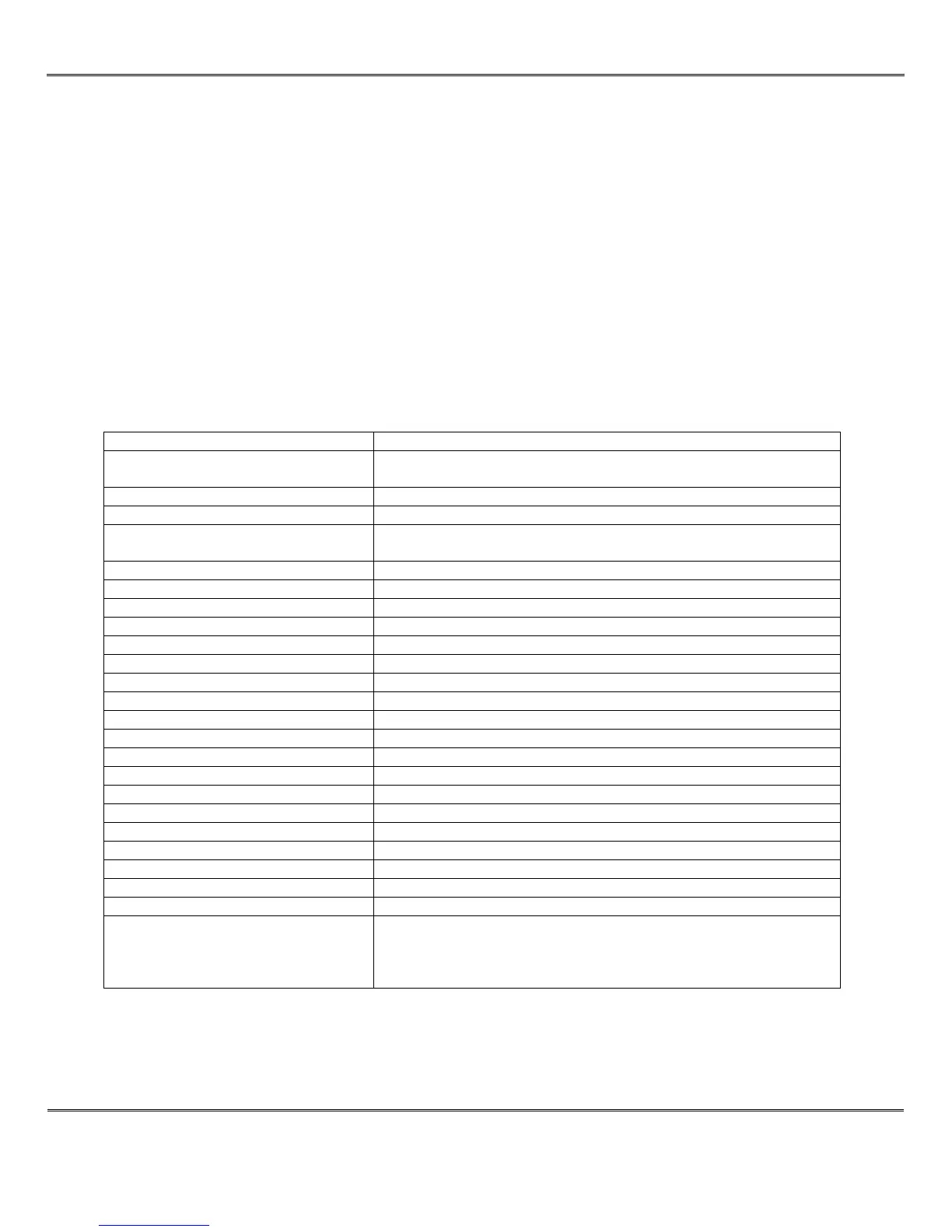
The table below shows a list of the available Data Log parameters. The table shows the data in the order that it appears.
1. Log Date/Time Date and time of log event
2. Log Store Code 1 = Daily charge Complete. 2 = Daily Charge Incomplete. 3 =
Equalize Charge Complete. 4 = Equalize Charge Incomplete.
3. Total Charge Cycles Total Charge cycles greater than 1 hour
4. Total Equ. Cycles Total Equalize cycles greater than 1 hour
5. Total Charge Amp-Hours/1000 Total Amp- Hours the charger has put out in thousands of Amp-
Hours.
6. Max. Charger Temperature * Future option
7. Current Charger Temperature * Future option
8. Minimum Charger Temperature * Future option
9. Maximum Charger DC Volt Max. DC volt for this particular charge cycle
10. Minimum Charger DC Volt Min. DC volt for this particular charge cycle
11. BID Serial Number ** Future option
12. Battery Amp-Hour Rating Battery Amp-hour setting from USER parameters
13. Battery Start Temperature * Future option
14. Battery End Temperature * Future option
15. Battery Cell Size Battery Cell size from USER parameters
16. Equalize Count Equalize count setting from USER Parameters
17. DC volts at Start DC volts at beginning of charge cycle
18. DC volts at End DC volts at end of charge cycle
19. Amp-Hours Returned Amp hours returned for this particular charge cycle
20. DC Amps at Start DC amps at beginning of charge cycle
21. DC Amps at End DC amps at end of charge cycle
22. Pre 80% Charge Time
23. Total Charge Time
24. Charge Profile Used Charge Profile 1-6 from Service Parameters.
25. Fault Code 1 = DC fuse, 2 = Open Battery, 3 = Time to gassing, 4 = Low
Battery, 5 = Overall Time Limit, 6 = Hot Battery, 7 = High Battery
Voltage, 8 = Time After Gassing, 9 = High Amp-Hours, 10 = AC
power distortion, 11 = AC fuse or single phase
*Note that all the temperature features are future features.
** Note the BID serial Number is a future feature
A total of 1000 events can be logged before data logger rolls over and overwrites previous data.


 To Next Page