EasyManua.ls Logo

OM SYSTEM LS-P5 - User Manual

OM SYSTEM LS-P5
172 pages
Print Icon
To Next Page IconTo Next Page
Loading...
EN
Linear PCM Recorder
USER MANUAL
LINEAR PCM RECORDER
LS-P5
Getting started
Recording
Playback
Menu
Bluetooth
®
function
Use with a computer
Other information
Safety precautions
1
2
3
4
5
6
7
8
Thank you for your purchase of our company’s voice recorder. Consult this
manual while operating the recorder to ensure that you are using the product
safely and correctly.
Be sure you have read and understood the contents of “8. Safety precautions”,
before using this product. Keep these instructions available for future reference.
Read this manual thoroughly before using the product and record test audio to
confirm that it is functioning normally before making important recordings.
The screen and product illustrations shown in this manual were produced during
the development stages and may differ from the actual product.
If there are additions and/or modifications of functions due to firmware update for
the recorder, the contents will differ. For the latest information, please visit our
website.

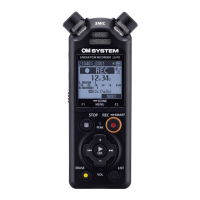
Table of Contents

Questions and Answers

  • S
    Shannon MartinJul 28, 2025
    What to do if the OM SYSTEM Measuring Instruments display is blank?
    • M
      Mr. Nicholas Ward Jr.Jul 29, 2025
      If the display is blank, it could be due to several reasons: * The batteries may not be inserted correctly. Ensure the positive and negative terminals are properly aligned. * The remaining battery power might be low. Try replacing or charging the batteries. * The power may be off. Make sure to turn the power on.
  • M
    Mr. Adam RichardsAug 2, 2025
    Why is my OM SYSTEM Measuring Instruments voice recorder not working?
    • G
      gwardAug 3, 2025
      If you're unable to operate the voice recorder, consider these possibilities: * The battery power may be low. Try replacing or charging the batteries. * The power might be off. Ensure the device is turned on. * The voice recorder could be in HOLD mode. Release HOLD mode to enable operation.
  • J
    Jesse MooreAug 8, 2025
    How to fix inaudible playback on OM SYSTEM Measuring Instruments?
    • L
      Luis AndersonAug 8, 2025
      If the playback is inaudible, consider the following: * If earphones are connected to the earphone jack, disconnect them to output playback through the built-in speaker. * If the recorder is connected to an audio device via Bluetooth®, end the Bluetooth® connection to play audio over the built-in speaker. * If [Off] has been selected for [Speaker], select [On] to output the playback through the built-in speaker. * If the volume is set to [00], adjust the volume.
  • M
    Michael JacksonAug 12, 2025
    What to do if OM SYSTEM Measuring Instruments is unable to record?
    • A
      Angela RamirezAug 12, 2025
      If the device is unable to record, it might be because: * There is no remaining memory. Erase unneeded files. * The maximum number of recordable files has been reached. Select another folder.
  • T
    tbrewerAug 18, 2025
    Why does my OM SYSTEM Measuring Instruments audio file sound distorted?
    • J
      John BradyAug 18, 2025
      If the audio file sound is distorted: * The recording level hasn’t been adjusted. Redo recording after adjusting the recording level. * The voice recorder’s recording level, or the output level of the connected external device may be too high. If the problem continues after adjusting the voice recorder’s recording level, adjust the output level of the external device.
  • L
    Leah FordAug 22, 2025
    How to increase recording volume on OM SYSTEM Measuring Instruments?
    • D
      Donna RobertsonAug 22, 2025
      If the recording is too quiet: * A low recording level has been set. Redo recording after setting the recording level to [High] or [Middle]. * The output level of the connected external device may be too low. Adjust the output level of the external device. * The recording level hasn’t been adjusted. Redo recording after adjusting the recording level.

Summary

Recording

Basic Recording Procedure

Step-by-step guide to start and stop audio recordings.

Adjusting Recording Levels

Methods for automatically or manually setting recording input levels.

External Input Devices

Connecting and using external microphones or line-in devices.

Playback

Basic Playback Procedure

How to play recorded files and music files.

Menu

Recording Menu Settings [Rec Menu]

Customizing recording quality, levels, microphone directivity, and more.

Playback Menu Settings [Play Menu]

Adjusting playback features like noise cancellation, voice balancer, and modes.

Bluetooth function

Connecting and Disconnecting Bluetooth Devices

Steps for pairing and establishing or ending wireless connections.

Connecting to Smartphones via Bluetooth

Pairing the recorder with a smartphone for remote operation.

Other information

Troubleshooting

Solutions for common problems encountered with the voice recorder.

Safety precautions

OM SYSTEM LS-P5 Specifications

General IconGeneral
Internal Memory4 GB
Sampling Frequency48 kHz
Frequency Response20 Hz - 20 kHz
Microphone DirectivityOmnidirectional
USB InterfaceUSB 2.0
DisplayLCD
Operating Temperature0 °C to 40 °C
Recording FormatWAV, MP3
External MemorymicroSD, microSDHC
MicrophoneBuilt-in stereo microphone
Input Terminal3.5 mm stereo mini jack
Output Terminal3.5 mm stereo mini jack
Measurement Range30 dB to 120 dB SPL