16
EN
1
Getting started
Charging the batteries
The supplied rechargeable batteries can be charged either by connecting the recorder to
a computer via the supplied USB cable or using an optional AC adapter that connects via
USB.
Charging the Batteries from a Computer via USB
The supplied rechargeable batteries can be charged by connecting the recorder to a
computer via USB. Be sure the batteries are correctly inserted in the recorder before
proceeding (☞ P.12).
NOTE
• Before charging the batteries,
insert the rechargeable batteries
provided and set [Battery] to [Ni-MH]
(☞ P. 12, P. 100).
• Never attempt to charge an alkaline
battery, lithium battery or other
primary cell battery. Fluid leakage or
overheating may cause the recorder
to malfunction.
1
Start the computer.
2
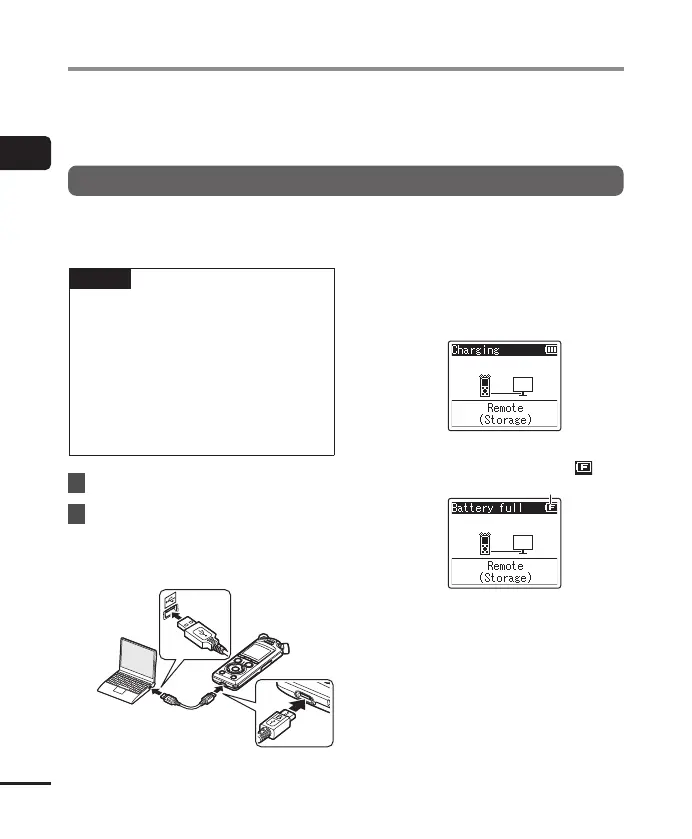
After confirming that the
recorder is stopped or off,
connect it to the computer
using the USB cable.
• The recorder will display a
[Charging] dialog and start charging
the batteries. The LED indicator light
will turn on.
• Charging has finished when the
battery indicator changes to [ ].
Battery indicator
Charging time: About 3 hours*
* Approximate time needed to fully
charge completely flat batteries at
room temperature. Battery charging
time will depend on the amount of
remaining power and the state of
the batteries.


 To Next Page