121
EN
4
Menu
A variety of recording options can be assigned to the F2 button for quick recall.
NOTE
• Before using [Pre-Recording], select
an option other than [FLAC] for [Rec
Mode] (☞P.85).
1
During recording or while the
voice recorder is in stop mode,
press the MENU/SCENE
button.
2
Press the + or − button to
select the [Rec Menu] tab.
3
Press the `OK button to
move the cursor into the list of
setting items.
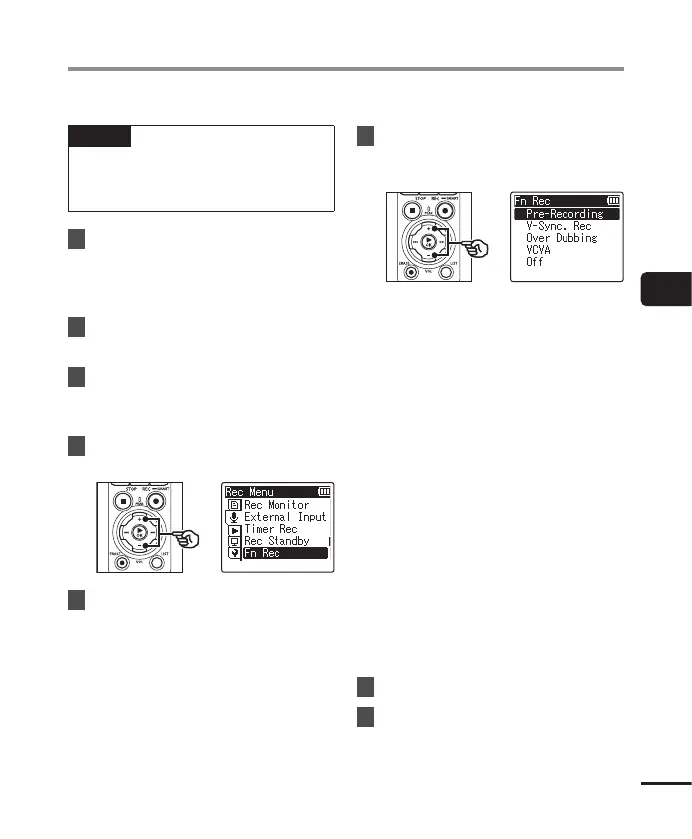
4
Press the + or − button to
select [Fn Rec].
5
Press the `OK button.
6
Press the + or − button to
select the option you plan to
assign to the F2 button.
[Pre-Recording]:
Recording starts approximately two
seconds before the REC( s) button
is pressed (☞ P.123).
[V-Sync. Rec]:
Recording starts automatically
when the recorder detects sounds
above a certain volume and stops
automatically when the volume
drops (☞P.89).
[Over Dubbing]:
Overdub a recording while playback
is in progress (☞ P.125).
[VCVA]:
Recording starts automatically
when the recorder detects sounds
above a certain volume and pauses
automatically when the volume
drops (☞ P.91).
[Off]:
The F2 button is not assigned a
recording function.
7
Press the `OK button.
8
Press the STOP ( 4) button to
exit the menu screen.
Choosing a Recording Method [Fn Rec]


 To Next Page