117
EN
4
Menu
Fading in/out audio at the beginning/end
of a file [Fade in/out]
You can apply fade in/out effect to the beginning/end of a file for approximately 1 second
respectively and save the file as another file.
NOTE
• Only PCM format files recorded with
this recorder can be faded in/out.
1
Select a file you want to apply
fade in/out effect to (☞ P. 33).
2
Press the MENU/SCENE
button while the voice recorder
is in stop mode.
3
Press the `OK button to
move the cursor into the list of
setting items.
4
Press the + or − button to
select [Fade in/out].
5
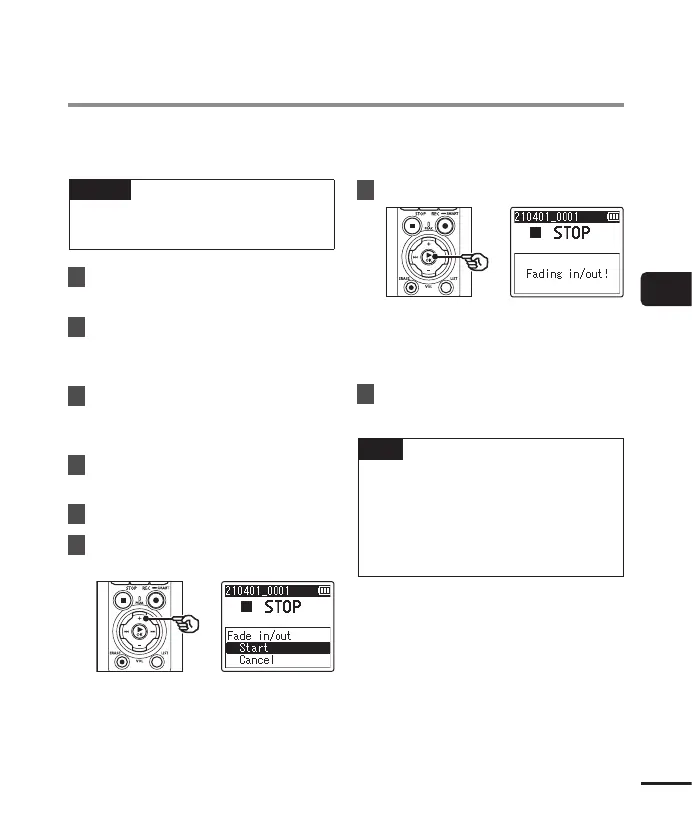
Press the `OK button.
6
Press the + button to select
[Start].
7
Press the `OK button.
• [Fading in/out!] is displayed on
the screen, and the audio is faded
in and out. The process is finished
when [Faded in/out] is displayed.
8
Press the STOP ( 4) button to
exit the menu screen.
TIP
• The file is given the name “File
name_1” after fade in/out effect is
applied.
• If the current folder contains 200 files,
a new folder will be created to hold
the additional files.


 To Next Page