10-25
10. Data Format Commands (P, G, R, W)
10.27
R/W51, R/W52, R/W53, R/W54, R/W55, R/W56, R/W57, R/W58, R/W59, R/W5A:
TABLE 10.25 *R/W5XXXXX
HEX DESCRIPTION NUMBER DEFAULT
COMMAND 1st 3 bytes = Read0 value of BYTES VALUE
SUFFIX 2nd 3 bytes = Input0 value
51 MP.SC.OF Read/Input 0 values = Pointer 0 6 200000200000
52 MP.SC.OF Read/Input 0 values = Pointer 1 6 200000200000
53 MP.SC.OF Read/Input 0 values = Pointer 2 6 200000200000
54 MP.SC.OF Read/Input 0 values = Pointer 3 6 200000200000
55 MP.SC.OF Read/Input 0 values = Pointer 4 6 200000200000
56 MP.SC.OF Read/Input 0 values = Pointer 5 6 200000200000
57 MP.SC.OF Read/Input 0 values = Pointer 6 6 200000200000
58 MP.SC.OF Read/Input 0 values = Pointer 7 6 200000200000
59 MP.SC.OF Read/Input 0 values = Pointer 8 6 200000200000
5A MP.SC.OF Read/Input 0 values = Pointer 9 6 200000200000
EXAMPLE: If Pointer 0 is read as with this command *R51 and the response is
R51200000200000, it means that:
2nd 3 bytes is Input0 value = 200000
1st 3 bytes is Read0 value = 200000
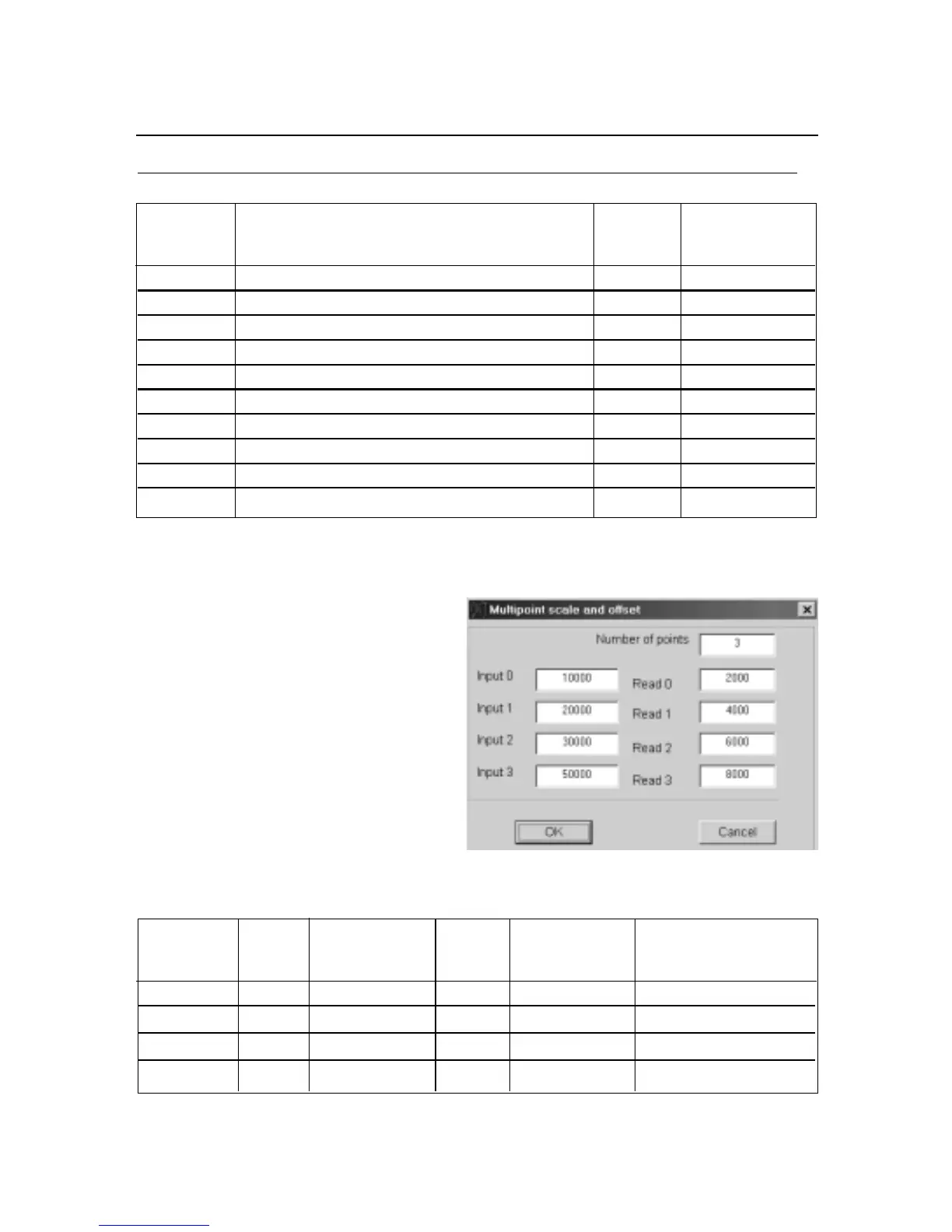
EXAMPLE: To setup Multi-Point Scale &
Offset with NUM.PNt = 3 as desired as
following and shown below:
Converting the decimal values to hex. values and send the Write Commands as listed
as following:
HEX. EQUIVALENT EQUIVALENT WRITE
COMMAND FOR HEX. VALUE FOR HEX. VALUE COMMAND
SUFFIX
51 Read 0 1007D0 Input 0 102710 W511007D0102710
52 Read 1 100FA0 Input 1 104E20 W52100FA0104E20
53 Read 2 101770 Input 2 107530 W53101770107530
54 Read 3 101F40 Input 3 10C350 W54101F4010C350
To enter the values of Pointer, the Sign and Decimal point must follow the manner
shown in Table 10.26.


 To Next Page
 Loading...