413
Conversion Instructions Section 3-11
Flags
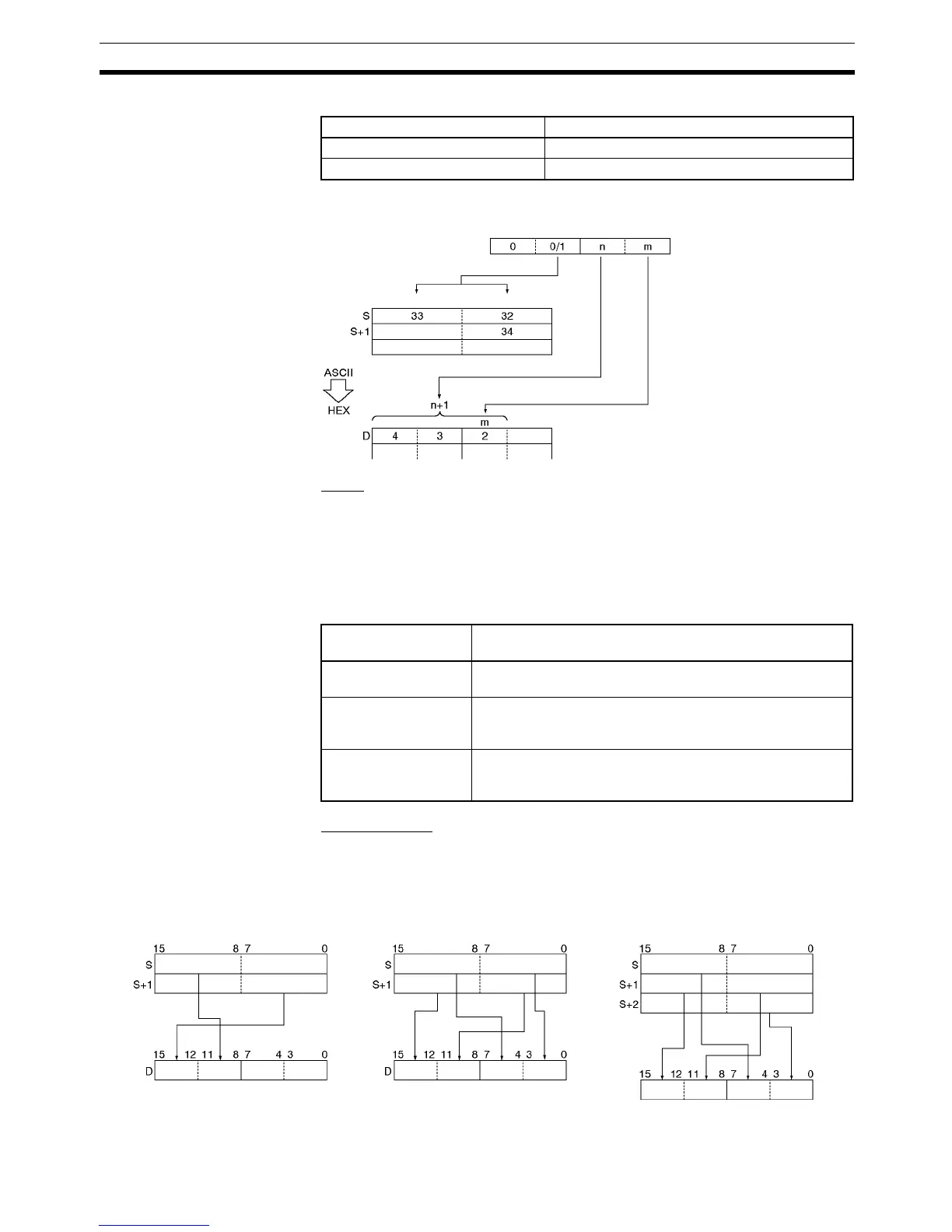
The following diagram shows the basic operation of HEX(162) with Di=0021.
Parity
It is possible to specify the parity of the ASCII data for use in error control dur-
ing data transmissions. The leftmost bit in each byte is the parity bit. With no
parity the parity bit should always be zero, with even parity the status of the
parity bit should result in an even number of ON bits, and with odd parity the
status of the parity bit should result in an odd number of ON bits.
The following table shows the operation of HEX(162) for each parity setting.
Examples of Di
When two or more bytes are being converted, HEX(162) will write the con-
verted digits to the destination word from right to left and will wrap around to
the rightmost digit if necessary. The following diagram shows some example
values for Di and the conversions that they produce.
Hexadecimal digits (4 bits) ASCII equivalent (2 hexadecimal digits)
0 to 9 30 to 39
A to F 41 to 46
Parity setting
(leftmost digit of Di)
Operation of HEX(162)
No parity (0) HEX(162) will be executed only when the parity bit in each
byte is 0. An error will occur if a parity bit is non-zero.
Even parity (1) HEX(162) will be executed only when there is an even num-
ber of ON bits in each byte. An error will occur if a byte has
an odd number of ON bits.
Odd parity (2) HEX(162) will be executed only when there is an odd num-
ber of ON bits in each byte. An error will occur if a byte has
an even number of ON bits.
C: 0021
Number of digits (n+1)
Right (0)Left (1)
Di
First digit to write
First byte to convert
Di: #0112 Di: #0030 Di: #0131
Digit 3 Digit 2 Digit 1 Digit 0
Leftmost
Rightmost
Digit 3 Digit 2 Digit 1 Digit 0
Digit 3 Digit 2 Digit 1 Digit 0
Leftmost Rightmost
Leftmost Rightmost
Leftmost
Rightmost
Leftmost Rightmost
D



 To Next Page