429
Conversion Instructions Section 3-11
Note Values of –0 in the source data will be treated as 0 and will not cause an error.
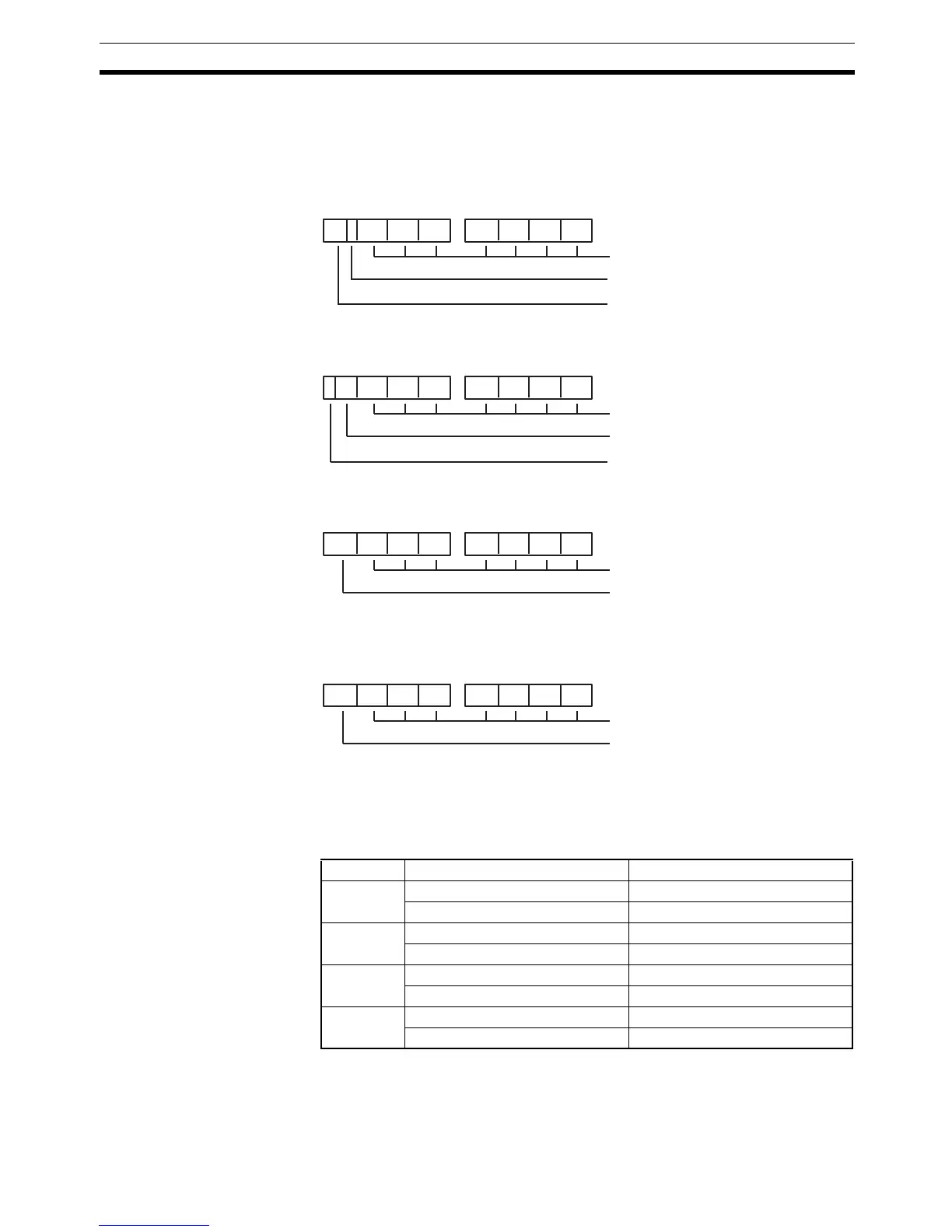
The control word specifies the signed BCD format that will be used for the
result, as shown below.
C = 0000 (Output Data Range: –999 9999 to 999 9999 BCD)
C = 0001 (Output Data Range: –7999 9999 to 7999 9999 BCD)
C = 0002 (Output Data Range: –999 9999 to 9999 9999 BCD)
C = 0003 (Output Data Range: –1999 9999 to 9999 9999 BCD)
The following table shows the possible double signed binary values for each
signed BCD format. An error will occur if the source data is not within the
allowed range for the specified signed BCD format.
Setting Signed binary values Signed BCD values
C=0000 FF67 6981 to FFFF FFFF –999 9999 to –1
0000 0000 to 0098 967F 0 to 999 9999
C=0001 FB3B 4C01 to FFFF FFFF –7999 9999 to –1
0000 0000 to 04C4 B3FF 0 to 7999 9999
C=0002 FF67 6981 to FFFF FFFF –999 9999 to –1
0000 0000 to 05F5 E0FF 0 to 9999 9999
C=0003 FECE D301 to FFFF FFFF –1999 9999 to –1
0000 0000 to 05F5 E0FF 0 to 9999 9999
S+1 S
7 digits BCD, 28 bits
Sign bit (0: Positive; 1: Negative)
Status of 3 bits: 0
S+1 S
3 bits of digit 8 (0 to 7)
7 digits BCD, 28 bits
Sign bit (0: Positive; 1: Negative)
S+1 S
0 to 9: Eighth digit BCD
F: Negative (–)
7 digits BCD, 28 bits
S+1 S
0 to 9: Eighth digit BCD
A: Negative (–1)
F: Negative (–)
7 digits BCD, 28 bits



 To Next Page