650
Data Control Instructions Section 3-17
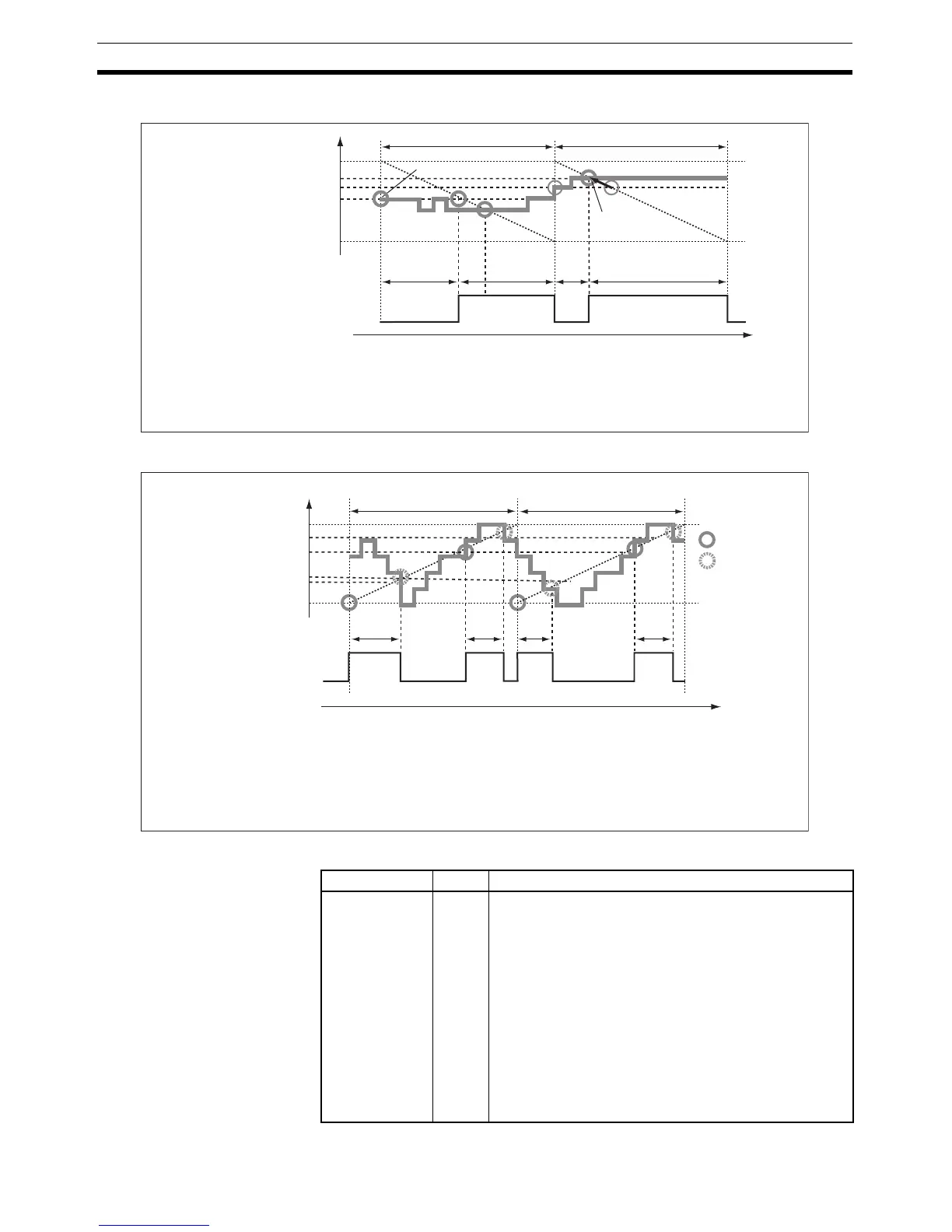
• Input time setting = 2 (Use higher value.)
• Input time setting = 3 (Continuous adjustment)
Flags
100%
a × 0.45 s
a × 0.55 s
a × 0.80 s
80%
70%
55%
0%
a ×
0.20 s
55% target is kept.
Control period (a) Control period (a)
Time
Output
Duty ratio
(MV/MV range)
70% target
raised to 80%.
If the duty ratio rises above the initial value early enough, the duty ratio will be
adjusted and the output will be turned ON sooner. (With this setting the output's
ON/OFF order is reversed and the output goes from OFF to ON.)
Use this setting for applications such as avoiding undershooting when using time-
proportional control to control cooling and using relatively long control period.
100%
100%
a × 0.35 s
0%
a ×
0.20 s
a ×
0.20 s
a ×
0.20 s
Control period (a)
Control period (a)
Output
Duty ratio
(MV/MV range)
: Output ON
: Output OFF
Time
Changes in the duty ratio are monitored in real time. If the duty ratio falls
below the initial value early enough, the duty ratio will be adjusted and the
output will be turned OFF sooner. If the duty ratio rises again after that,
the ratio will be adjusted again and the output will be turned ON. This
process is repeated continuously.
Use this setting to improve responsiveness when the control period is
relatively long and the duty ratio changes quickly. This setting is also
appropriate for lighting or power applications that require precise control.
Name Label Operation
Error Flag ER ON if the input data in S is out of range. (The input data
setting range depends on the input type setting.)
ON if the C data is out of range. (The manipulated vari-
able range will cause an error only when the input type is
set to manipulated variable.)
ON if the control period in C+1 is out of range.
ON if the output limit function is enabled but the output
lower limit (C+2) or output upper limit (C+3) is out of
range.
ON if the output limit function is enabled but the output
lower limit (C+2) is less than or equal to the output upper
limit (C+3).
OFF in all other cases.



 To Next Page