850
Network Instructions Section 3-24
About Communications
Port Numbers
There are 8 logical communications ports provided, so 8 communications
instructions can be executed simultaneously. Only one instruction can be exe-
cuted at a time for each communications port. Exclusive control must be used
when more than 8 instructions are executed.
These 8 communications port numbers are shared by the network instructions
(SEND(090), RECV(098), and CMND(490)), the serial communications
instructions (TXDU(256) and RXDU(255)), and the PROTOCOL MACRO
instruction (PMCR(260)). Be sure not to specify the same port number on two
instructions at the same time.
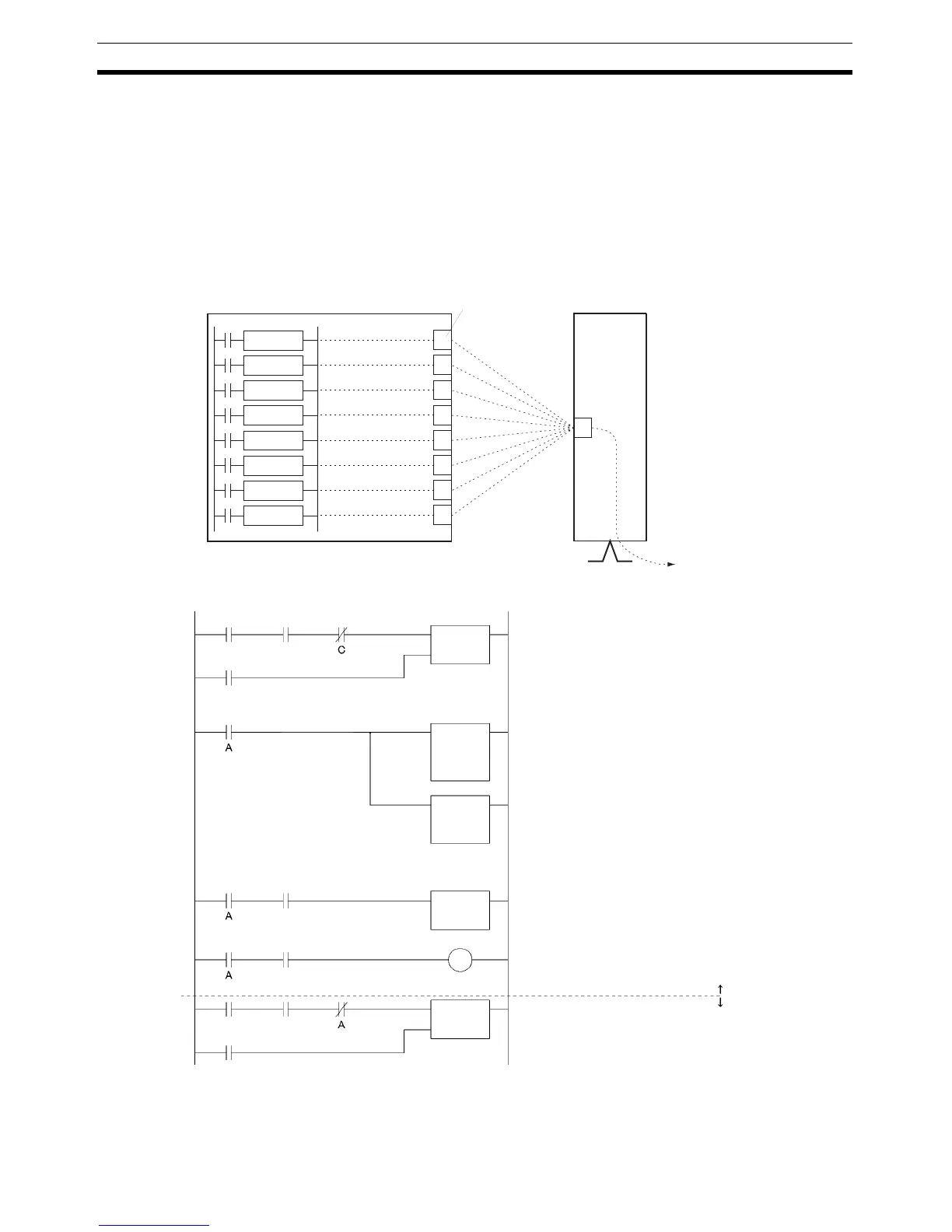
The following diagram shows an example of exclusive control.
CP1H CPU Unit
Instruction 1
Instruction 2
Instruction 3
Instruction 4
Instruction 5
Instruction 6
Instruction 7
Instruction 8
Communications port
(internal logic port)
CJ-series Communications Uni
KEEP A
DIFU B
KEEP C
Reset B
Reset D
Execution
condition
Relevant
Communications
Port Enabled Flag
Creates op-
erand or
control data
with @MOV
or @XFER.
@SEND,
@RECEIVE,
@CMND
Relevant
Communications Port
Enabled Flag
Relevant
Communications Port
Enabled Flag
Execution
condition
Relevant
Communications
Port Enabled Flag
Same as above.
Bit A remains ON while the communications
instruction is being executed.
Copies the operand data and control data for
the communications instruction to the desired
data area.
Executes the communications instruction
for the specified port.
Writes the reset input. (Reset B is turned
ON when the communications instruction
is completed.)
For Transmission Error Flag display
(Good if data is retransmitted.)
Exclusive control to prevent simulta-
neous execution:
Exclusive control prevents another
communications instruction from being
executed until the instruction above is
completed.



 To Next Page