Section 2 NS Series Functions 2-11 Multifunction Objects
2-172
NS Series Programming Manual
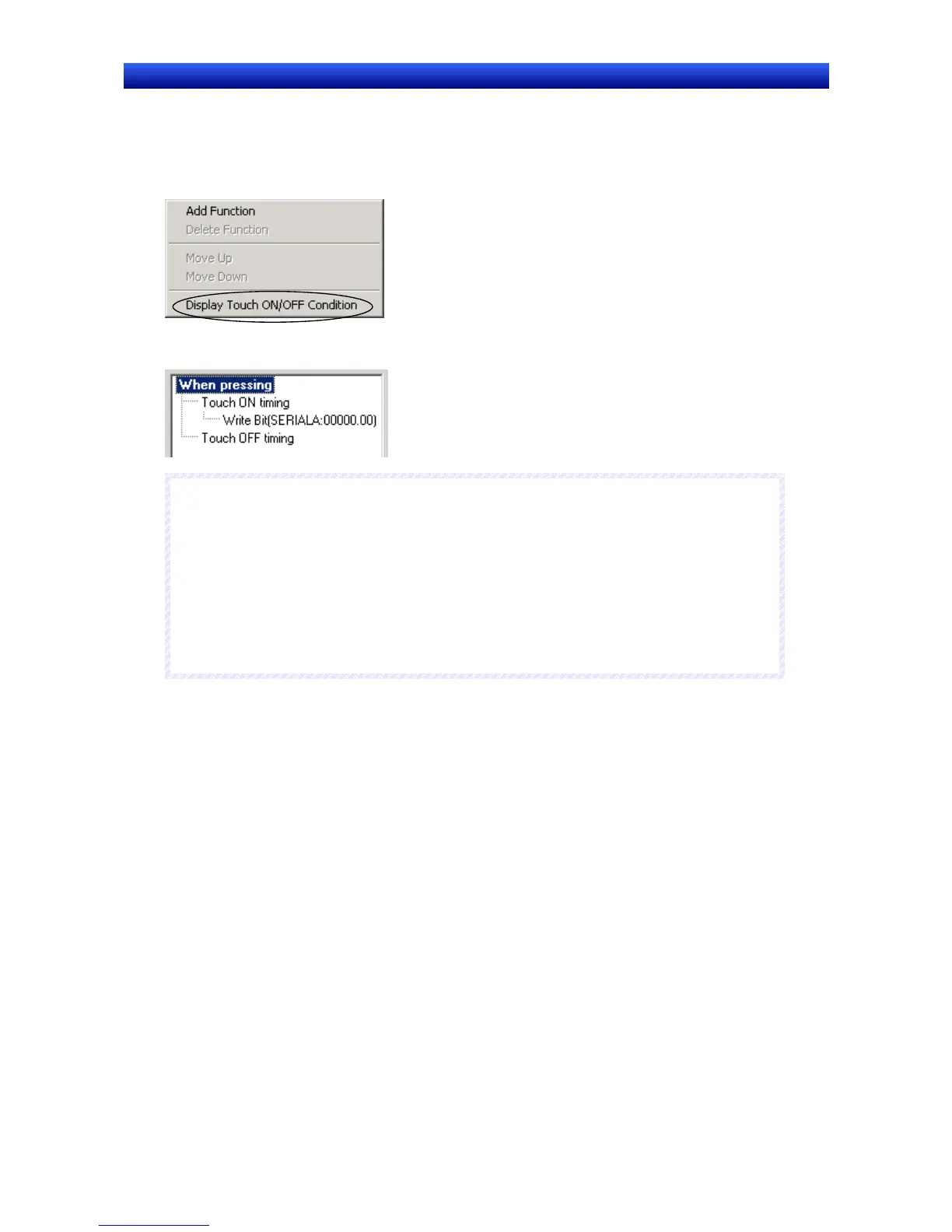
1. Move the mouse cursor to the Action Item List.
2. Right-click the mouse button and select Display Touch ON/OFF Condition from the pop-up menu
that is displayed.
3. Touch ON timing and Touch OFF timing will be added to the action timing conditions.
N
N
N
o
o
o
t
t
t
e
e
e
♦
If the execution conditions are changed to Display Touch ON/OFF Condition, the following func-
tions will be set to Touch OFF timing.
Switch Screen (if not set to Pop-up page selection.)
Control Pop-up Screen
Display System Menu
Authentication Cancellation
♦
Key Button and Video Control – Vision Sensor Console Output can be set only for touch ON tim-
ing.
The settings for When pressing operation are outlined below.


 To Next Page
 Loading...





