Section 2 NS Series Functions 2-11 Multifunction Objects
2-182
NS Series Programming Manual
1
2
3
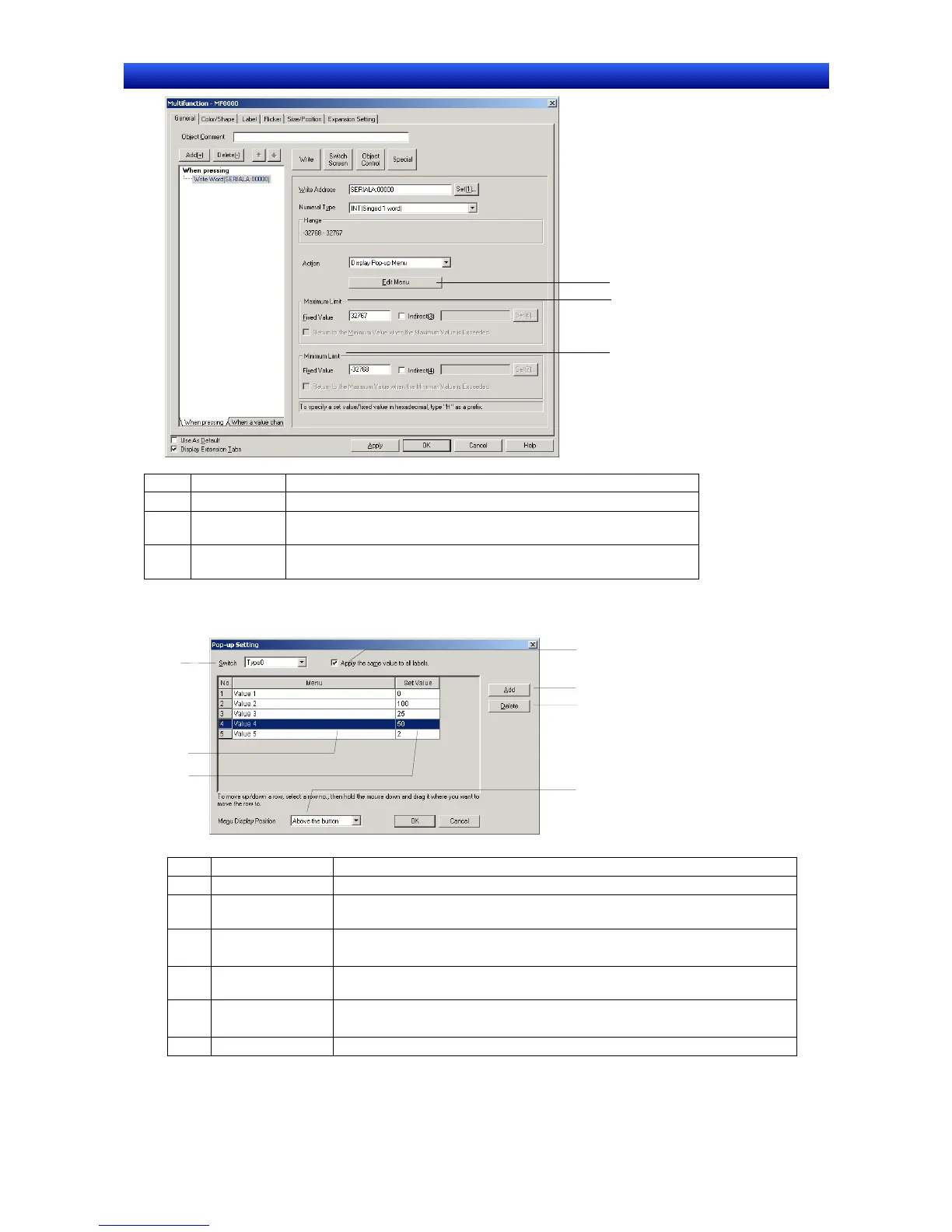
No. Item Details
1 Edit Menu Displays the Pop-up Setting Dialog Box.
2
Maximum
Limit
Sets the maximum limit. Either a fixed value or indirect specification
can be selected.
3
Minimum
Limit
Sets the minimum limit. Either a fixed value or indirect specification
can be selected.
Editing Pop-up Menus
1
2
3
4
5
6
7
No. Item Details
1 Switch Switches labels.
2
Apply the same
value to all labels
Applies the same set value to all labels.
3 Menu list Sets the heading name displayed in a pop-up menu.
The name can be up to 64 characters long.
4 Set Value
Specifies the value that will be written to the communications address when
the corresponding menu item is selected.
5 Add Adds a menu item below the currently selected row.
If there is no row selected, a new row is added to the bottom of the list.
6 Delete Deletes the currently selected menu item.


 To Next Page
 Loading...





