4 - 11
4 Calculating Safety Reaction Times
NX-series Safety Control Unit User’s Manual (Z930)
4-3 FSoE Watchdog Timers
4
4-3-4 Changing FSoE Watchdog Timers
Use the following procedure to change an FSoE watchdog timer.
1 In the Multiview Explorer, select the Safety CPU Unit in the Controller Selection Box.
2 Double-click Safety I/O under Configurations and Setup − Communications − Safety.
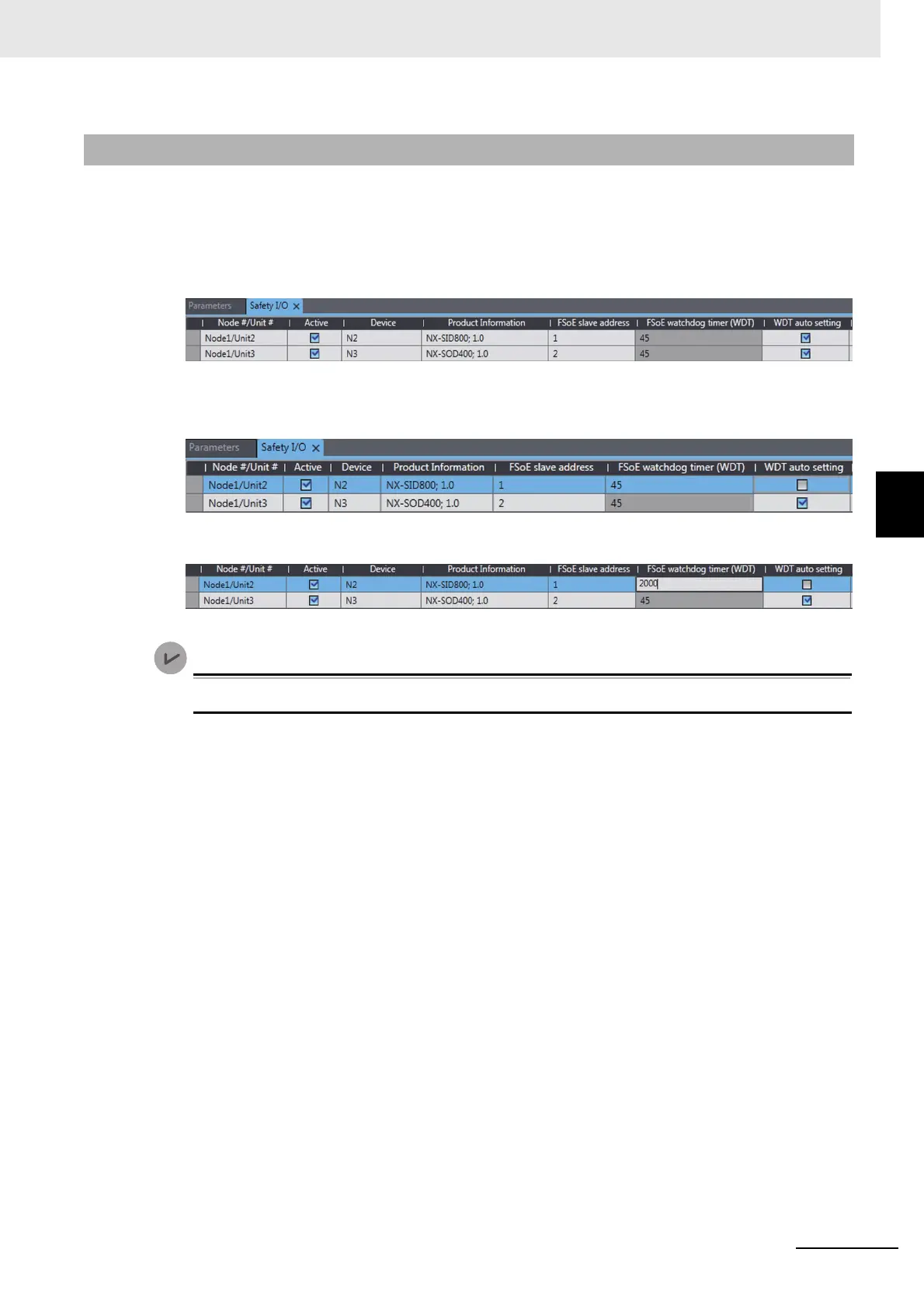
The following Safety I/O Unit Setting Tab Page is displayed.
3 Clear the selection of the WDT auto setting Check Box for the Unit to change.
This enables changing the value of the FSoE watchdog timer.
4 Double-click the cell in the FSoE Watchdog Timer Column for the Unit to change and set the
desired FSoE watchdog timer value.
.
You can change the FSoE watchdog timers with Sysmac Studio version 1.10 or higher.
4-3-4 Changing FSoE Watchdog Timers










 To Next Page