8 - 21
8 Checking Operation and Actual Operation
NX-series Safety Control Unit User’s Manual (Z930)
8-5 Checking External Device Wiring
8
8-5-2 Monitoring a Safety I/O Unit
This section describes how to monitor Safety I/O Unit I/O terminal information to check external device
wiring.
When Sysmac Studio Is Connected to NJ/NX-series CPU Unit
1 Place the Sysmac Studio online with the NJ/NX-series CPU Unit.
In the Multiview Explorer, select the Safety CPU Unit in the Controller Selection Box.
2 Place the Safety CPU Unit in DEBUG mode.
Refer to 8-4 Changing to DEBUG Mode on page 8-17 for a detailed procedure.
3 Double-click Parameters under the name of the Safety I/O Unit under Configurations and
Setup − Communications − Safety − Safety I/O.
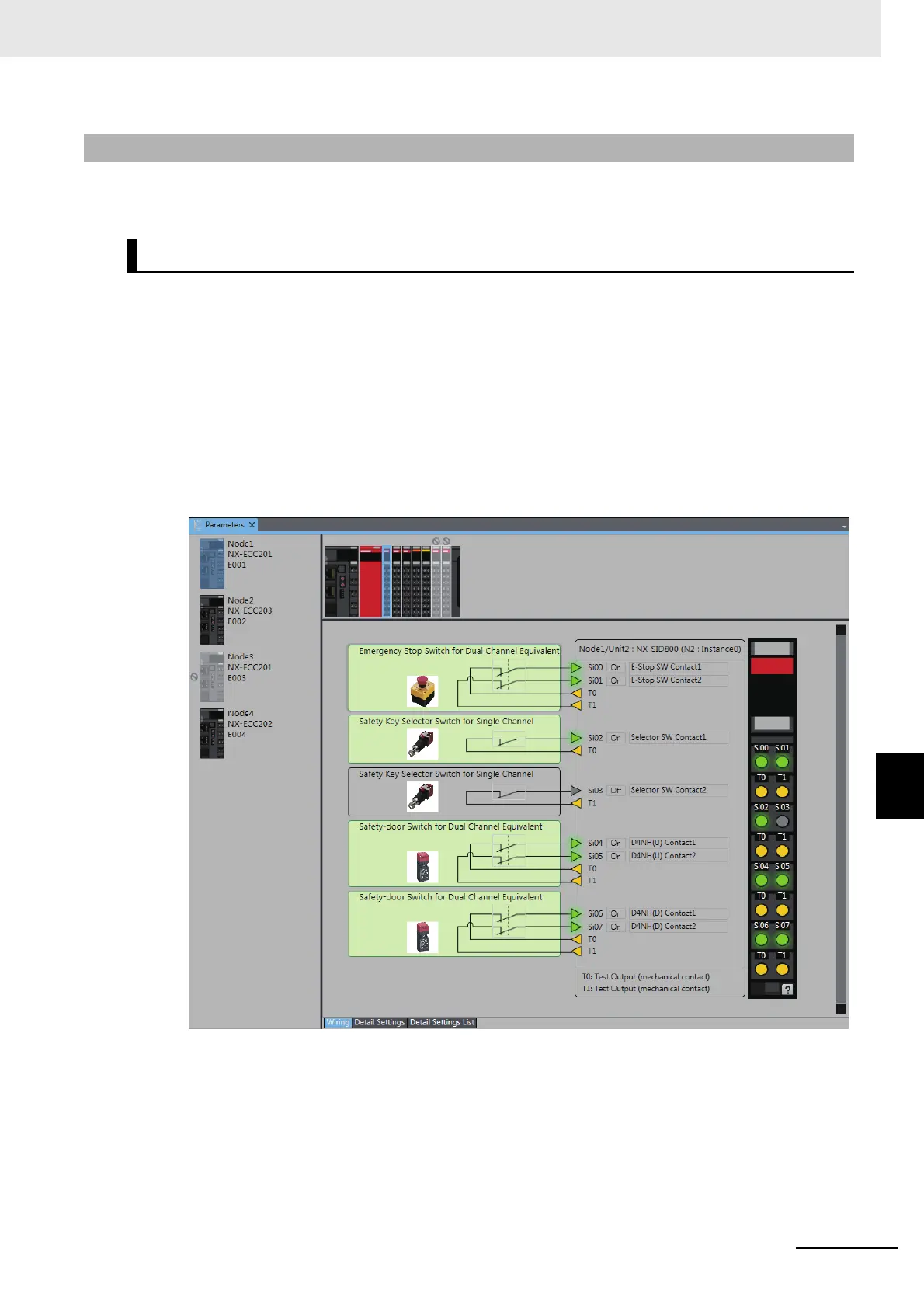
The Parameters Tab Page shown below is displayed. Select the Safety I/O Unit to monitor.
8-5-2 Monitoring a Safety I/O Unit
Executing the Monitor for Safety I/O Terminals










 To Next Page