A - 63
Appendix
NX-series Safety Control Unit User’s Manual (Z930)
A-6 I/O Ports for Safety I/O Units That Are
Displayed in the I/O Map of the NJ/NX-series
A
A-6-1 NX-SIH400 Safety Input Unit
A-6 I/O Ports for Safety I/O Units That Are
Displayed in the I/O Map of the
NJ/NX-series CPU Unit
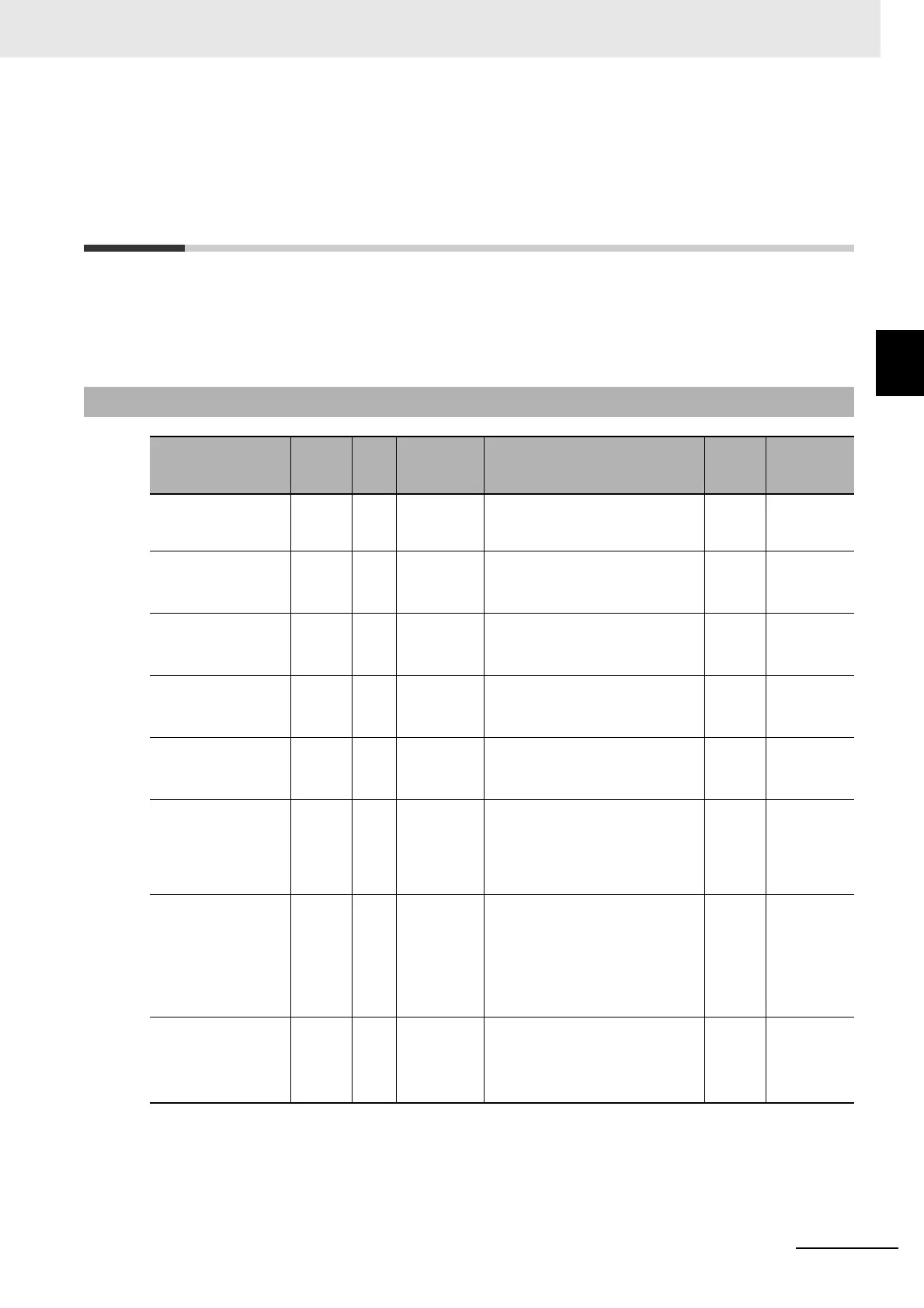
The I/O ports for Safety I/O Units that are displayed in the I/O Map of the NJ/NX-series CPU Unit are
described in this section. The names of the I/O ports that correspond to the data in the I/O Map of the
Safety CPU Unit are given in the Corresponding port name Column. “Same” means that the same
name is used.
A-6-1 NX-SIH400 Safety Input Unit
Port
Data
type
R/W Name Description Default
Corre-
sponding
port name
Standard Input 1st
Byte
BYTE R Standard
Input 1st
Byte
--- 00 hex ---
Si00 Logical Value BOOL R Si00 Logi-
cal Value
Gives the status of safety input
terminal Si00.
0: OFF, 1: ON
0Same
Si01 Logical Value BOOL R Si01 Logi-
cal Value
Gives the status of safety input
terminal Si01.
0: OFF, 1: ON
0Same
Si02 Logical Value BOOL R Si02 Logi-
cal Value
Gives the status of safety input
terminal Si02.
0: OFF, 1: ON
0Same
Si03 Logical Value BOOL R Si03 Logi-
cal Value
Gives the status of safety input
terminal Si03.
0: OFF, 1: ON
0Same
Safety Connection
Status
BOOL R Safety Con-
nection Sta-
tus
This flag indicates when a safety
connection is active. Use it for an
input to the Activate terminal on a
safety FB or for safety connec-
tion/disconnection applications.
0Same
Safety Input Termi-
nal Status
BOOL R Safety Input
Terminal
Status
This flag indicates the status of
the safety input terminals.
0: An error has occurred on one
of the safety input terminals.
1: All of the safety input terminals
are normal (no errors).
0Same
Unit Normal Status BOOL R Unit Nor-
mal Status
This flag indicates the status of
the Unit.
0: An error has occurred.
1: Normal (no errors)
0 ---










 To Next Page