8 - 39
8 Checking Operation and Actual Operation
NX-series Safety Control Unit User’s Manual (Z930)
8-6 Functions for Checking Operation
8
8-6-5 Controlling BOOL Variables, Changing Present Values, and Using
Forced Refreshing
Forced Refreshing Other Variables in the FBD Editor
Use the following procedure to execute forced refreshing on non-BOOL variables.
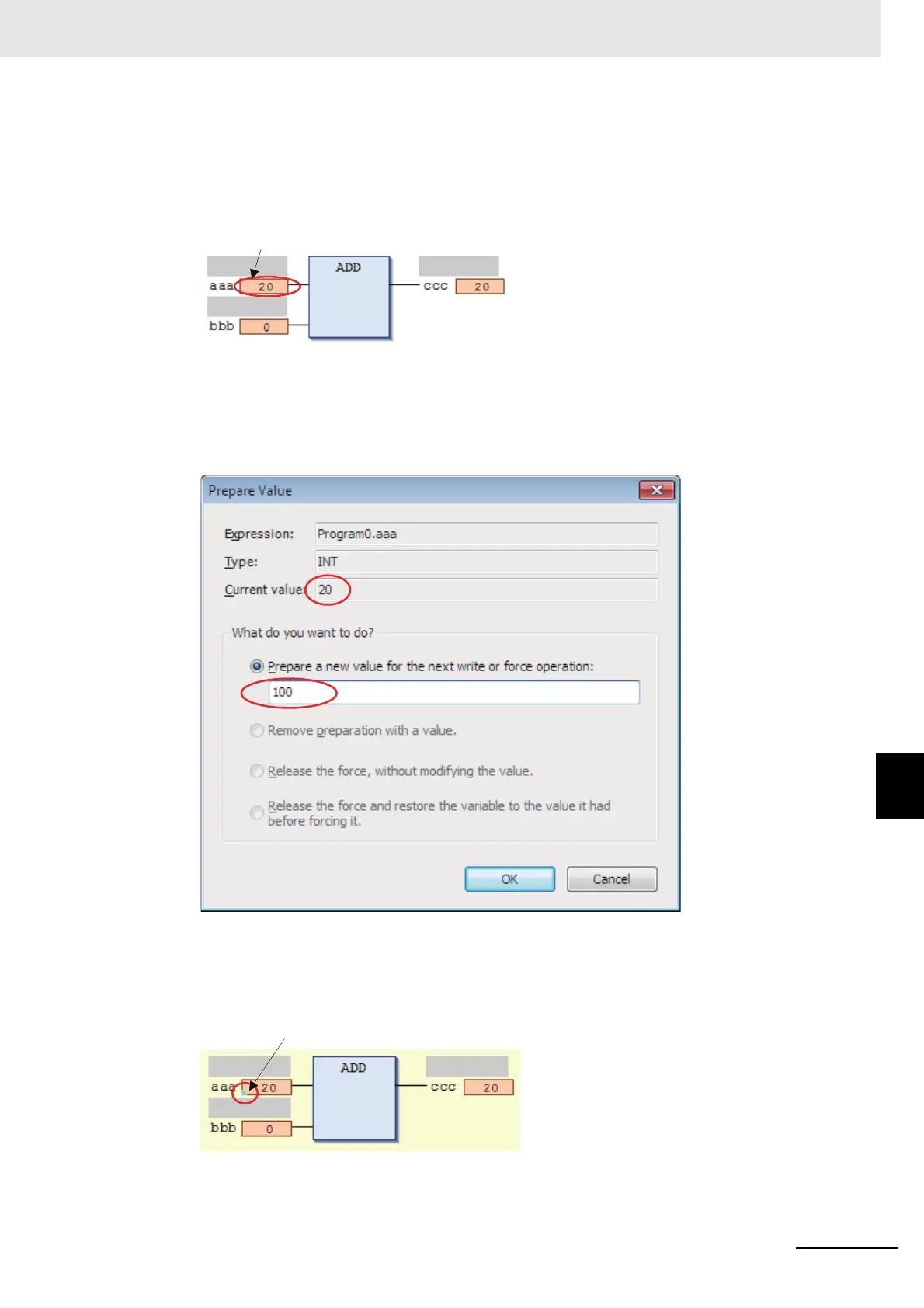
1 Click the present value for the non-BOOL variable to change.
Example: To force-refresh the present value of variable aaa, click the present value of 20.
The Prepare Value Dialog Box is displayed.
2 Select the Prepare a new value for the next write or force operation Option and enter the new
value.
Example: This example changes the value to 100.
3 Click the OK Button.
The Prepare Value Dialog Box closes and the value changes to a temporary value.
A light blue triangle is displayed at the lower left of the value. This indicates that a temporary
value is in effect.
To cancel the temporary value, click the present value of the desired variable again. Select the
Remove preparation with a value Option in the Prepare Value Dialog Box, and then click the OK
Button.
Click here.
A light blue triangle is displayed.










 To Next Page