range Pi 用户手册 深圳市迅龙软件有限公司版权所有
www.orangepi.cn 52 www.xunlong.tv
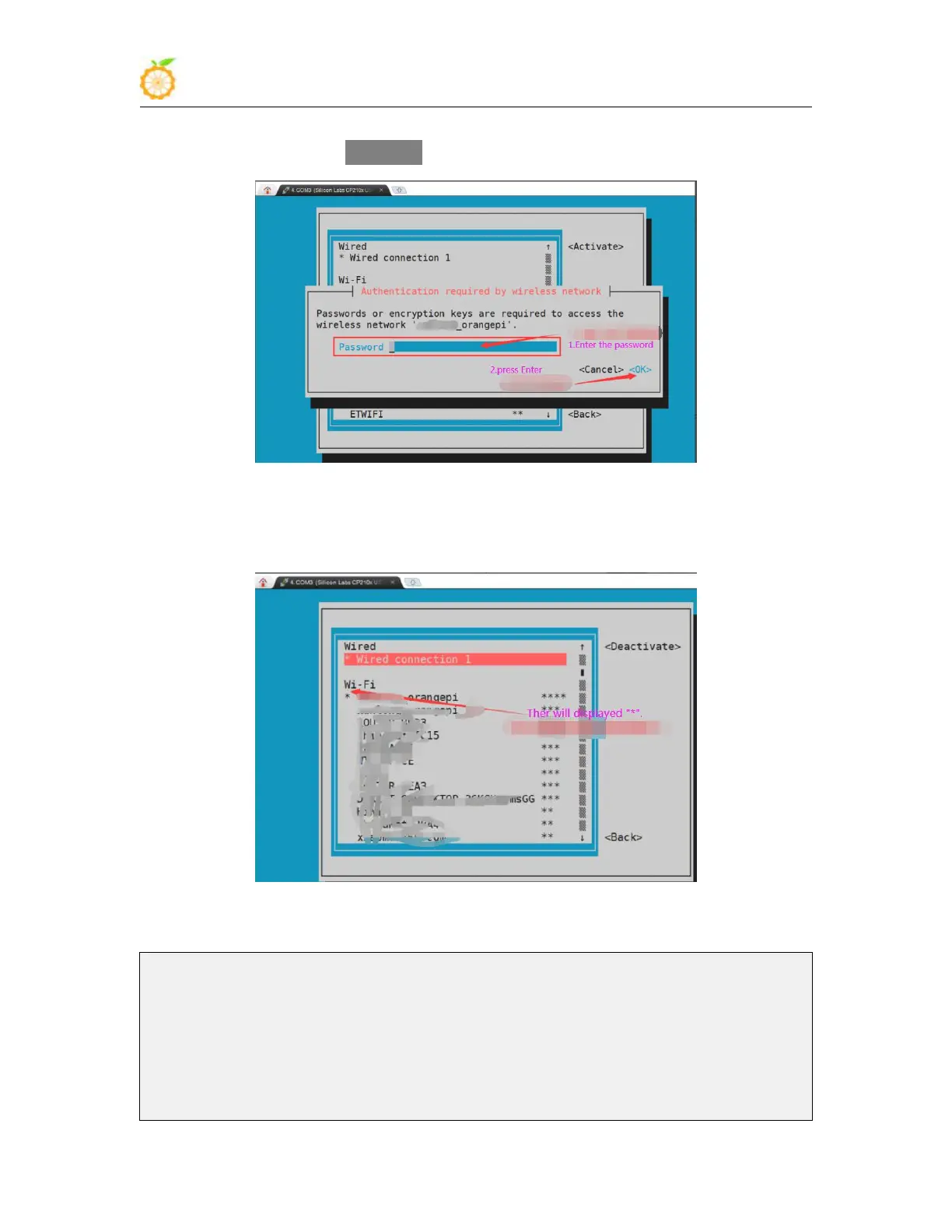
7) WIFI Then a dialog box for entering the password will pop up, enter the
corresponding password in Password and press Enter to start connecting to WIFI
8) After the WIFI connection is successful, a "*" will be displayed in front of the
connected WIFI name
9) The wifi IP address can be viewed through the ifconfig command
root@orangepi:~# ifconfig wlan0
wlan0: flags=4163<UP,BROADCAST,RUNNING,MULTICAST> mtu 1500
inet 192.168.1.49 netmask 255.255.255.0 broadcast 192.168.1.255
inet6 fe80::76bb:f67d:ef98:2f9a prefixlen 64 scopeid 0x20<link>
ether 12:81:3e:a8:58:d8 txqueuelen 1000 (Ethernet)
RX packets 185 bytes 109447 (109.4 KB)



 To Next Page