range Pi 用户手册 深圳市迅龙软件有限公司版权所有
www.orangepi.cn 61 www.xunlong.tv
4) Then use the aplay command to play the audio headset to hear the sound
root@orangepi:~# aplay -D hw:0,0 audio.wav
3.17.2. Mic recording test
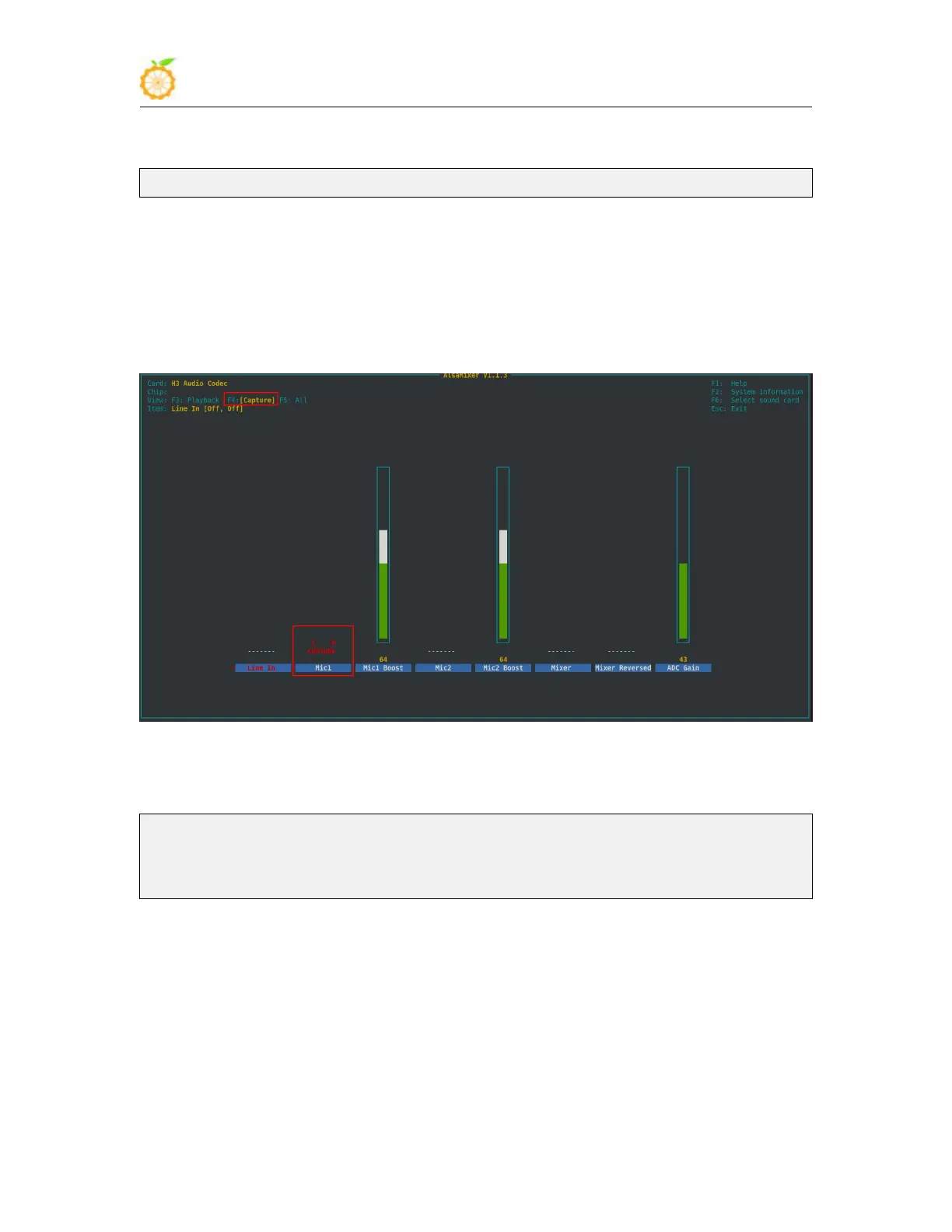
1) The linux5.4 system needs to use alsamixer to open the audio adjustment interface,
then press the F4 key to enter the recording channel setting, then use the arrow keys to
move to the Mic1 option, and then press the space bar to open the recording channel. The
linux3.4 system does not need to be set
2) After opening the recording channel, you can start recording. The recording
commands are as follows
root@orangepi:~# arecord -d 5 -f cd -t wav test.wav
Recording WAVE test.wav' : Signed 16 bit Little Endian, Rate 44100 Hz, Stereo
root@orangepi:~#
3) After the recording is completed, a recording file named test.wav will be generated in
the current path. Use the aplay command to play test.wav to check whether there is sound
output
3.17.3. HDMI audio playback test
1) First use the aplay -l command to ensure that you can see the HDMI sound card
device, where card 1 is the HDMI sound card device



 To Next Page