6 Control system
6.1 User interface 44
6.1.1 Choose menu language 45
6.1.2 Main menu - start screen 45
6.1.3 Program menus - basic functions 45
6.1.4 Settings 46
6.1.5 User settings 49
6.1.6 Advanced settings 49
6.1.7 Sensor test 50
6.1.8 Error messages memory 50
6.1.9 Values and settings in menu 51
6.1.10 Error messages on display 52
6.1 USER INTERFACE
This section provides a brief introduction to the user interface, so that you quickly can get started using the
machine.
NOTE: Software reviewed by this chapter is MP2000 5.0 G. Variations from the illustrations may occur.
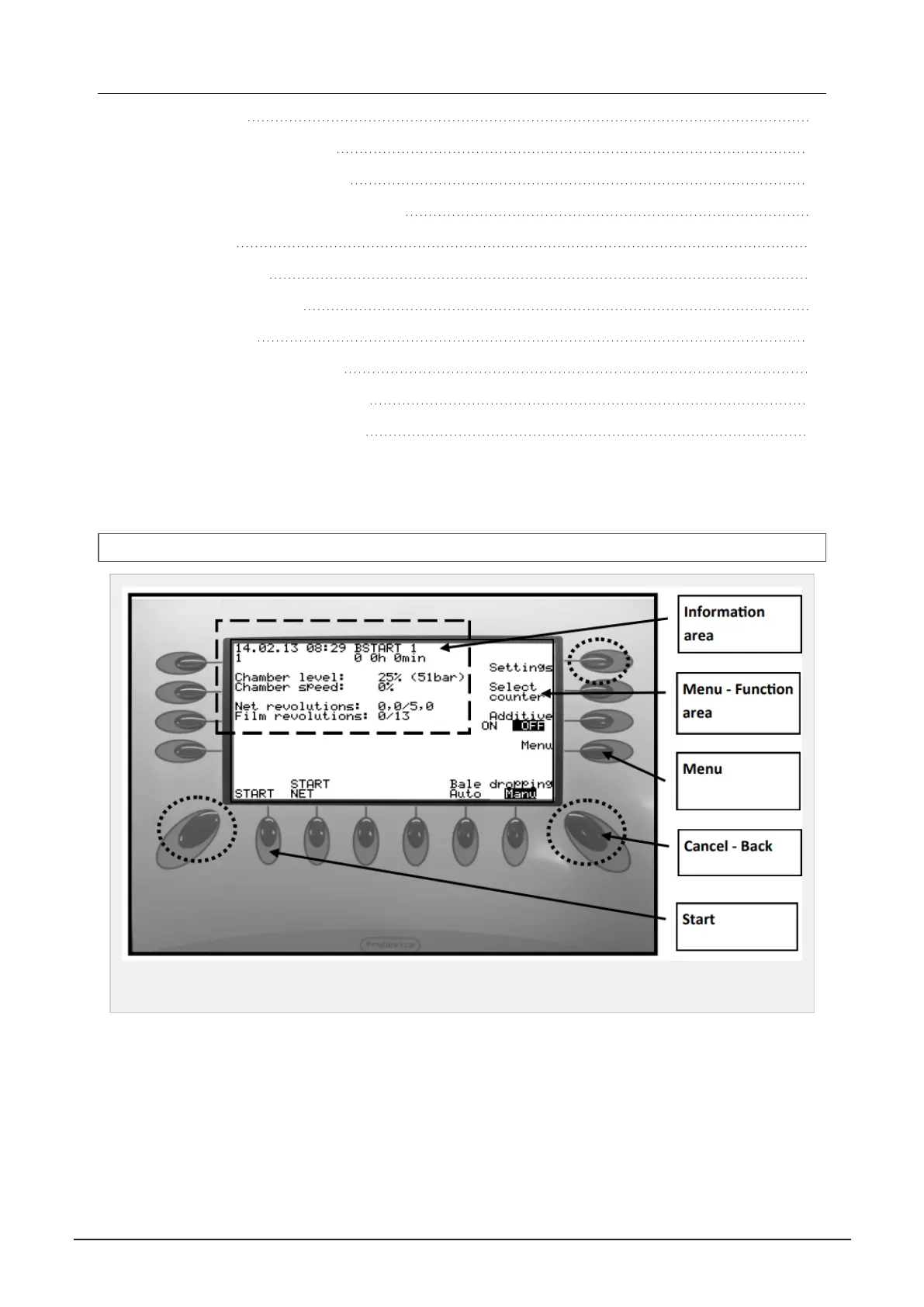
Figure 6.1 :
Control box user interface
Information area:
Display information about status in different menus. Also time, date and counters
Menu - Function area:
Display machine information, on each function in chosen menu.
Buttons:
By pressing button near/under desired function, the function is activated.
Menu button:
6 CONTROL SYSTEM 44


 To Next Page