Section
300~installation
Installing a
Tl
in a Single Cabinet
Chapter 4. Trunks and Lines
The following instructions explain how to install a
Tl
in a single-cabinet
system. These instructions also apply when a
Tl
is installed in only the
master cabinet of a two cabinet system.
If only one
Tl
is installed in a two-cabinet system, it must be installed in the
cabinet specified in Table 4-8 on page
4-
13.
Note: The Tl Interface cannot be used for systems consisting of a DBS 72
connected to a DBS 40.
1.
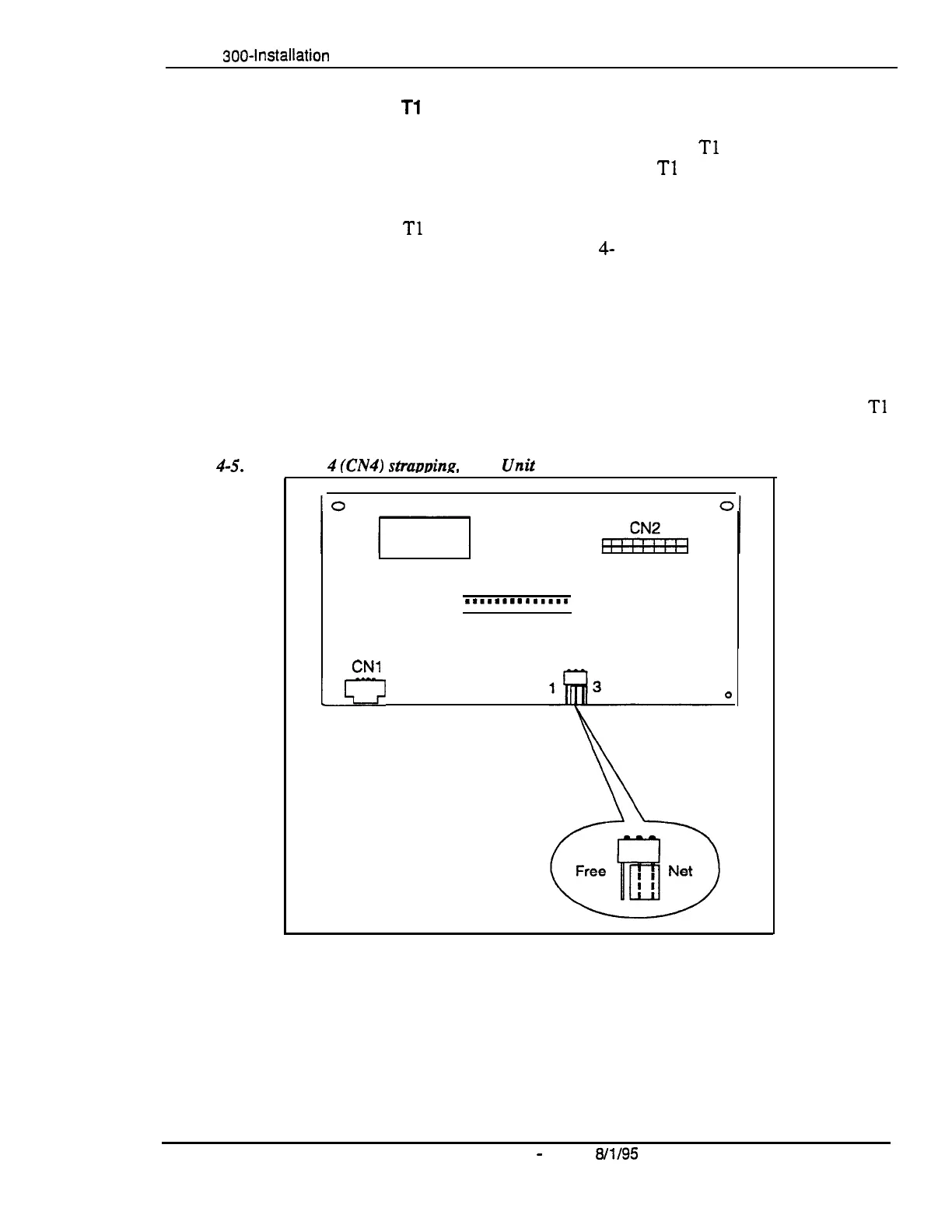
Check connector 4 (CN4) on the Sync Unit (VB-43563). Make sure that
Pins 2 and 3 are strapped. (See Figure 4-5.)
When Pins 2 and 3 are strapped, the Sync Unit synchronizes the DBS
Tl
card with the signaling provided by the public network.
Figure
4-S.
Connector
fCN4)
straimina,
Sync
0
CN3
.*.......a....
. . . . . ...*.....
CNl
CN4
Jr?
0
,
DBS-70-300
DBS Manual
-
Issued
8/l/95
4-21
Technical Manuals Online! - http://www.tech-man.com








 To Next Page