Operation
21
6Operation
6.1 Control panel
It is interfaced with the detector and is used to:
– display information about the test
– access the available functions
– setting of the detector's parameters.
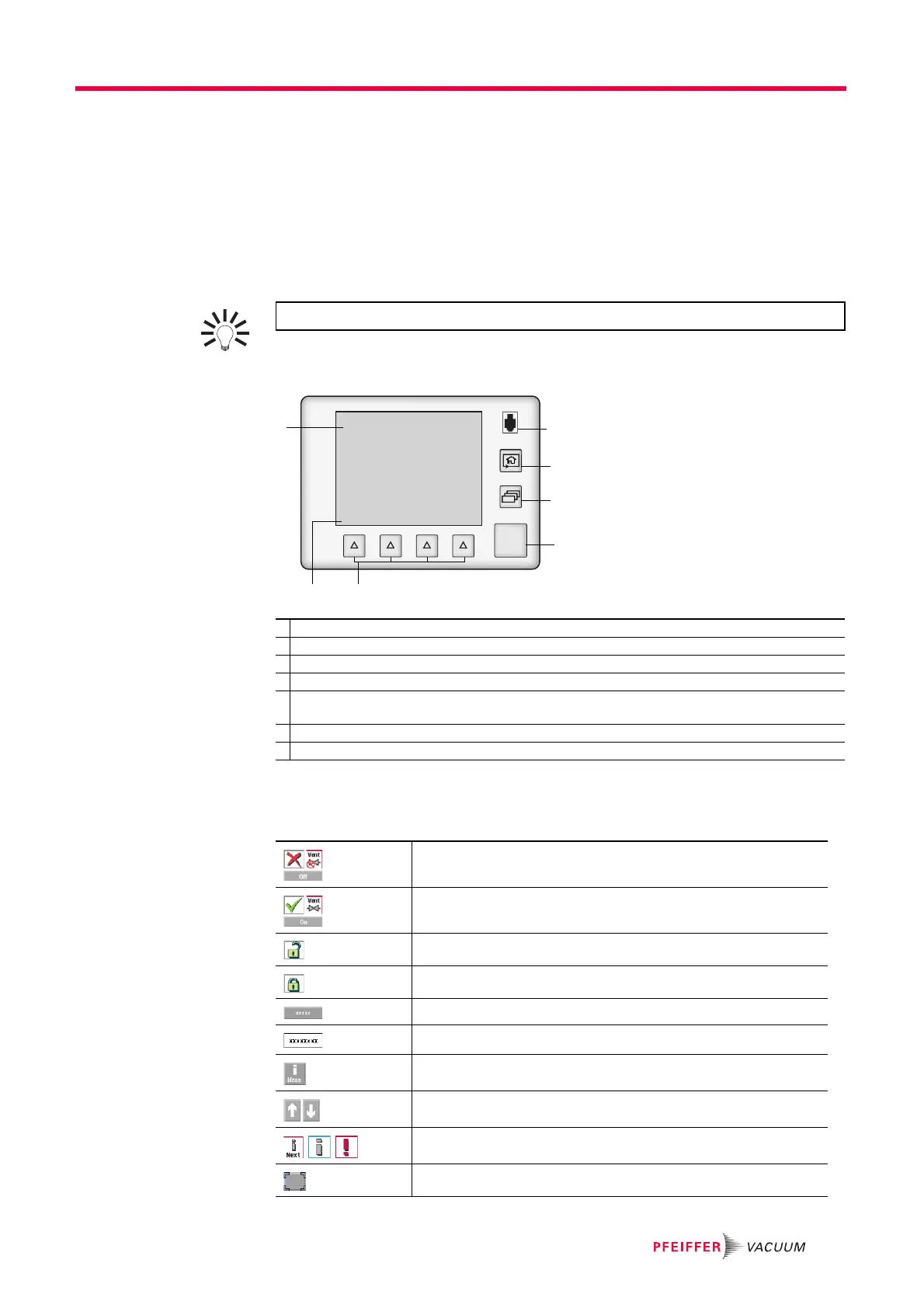
6.1.1 Description
Fig. 5: Control panel
Remove the film that protects the screen upon delivery.
Use the touch screen manually without using hard objects such as pens,
screwdrivers, etc.
For a screenshot, set a function key to [Screen Copy] (see 7.7.2).
1 Application screens (touch screen): these are accessible or hidden (see 7.7.3).
2 Test Start/Stop.
3 Changing the application screens: return to the home page (standard screen) from any menu.
4 Standard remote control connection (accessory).
5 Accessing the functions for daily use. Functions assigned to a key by the operator (provides access
to the functions if there is a problem with the touch screen).
6 Displaying a function key level: starting the function or displaying a sub-menu by touching the screen.
7 Changing the level of function keys.
Function deactivated (OFF)
Function activated (ON)
Authorized access without password
Access locked: access with password
"Grey" key: access settings or function
"White" key: key not customisable, for information
"Measurement information" key: to display the measured leak rate
Arrows for navigating within the menus
Access to the error/warning window
Value selected is customisable
START
STAND-BY
4
3
7
2 5
2
1



 To Next Page