Advanced settings
56
7.7.5 Access - Password
From the "Settings" screen, press [Config.] [Access/Password].
Enter the password (’5555’ by default) and validate.
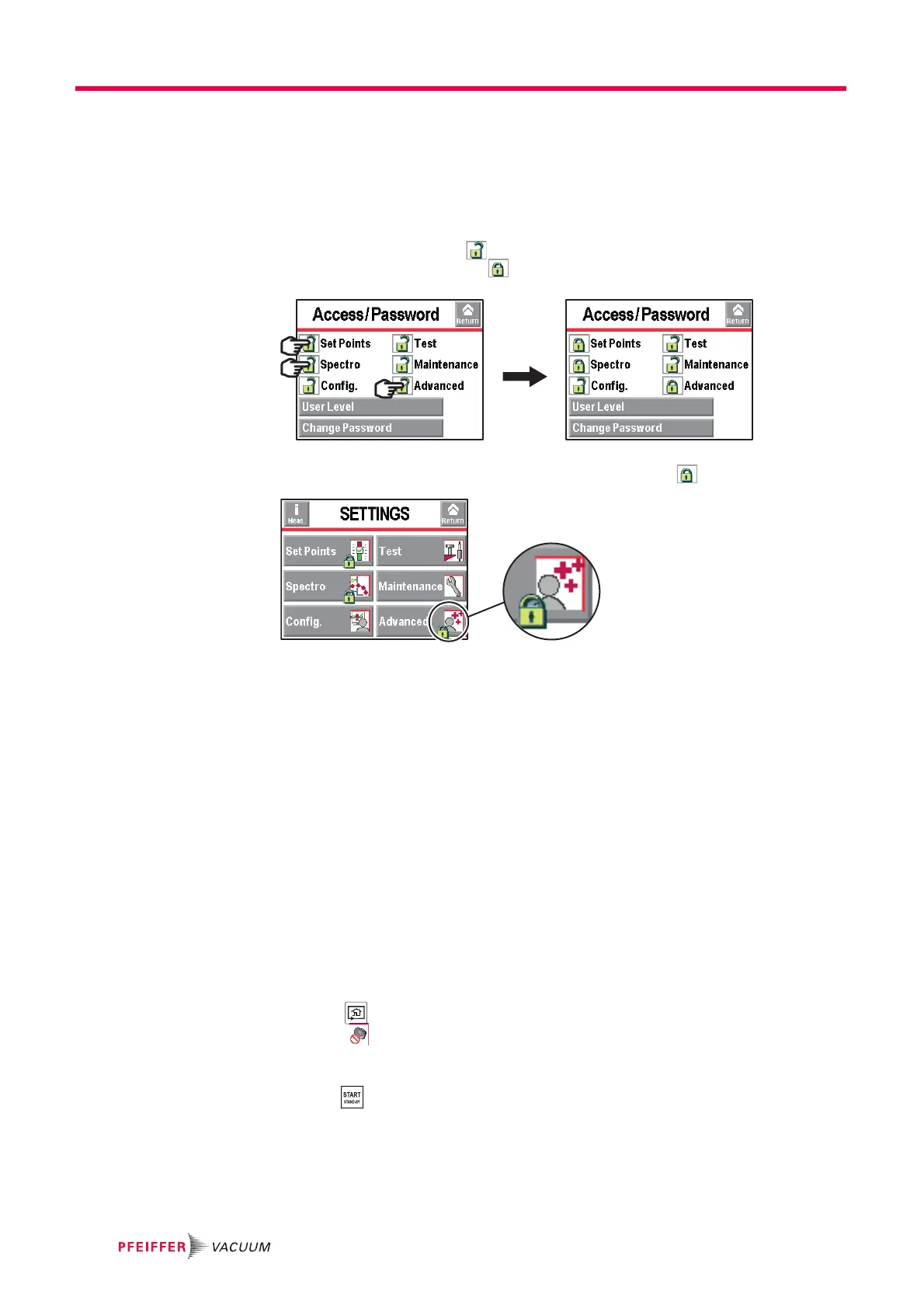
Menu access The operator can lock access to one or more menus on the "Settings" screen. To access
a locked menu, the operator will be asked to provide the password.
Lock a menu by pressing. .
Unlock a menu by pressing .
Fig. 36: Example: Locking the Set Points, Spectro and Advanced menus
On the "Settings" screen, the locked menus are indicated by .
Fig. 37: Locked menus
Change password From the "Settings" screen, press [Config.] [Access/Password].
Enter the password (’5555’ by default) and validate.
Press [Change Password].
Enter the new password and validate.
User level From the "Settings" screen, press [Config.] [Access/Password][User level]
3 user levels can be used to restrict the display and operator access to settings and func-
tions:
● restricted access,
● medium access,
● full access.
Limits with Restricted access
● Invalid key: no settings can be made without password.
● Invalid picto.
● Function keys hidden.
● Inlet pressure and cell pressure hidden.
● Invalid key: test started by RS 232 only.
● Measured leak rate and reject set point displayed only in test.



 To Next Page