Mixing pump G 4 X smart Overview - Operation and service
Cleaning the machine after work
52 2021-08-12
42.3 Switch the machine back on after the blockage has been removed
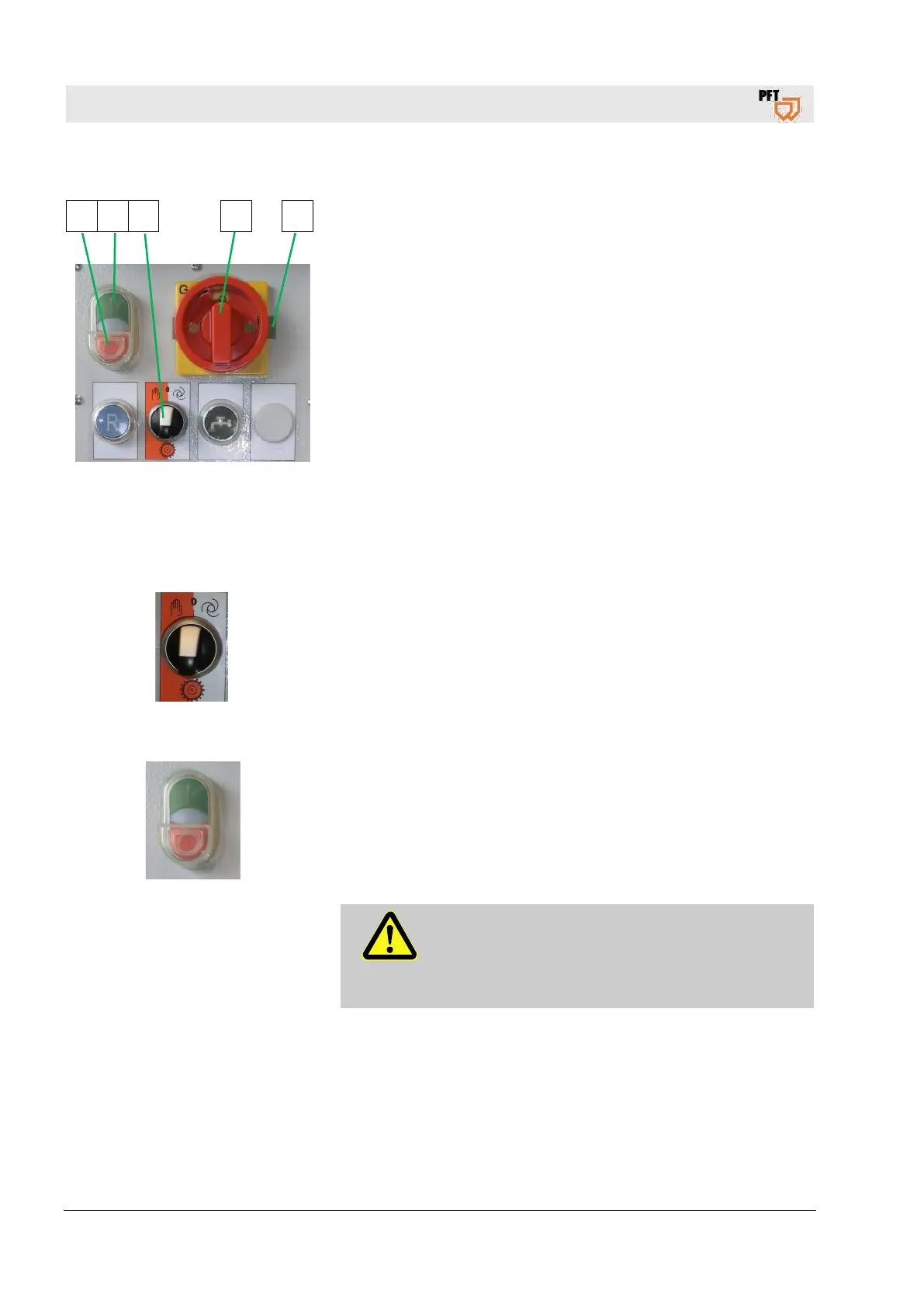
5 4 3 1 2
Fig. 75: Change direction of rotation
1. With the main switch (1) in position “0”, push the metal bracket
(2) into the opposite direction.
2. Turn main switch (1) to position "1".
3. Turn the selector switch (3) of the star wheel clockwise.
4. Press the green push button (4) control voltage “ON”.
5. Let the machine run for a short while without mortar hoses.
6. As soon as mortar emerges at the pressure flange, press the red
push button (5) control voltage “OFF”.
7. Apply wallpaper paste to the cleaned mortar hoses and connect
to the machine and spray gun.
8. Press the green push button (4) control voltage “ON”, open the
air tap at the spraying gun as described in chapter 37.1.
43 Cleaning the machine after work
43.1 Empty the mixing tube
Fig. 76: Switch of star wheel
The machine has to be cleaned daily after work:
1. Shortly before finishing your work turn the selector switch of the
star wheel to position “0”.
2. The star wheel is switched off and thus the material supply to the
mixing section is interrupted, e.g. for cleaning the mixing section
using the cleaning shaft or carrying out a pressure test of the
pump.
Fig. 77: Switching off
1. As soon as thinner material emerges from the spraying gun,
close the ball valve at the spraying gun.
2. Switch the machine off by pressing the red push button (2)
control voltage “OFF”.
3. Switch off the air compressor at the red switch.
4. Open the air tap at the spraying gun.
DANGER!
Risk of injury from discharged mortar!
Discharged mortar may lead to injuries to eyes and
face.
Attention, residual pressure.


 To Next Page