ProgrammerManual PTX‐S828
Chapter5IPDSProgrammingInformation 129 260071‐001A
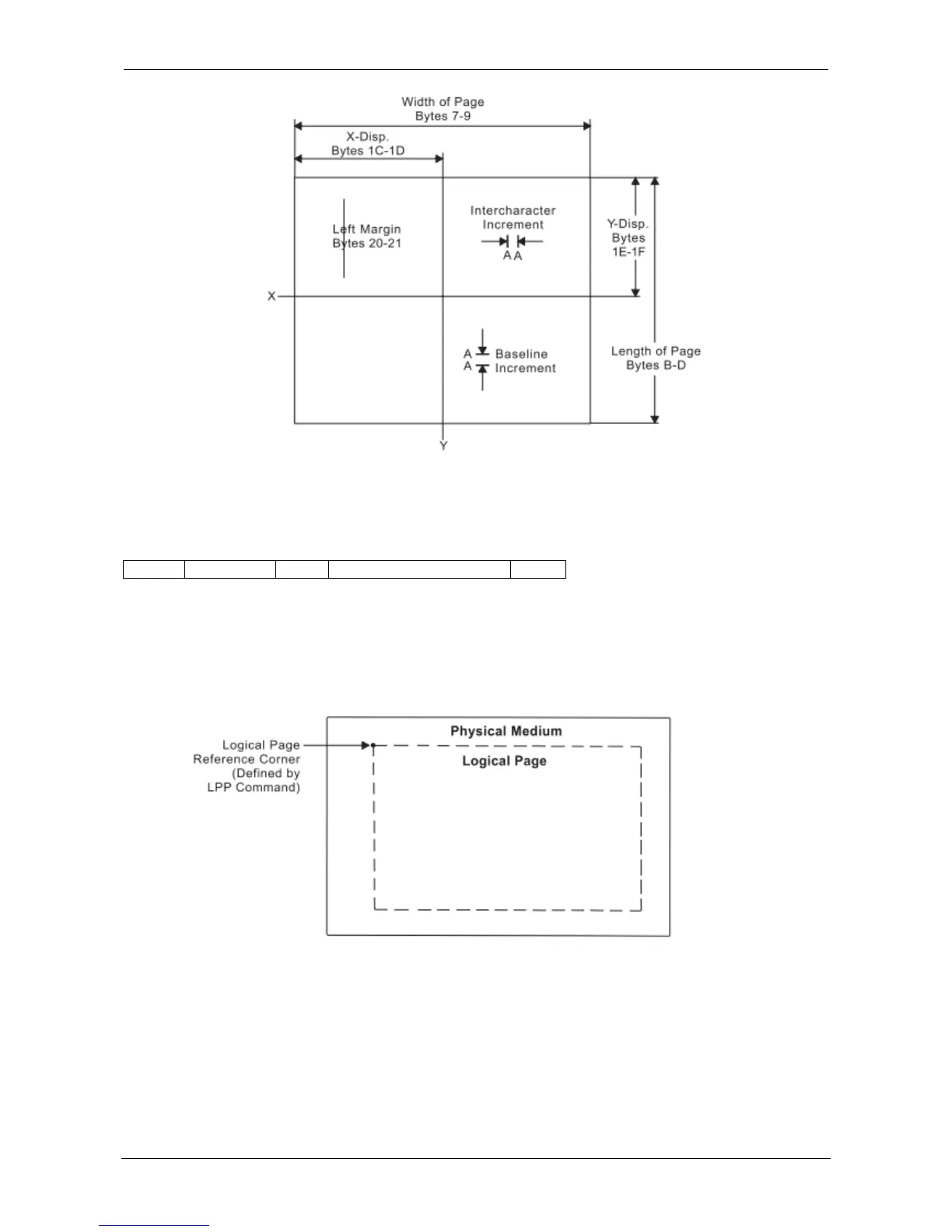
Figure 12. Using the Load Page Descriptor Command to Specify the Logical Page
Logical Page Position (LPP)
Length D66D Flag Correlation ID (Optional) Data
This command positions the upper left corner of the logical page (defined by the Logical Page Descriptor
control) with respect to the physical medium. The Logical Page Position command is only valid in the
home state.
Figure 13 shows the LPP command positioning the logical page on the physical medium.
Figure 13. Using the Logical Page Position Command to Position
The physical medium dimensions do not change. The X and Y coordinates of the LPP command specify
the location of the Logical Page Reference Corner relative to the corresponding corner of the physical
medium. These coordinates are expressed in terms of the units in effect at the time the LPP command is
received.















 To Next Page