ProgrammerManual PTX‐S828
Chapter5IPDSProgrammingInformation 169 260071‐001A
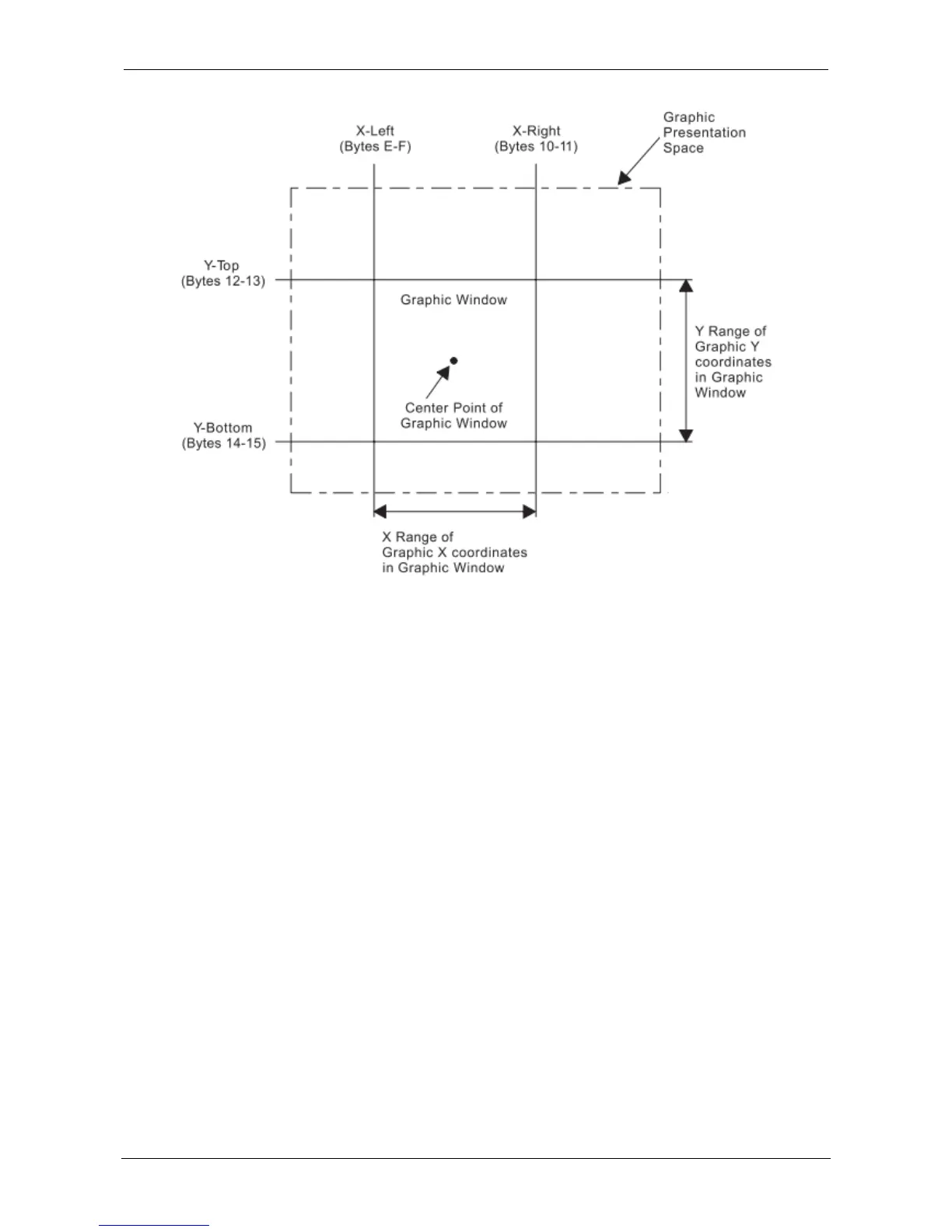
Figure 22. Graphic Data Descriptor and the Graphic Medium Presentation Space
Area Mapping Control Options
Byte B in the GOC data field is the area mapping control option byte. The option values are:
● 10 - Scale to fit
● 20 - Center and trim
● 30 - Position and trim.
Scale to Fit Mapping: The center of the graphic window is mapped to the center of the graphic block
area and the graphic data is scaled by the printer (to a printer-supported unit per unit base) so that the
picture within the graphic window fits entirely within the output area at the closest maximum scale.
Figure 23 shows the result of scale-to-fit mapping. For this example, the graphic window is shown larger than
the graphic block area. The parameters in the Graphic Data Descriptor specify the size of the graphic
window (in GPS coordinate units). The parameters in the Graphic Area Position and the Graphic Output
Control specify the size and location of the graphic block area on the physical medium.
If the graphic block area is smaller than the graphic window, as shown in this example, the graphic window
is proportionally reduced to fit in the graphic block area. That is, the entire graphic drawing contained
within the graphic window appears in the graphic block area, reduced in size to fit in the graphic block
area.
This size reduction is done to scale, keeping the same proportions as the original graphic drawing.















 To Next Page