Current Status
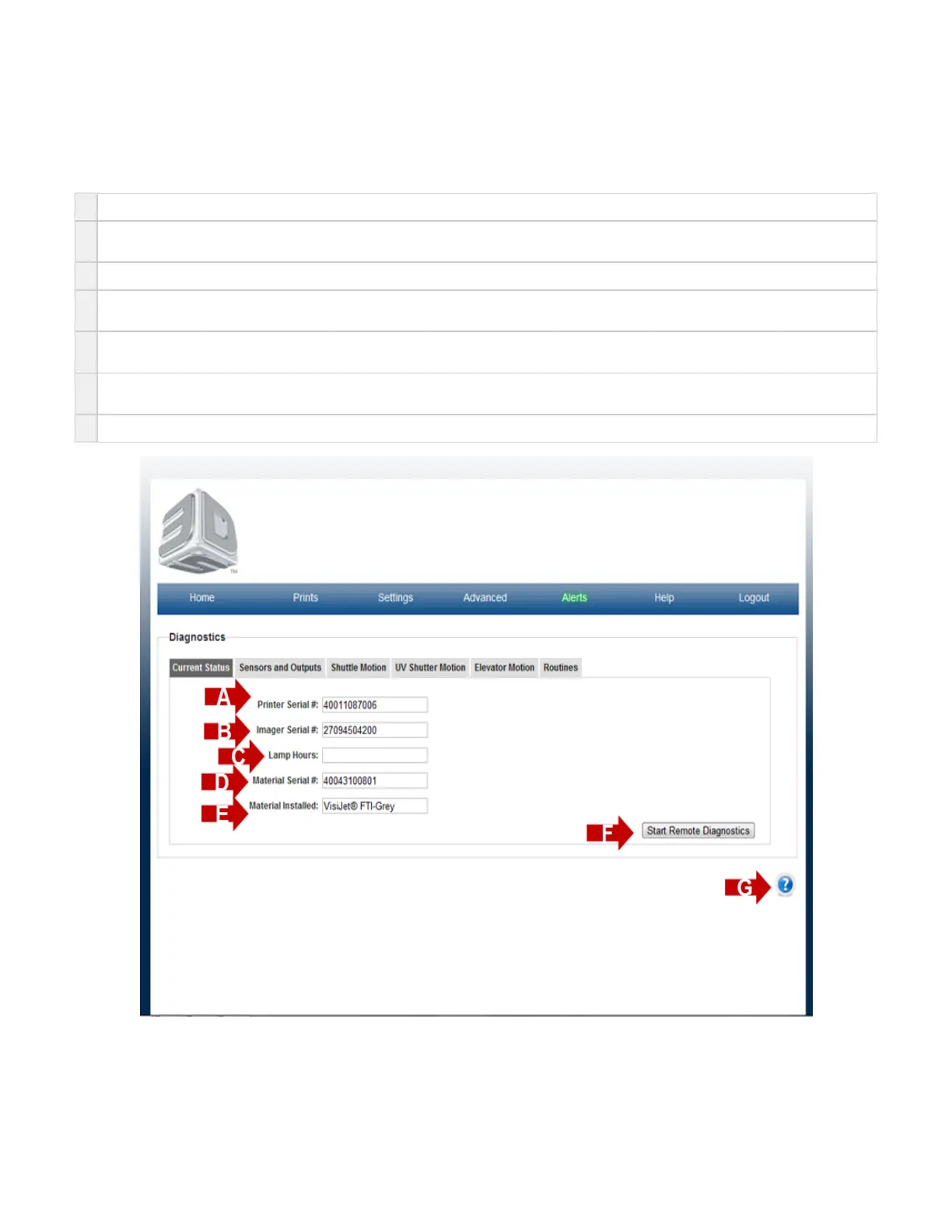
On the "Home" page, click on "Advanced" and select "Diagnostic" in the drop down menu to view "Current Status Screen" screen.
The purpose of the Current Status page is provide a forum where the system can provide the status on the major components of the system.
A
Printer Serial Number - each system has its own unique system serial number. This number will be required when requesting service.
B
Imager Serial Number - the installed imager has its own unique imager serial number. This number will be required when requesting
service on a system's installed imager.
C
Lamp Hours - The number of hours in which the installed imager has been turned on.
D
Material Serial Number - each material cartridge has its own unique material cartridge serial number. If a cartridge is installed in the system,
the serial number will be reported in this location.
E
Material Installed - this is the type of material that is currently installed in the printer. If a material cartridge is installed in the system, the
material type will be reported in this location.
F
The Start Remote Diagnostics button is a user initiated permission button that allows one of 3D Systems' Service Technicians the ability to
remote access the printer. This allows for the service technician to access information to restore the printer to proper working condition..
G Click on the to obtain help for this particular screen.?



 To Next Page