Configuring the MVI56-PDPMV1 Module MVI56-PDPMV1 ♦ ControlLogix Platform
User Manual PROFIBUS DPV1 Master
Page 108 of 251 ProSoft Technology, Inc.
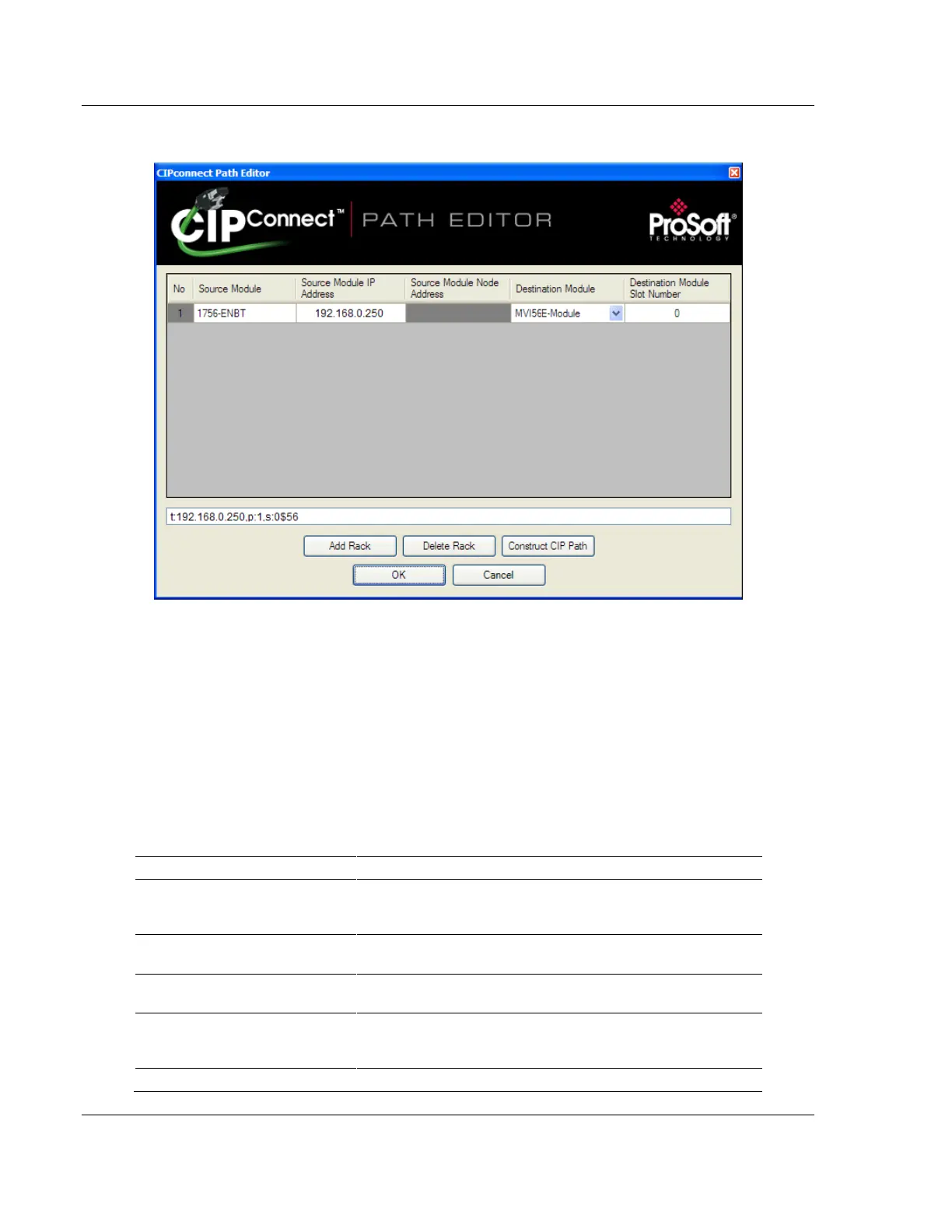
3 Click CIP PATH EDIT to open the CIPconnect Path Editor dialog box.
The CIPconnect Path Editor allows you to define the path between the PC and
the MVI56-PDPMV1 module. The first connection from the PC is always the
1756-ENBT module (Ethernet/IP).
Each row corresponds to a physical rack in the CIP path.
If the MVI56-PDPMV1 module is located in the same rack as the first 1756-
ENBT module, you should only set rack 1 and configure the associated
parameters.
If the MVI56-PDPMV1 is available in a remote rack (accessible through
ControlNet or EtherNet/IP) then the user should include all racks (through the
ADD RACK button).
Source module type. This field is automatically selected
depending on the destination module of the last rack (1756-
CNB or 1756-ENBT).
IP address of the source module (only applicable for 1756-
ENBT)
Source Module Node Address
Node address of the source module (only applicable for 1756-
CNB)
Select the destination module associated to the source module
in the rack. The connection between the source and destination
modules is performed through the backplane.
Destination Module Slot Number
The slot number where the destination module is located.



 To Next Page