MVI56-PDPMV1 ♦ ControlLogix Platform Configuring the MVI56-PDPMV1 Module
PROFIBUS DPV1 Master User Manual
Page 125 of 251 ProSoft Technology, Inc.
2.5.4 Viewing the Controller Tags in RSLogix 5000
Note: For this procedure, you must connect a serial cable from the serial port on your PC to the
DB9M connector on the ControlLogix processor.
1 Open the sample ladder logic in RSLogix 5000.
2 Open the COMMUNICATIONS menu, and choose GO ONLINE.
3 In the Controller Organization window, double-click CONTROLLER TAGS.
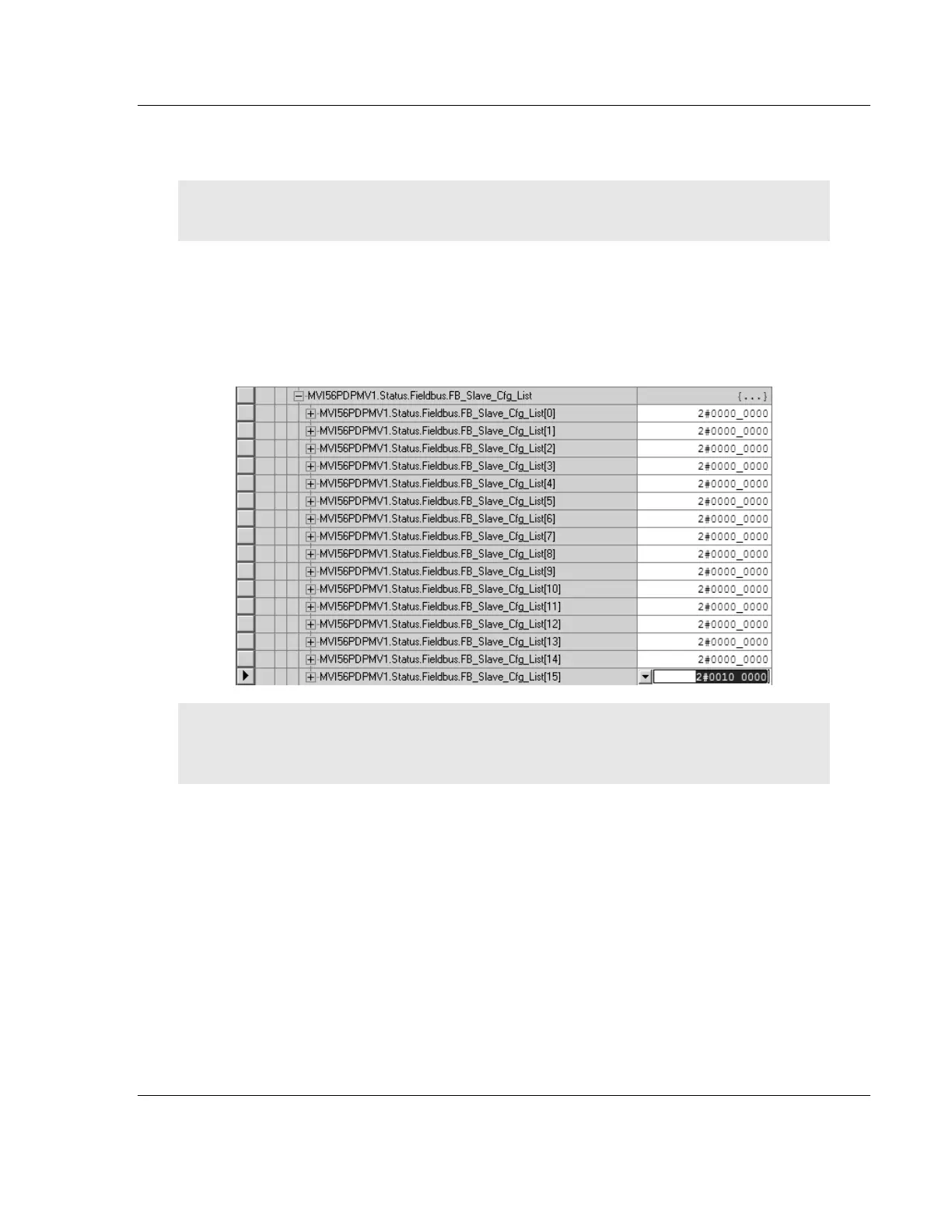
4 Expand the MVI56PDPMV1, MVI56PDPMV1.Status and
MVI56PDPMV1.Status.Fieldbus tags.
Note: For the FLEX sample program, you must toggle the command bit
MVI56PDPMV1.Command.GetStatus in order to update the status data. For the LEGACY sample
program the status data is updated automatically.
In the illustration above, the binary value in
MVI56PDPMV1.Status.Fieldbus.FB_Slave_Cfg_List[15] indicates that a slave
is configured at address 125 (the PROFIBUS Slave Address configured in the
Configuring the PROFIBUS Slaves (page 85) procedure).


 To Next Page