Diagnostics and Troubleshooting MVI56-PDPMV1 ♦ ControlLogix Platform
User Manual PROFIBUS DPV1 Master
Page 190 of 251 ProSoft Technology, Inc.
Input Database View Menu
Press [I] from the Main Menu to open the Input Database View menu. Use this
menu command to view the current contents of the module’s database. Press [?]
to view a list of commands available on this menu.
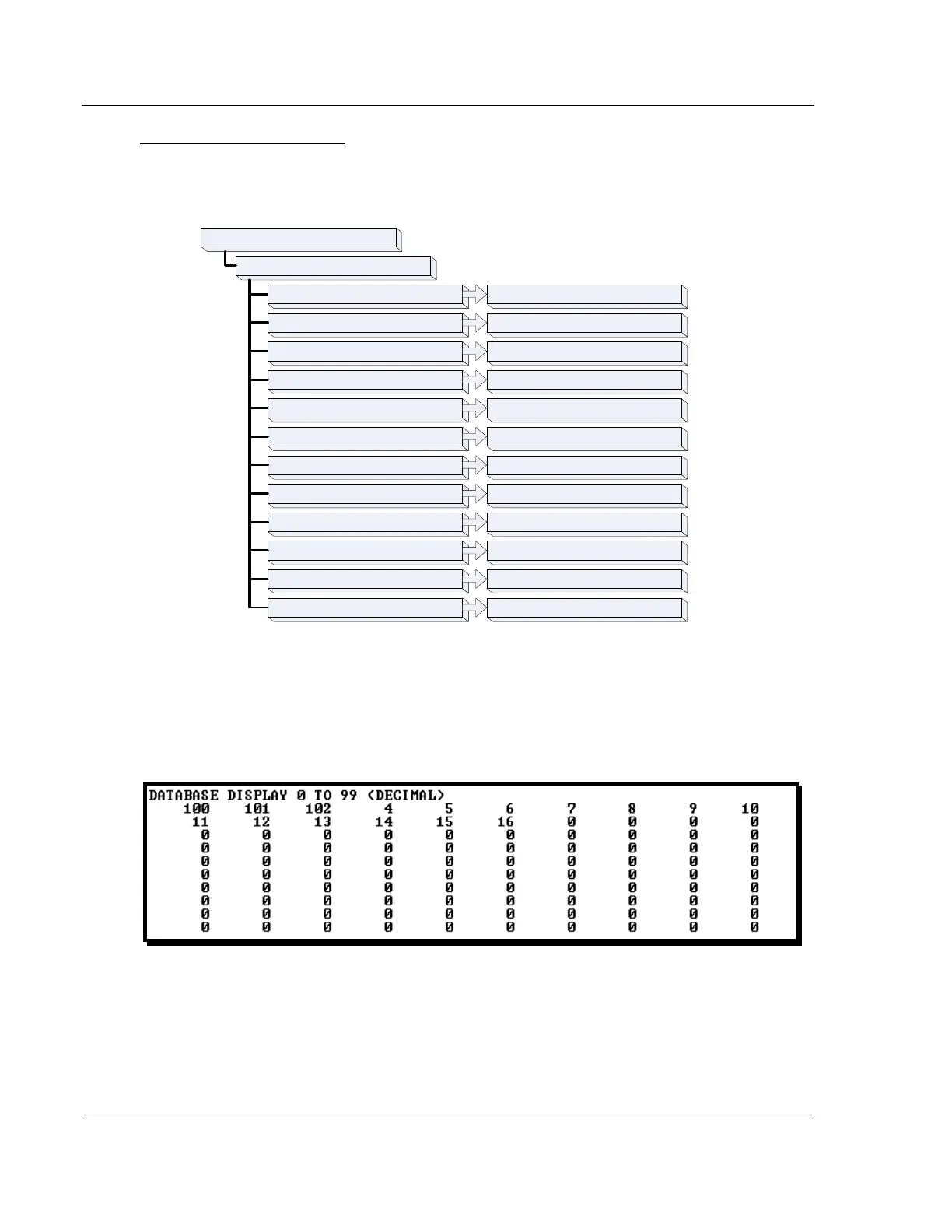
M = Main Menu
D = Database Menu
P = Previous Page
– = Back 5 Pages
0 – 3 = Pages 0 to 3000
F = Float Display
D = Decimal Display
H = Hexadecimal Display
N = Next Page
+ = Skip 5 Pages
A = ASCII Display
M = Main Menu Goes up one level to main menu
Goes back one page of data
Goes back five pages of data
Selects page 0, 1000, 2000 or 3000
Displays data in decimal format
Goes forward one page of data
Goes forward five pages of data
Displays data in text format
Displays data in floating point format
Displays data in hex format
S = Show Again Redisplays last selected page of data
? = Display Menu Redisplays (refreshes) this menu
Displaying the Current Page of Registers Again
Press [S] from the Database View menu to show the current page of registers
again.
This screen displays the current page of 100 registers in the database.


 To Next Page