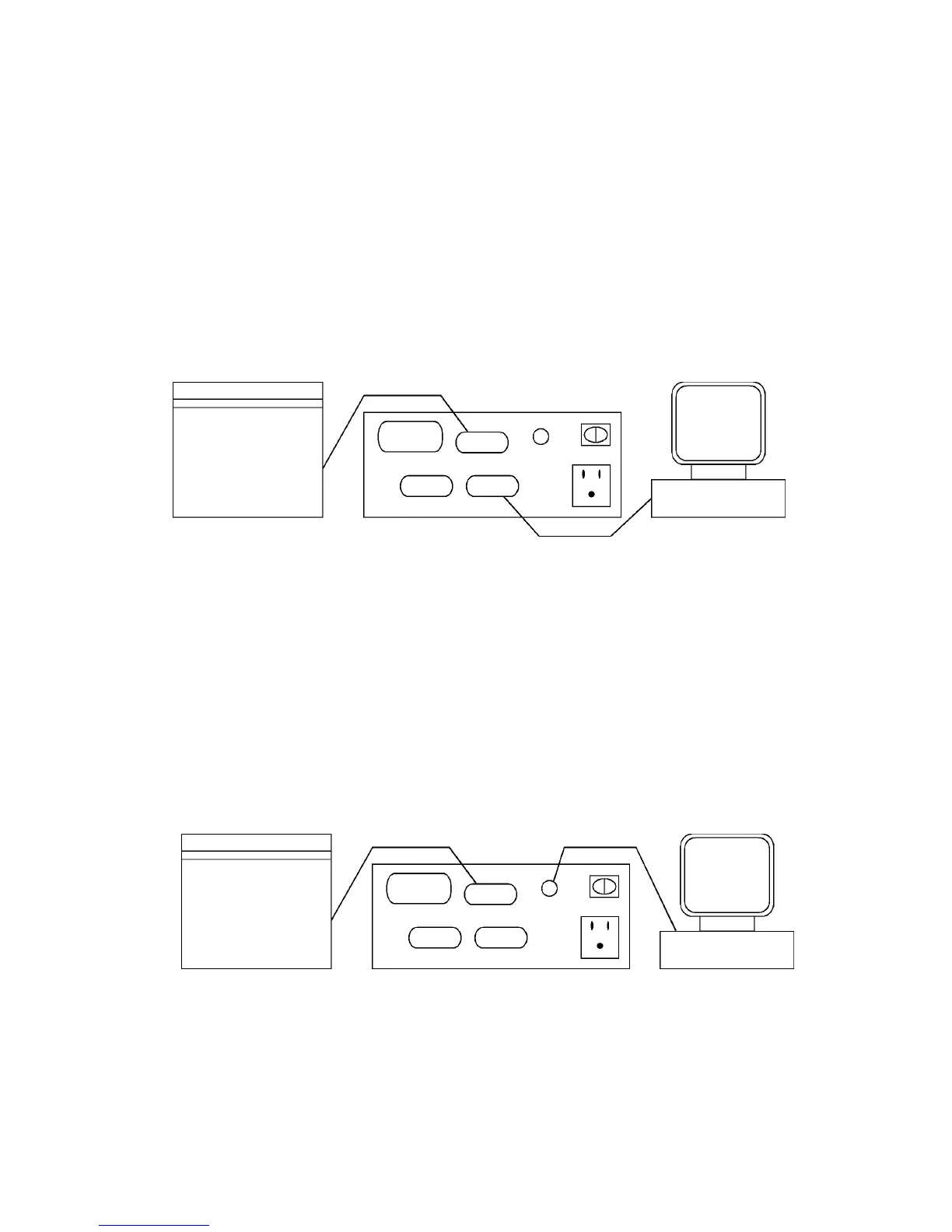
B. IBM and compatibles - Serial
1. Make sure that the customer’s computer is turned off.
2. Attach the DB-25 Female end of a standard PC serial printer cable to the
customer designated serial output port on the rear of the computer.
Record the choice of COM1 or COM2 because this port name will be
required during the configuration process.
3. Attach the other end (DB-25 Male) of a standard PC serial printer cable to
the input port on the rear of the PCRIP-10 labeled "Serial In".
Figure B - Serial Connection
C. Macintosh computers - AppleTalk Standard
1. Make sure that the customer’s computer is turned off.
2. Attach one 8-pin mini din Male end of a standard Macintosh printer cable
to the printer output port on the rear of the computer.
3. Attach the other end (8-pin mini din Male) of a standard Macintosh printer
cable to the input port on the rear of the PCRIP-10 labeled "AppleTalk".
Figure C - AppleTalk Connection
Priport
Parallel In Digital Duplicator
Diagnostic
AppleTalk
Personal Computer
Serial In
Macintosh
Priport
Parallel In Digital Duplicator
Diagnostic Serial In
AppleTalk
FSM 6-9 VT2105


 To Next Page