OPERATION PANEL : SS830
1
2
3 4
5
●
l?
Combine
[
Reset
W
Idling
2 Cxlglnals
Image Posltlon
Q
Ica93 75 64
+2
+1
●
Q]
● fJf-J+~
/0000] [L LLfJvbj
A
D
*
~~
Cl[
U
Reduction
w
❑0
F
c Cl
D
6Llne Photo~ ‘!’4 ,
&~& =
Lower
End Cycle
[n
❑] l’- ~ 3- 4> 5=]
1-
@ [=
H
0]
Image
-1
Mode
[
4
[,
m
\
1 \
w
/
\
19
18 17
16
15
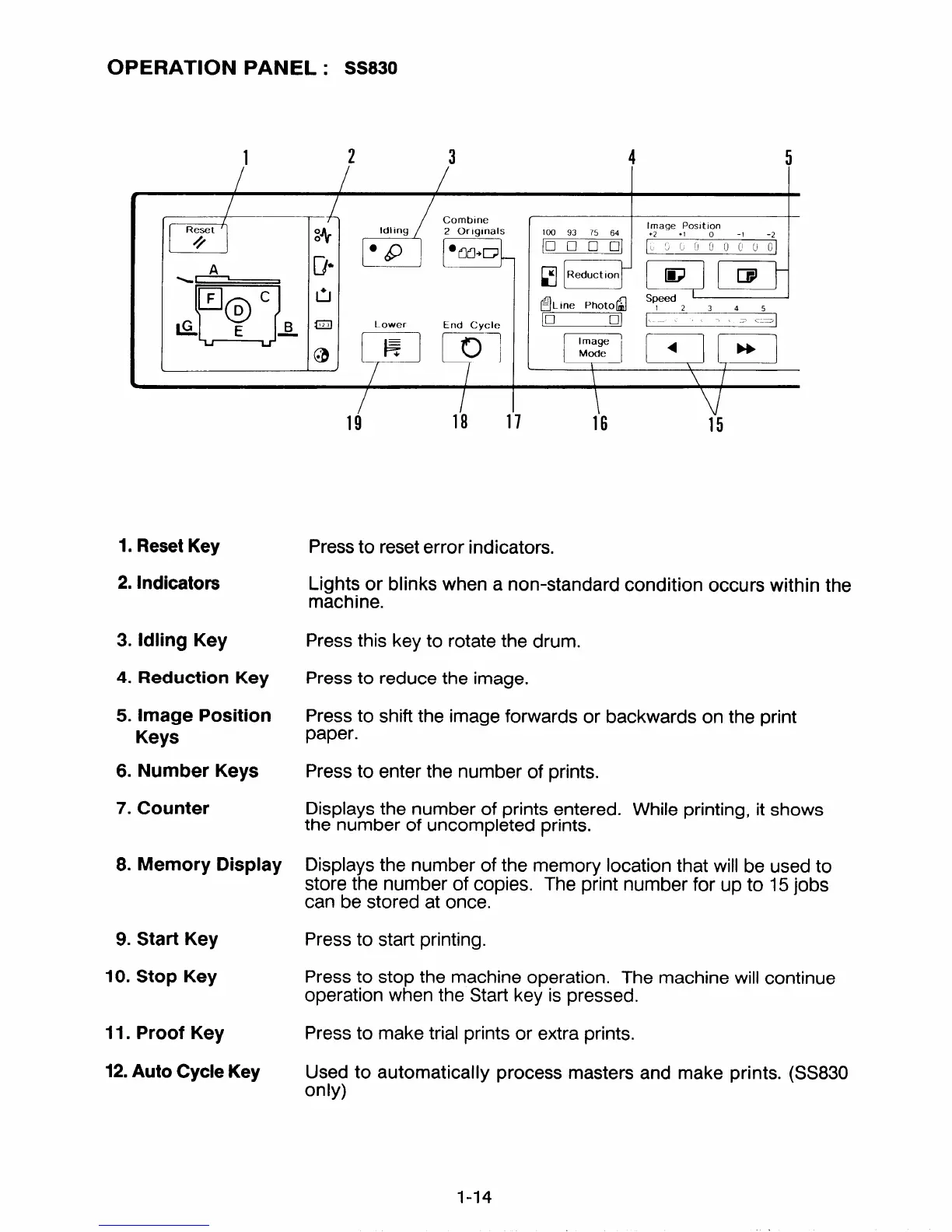
1. Reset Key
2. Indicators
3. Idling Key
4. Reduction Key
5. Image Position
Keys
6. Number Keys
7. Counter
8. Memory Display
9. Start Key
10. Stop Key
11. Proof Key
12. Auto Cycle Key
Press to reset error indicators.
Lights or blinks when a non-standard condition occurs within the
machine.
Press this key to rotate the drum.
Press to reduce the image.
Press to shift the image forwards or backwards on the print
paper.
Press to enter the number of prints.
Displays the number of prints entered. While printing, it shows
the number of uncompleted prints.
Displays the number of the memory location that will be used to
store the number of copies. The print number for up to 15 jobs
can be stored at once.
Press to start printing.
Press to stop the machine operation. The machine will continue
operation when the Start key is pressed.
Press to make trial prints or extra prints.
Used to automatically process masters and make prints. (SS830
only)
1-14


 To Next Page