ROBOTAPE 50 CFA
6. ABOUT THE USE
6.1. RECOMMENDATIONS FOR OPERATION AND USE
‒ Before performing any operation, the operator must make sure that he/she understood the "Instructions
for use".
‒ When using the machine for the first time, the operator must read the manual and identify the controls
and simulate some operations, especially the start-up and shutdown.
‒ Check that all safety devices are installed correctly and in good working order.
‒ Only implement the uses intended by the manufacturer and do not tamper with any device to obtain
erformances different from the intended ones.
6.2. CONTROL DESCRIPTION
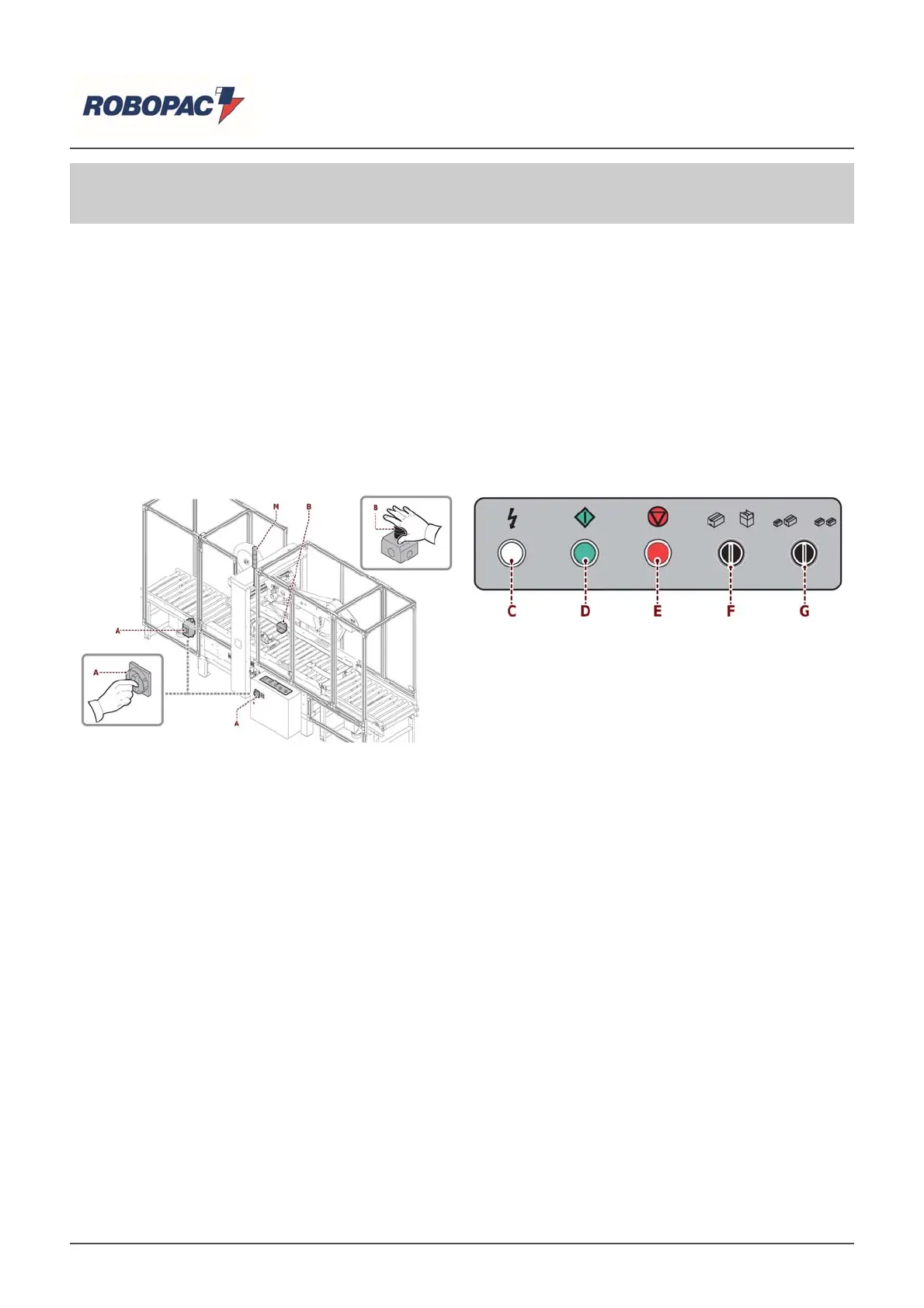
he illustration shows the main controls of the machine and the list shows their descri
tion and function.
A) IG Main switch: switches the power source tension on and off.
Position "0" (OFF) indicates that the machine is not powered.
Position I (ON) indicates that the machine is on.
B) Emergency stop push-button: it is used to stop with a voluntary action, in case of imminent risk, the
organs of the machine that may pose a rick.
For further details consult the
ara
ra
h "Descri
tion of safet
devices".
C) White
ilot li
ht: when on indicates that the machine is electricall
owered.
D) Green “Start” button: used to activate the machine’s work c
cle.
E) Red “Sto
” button: used to sto
the machine’s work c
cle.
F) “Cycle By Pass” selector: used to select the By Pass operating mode.
Selector in central
osition (stable
osition "0"):
‒
he ta
in
c
cle is enabled.
Ri
ht selector (stable
osition "I"):
‒
he "B
Pass" c
cle without ta
in
is enabled.
|
Important
With re
ard to the “B
Pass” c
cle: the lower and u
er ta
in
heads must also be removed.
G) “Fixed format cycle” selector: used to select the operating mode on fixed format boxes.
Selector in central
osition (stable
osition "0"):
‒
he variable format c
cle is enabled.
Ri
ht selector (stable
osition "I"):
‒
he fixed format c
cle is enabled.
H) "Lack of/End of upper tape" selector: used to enable the Lack of/End of upper tape alarm on the upper
taping unit.
The selector is inside the (SA1) electric
anel.
English


 To Next Page