ROBOTAPE 50 CFA
I) "Lack of/End of lower tape" selector: used to enable the Lack of/End of lower tape alarm on the lower
taping unit.
The selector is inside the (SA2) electric
anel.
M) Luminous column
Red light:
Constantly lit or flashing: indicates an emergency or alarm condition.
Off: no alarm or emer
enc
in
ro
ress.
Yellow light:
Lit continuously (with green light off): indicates that the machine has stopped.
Lit continuously (with continuous green light): indicates that the machine is still waiting for the outgoing
boxes to be removed (“too full when exiting”).
Lit flashin
: indicates the ta
e is almost finished.
Green light:
On steady: it means that the machine is running in active automatic cycle.
Off: indicates that the machine is NOT in active automatic c
cle.
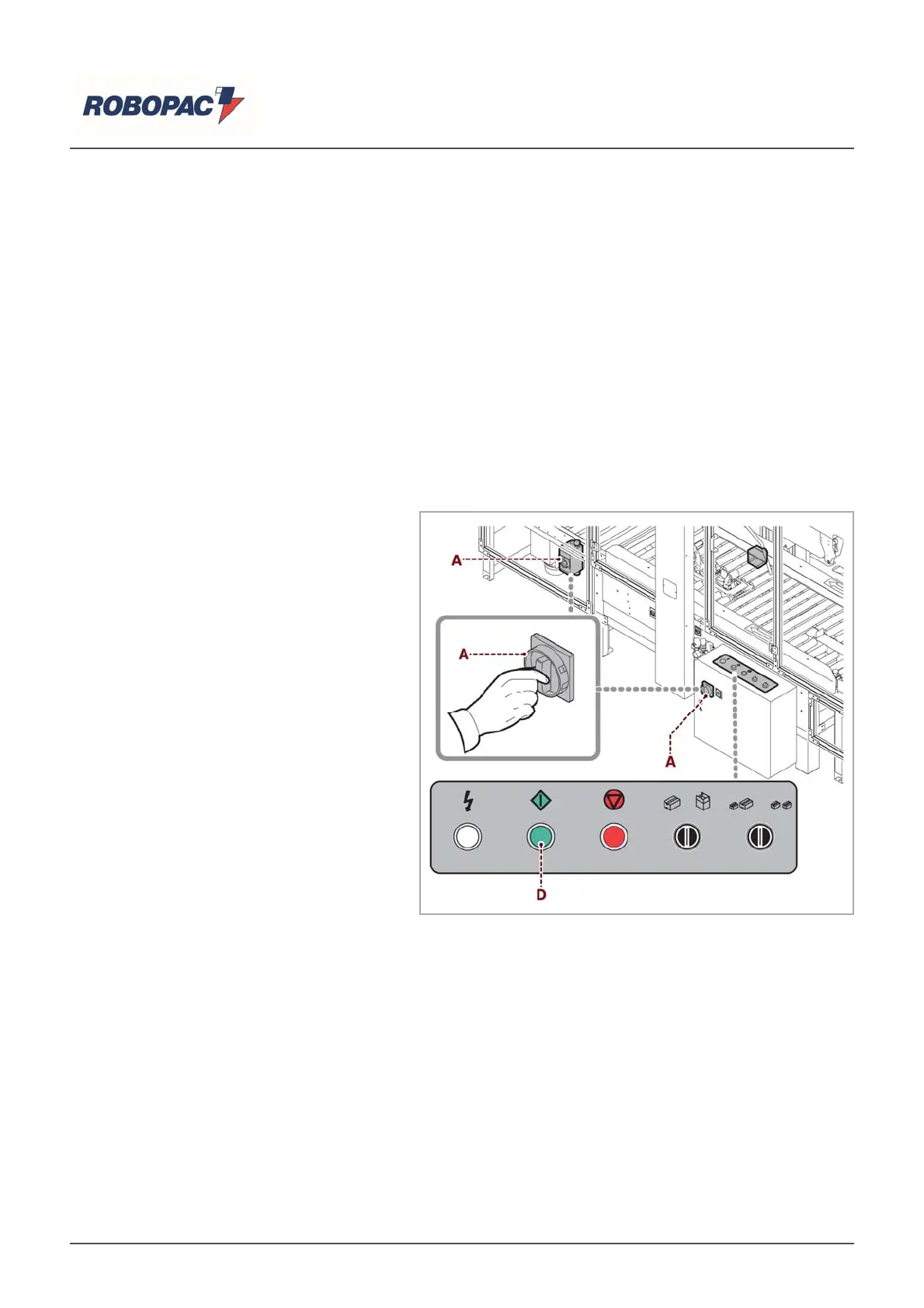
6.3. SWITCHING THE MACHINE ON AND OFF
Proceed as indicated.
Switching on
1. Turn the master switch (A) to "I" (ON)
to activate the power supply.
2. Press the "start" button (D) to start the
machine.
Switching off
3. Press the (E) “Stop” switch to turn off
the machine.
4. Turn the master switch (A) in position
"0" (off) to disable the
ower su
l
.
English


 To Next Page