Robustel R5020 User Guide
RT_UG_R5020_v.1.0.2 Mar. 17, 2023 87/167
Select from “Accept” or “Drop”.
Accept: When Default Filtering Policy is drop, router will drop all
the connecting requests except the hosts which fit this accept
filtering list
Drop: When Default Filtering Policy is accept, router will accept all
the connecting requests except the hosts which fit this drop
filtering list
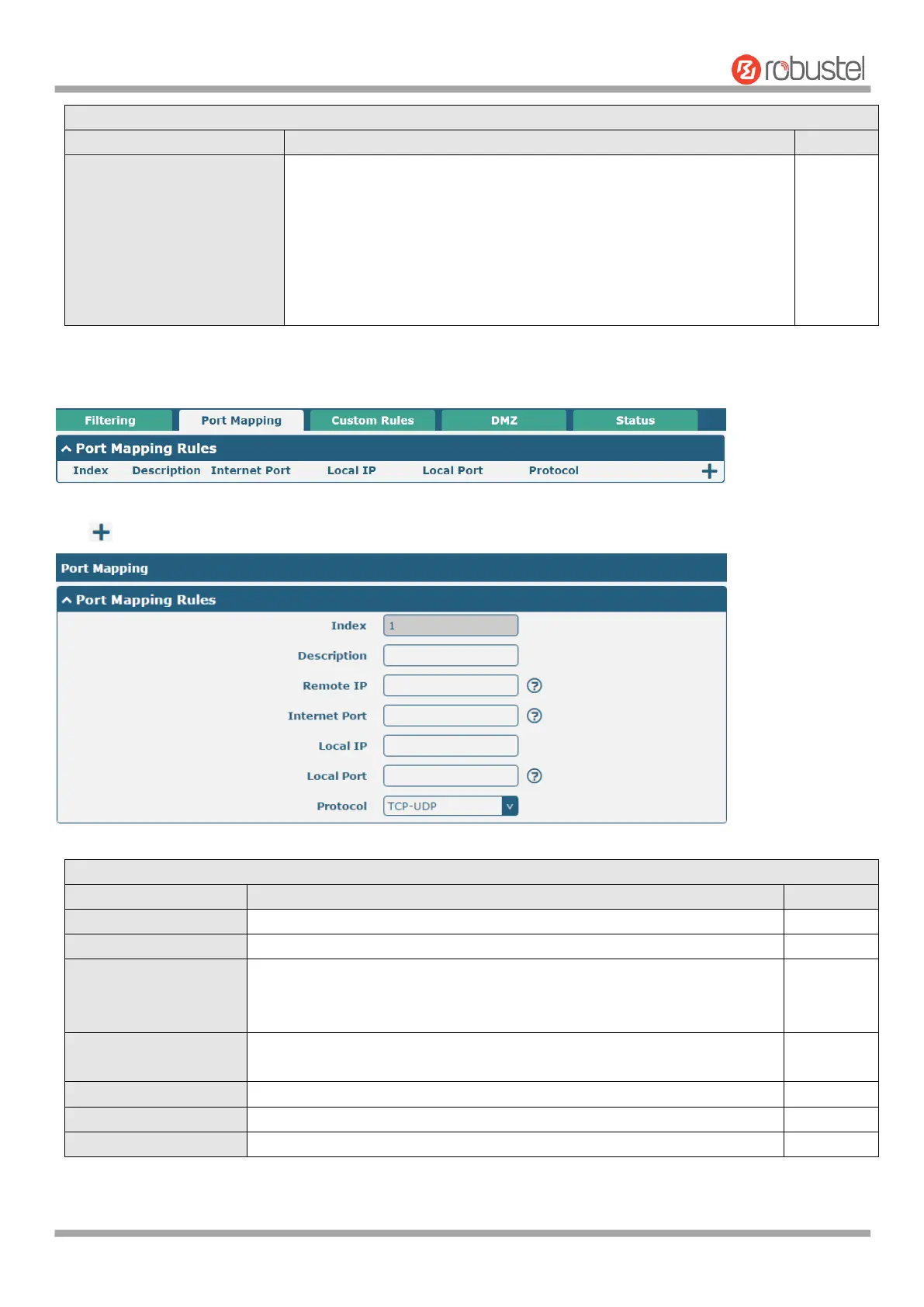
Port mapping is defined manually in routers, and all data received from certain ports of the public network is forwarded
to a certain port of an IP in the intranet. Click Network > Firewall > Port Mapping to display as follows:
Click to add port mapping rules. The maximum rule count is 50.
Indicate the ordinal of the list.
Enter a description for this port mapping.
Specify the host or network which can access to the local IP address.
Empty means unlimited. e.g. 10.10.10.10/255.255.255.255 or
192.168.1.0/24
Set the internet port of router which can be accessed by other hosts from
internet.
Enter router’s LAN IP which will forward to the internet port of router.
Enter the port of router’s LAN IP.
Select from “TCP”, “UDP” or “TCP-UDP” as your application required.













 To Next Page